 HioBuy
Supplier Inquiry V2: Contact a 1688 or Taobao Seller from Your Product Page
Run the open-source inquiry demo and wire Contact-Supplier chat: create a product conversation on the Ask API, send the first customer message, verify signed ask.* webhooks, reconcile history, then close and rate — without using the retired V1 /v1/supplier-inquiries routes.
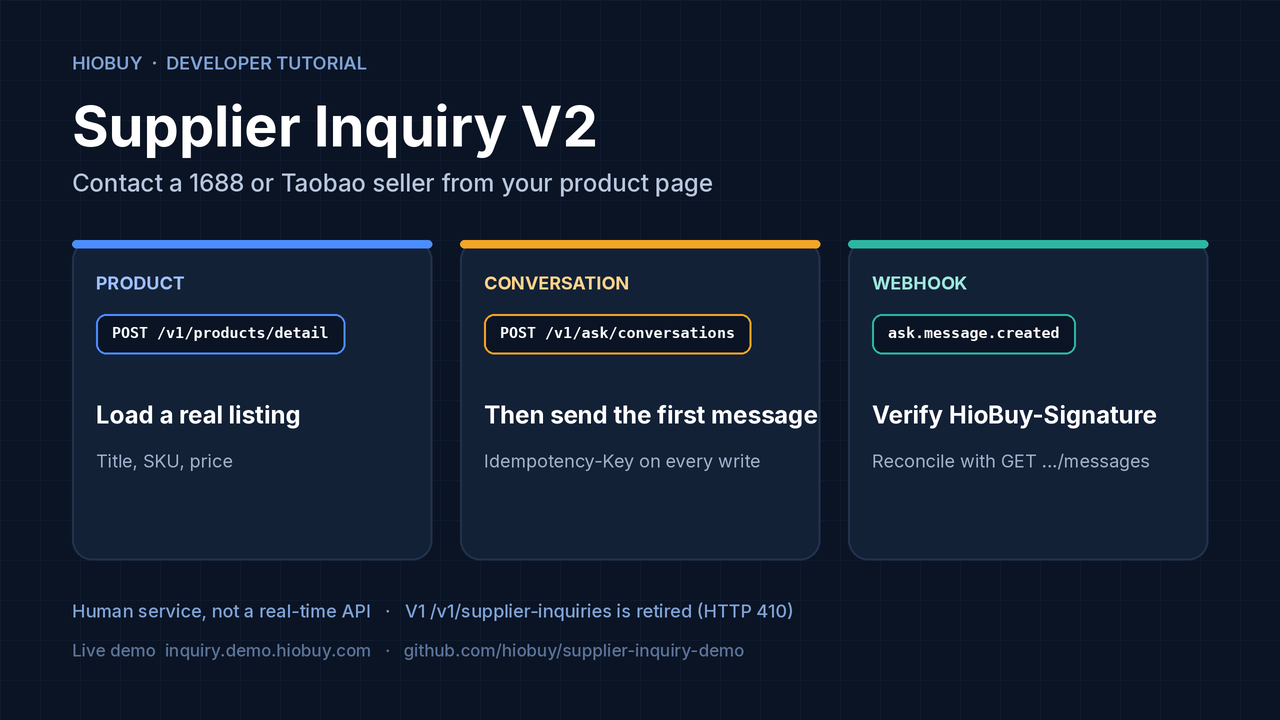
Supplier Inquiry V2: Contact a 1688 or Taobao Seller from Your Product Page
A product detail page can tell your customer the title, SKU, and price. It usually cannot tell them the minimum order quantity, whether a logo can be printed, what material a fabric actually is, or how long a custom run will take. Those answers live with the seller, and they arrive on a human timescale.
HioBuy Supplier Inquiry V2 is a conversation API for that gap. Your backend creates a product conversation, your customer sends a message, HioBuy routes the thread to HIOAsk support staff (who coordinate with the supplier), and your app receives a signed webhook when a customer-facing reply is published.
hiobuy/supplier-inquiry-demo is an open-source (MIT) fixed-product demo of that flow. A "Contact Supplier" button and a floating chat talk only to the demo backend. The HioBuy API key never reaches the browser.
- Live demo: inquiry.demo.hiobuy.com
- Repository: github.com/hiobuy/supplier-inquiry-demo
- Supplier Inquiry V2: hiobuy.com/en/api-docs/supplier-inquiry
- Create & send: supplier-inquiry-create
- Webhooks & delivery: supplier-inquiry-questions
- History, close & ratings: supplier-inquiry-list
- Public API index: hiobuy.com/en/api-docs
- Register a key: developers.hiobuy.com
This tutorial covers:
- When Supplier Inquiry is the right tool — and when the Product API is enough.
- The V2 call sequence: identity, product, create, first message, webhooks, reconcile, close, rate.
- How to run the hosted demo and the local Node host.
- Signed
ask.*webhooks, recall placeholders, and common errors. - Why
/v1/supplier-inquiriesnow returns HTTP 410.
What this demo is (and is not)
It is a single real product page with chat. The operator configures a production HioBuy API key, a channel (1688 or taobao), and one numeric product ID on the server. Visitors open that product and talk; they never enter credentials.
What it exercises:
| Step | Official endpoint | Scope |
|---|---|---|
| Inspect the key | GET /v1/ask/identity | any valid key (real chat still needs production + write) |
| Load the product | POST /v1/products/detail | your App's product entitlements |
| Start a thread | POST /v1/ask/conversations | supplier_inquiry:write |
| Send a message | POST /v1/ask/conversations/{id}/messages | supplier_inquiry:write |
| Receive replies | signed webhooks + GET .../messages | supplier_inquiry:read |
| Close / rate | POST .../close, GET/POST .../rating | write / read as documented |
Sources: Supplier Inquiry V2, Create conversations & send messages, Product detail.
What it is not:
- A white-label storefront, cart, or checkout.
- A real-time automated Q&A API. Replies depend on staff and supplier availability.
- A direct integration with HIOAsk. You talk to
https://api.hiobuy.com. HioBuy owns identity, access, and routing. - The retired V1 typed-question API (
packed_weight,package_dimensions,supplier_inquiry.*events). Those routes return410 HIOASK_V1_RETIRED. V2 returns chat messages, not that question/answer dataset.
The hosted demo uses its own server-configured key and one fixed product. For your integration, use your own production key, product, and HTTPS webhook. Demo or test conversations must set context.source = inquiry_demo; ordinary production integrations omit that field.
When to use Supplier Inquiry
HIOAsk Supplier Inquiry is aimed at business sourcing and wholesale questions: minimum order quantity, bulk pricing, customization, materials, production lead times, and other seller-specific facts.
Important limits, from the official overview:
- Packed weight and packaging dimensions may not be available from the seller.
- Estimated weight and dimensions for multiple items or a consolidated shipment cannot be guaranteed before physical inspection and packing.
- HIOAsk facilitates the conversation; it does not guarantee that every question will come back with the requested information.
- Access is enabled per App after commercial onboarding — contact HioBuy support to request it. A product subscription alone does not turn the capability on.
- For basic catalog data (title, SKUs, price, images), call the Product APIs first.
This capability does not require warehouse fulfillment.
Architecture
Your product page
        │  Contact Supplier (no API key in the browser)
        ▼
Your backend
        │  Bearer production key
        ▼
https://api.hiobuy.com
  POST /v1/products/detail
  POST /v1/ask/conversations
  POST /v1/ask/conversations/{id}/messages
        │
        ▼
HioBuy routes the thread to HIOAsk staff
        │  staff coordinate with the seller
        ▼
Signed webhook to your HTTPS endpoint
  ask.message.created
  ask.message.recalled
  ask.conversation.updated
  ask.conversation.closed
        │
        ▼
Your backend verifies HioBuy-Signature,
deduplicates by event id, then updates the chat.
Reconcile with GET .../messages on load and periodically.
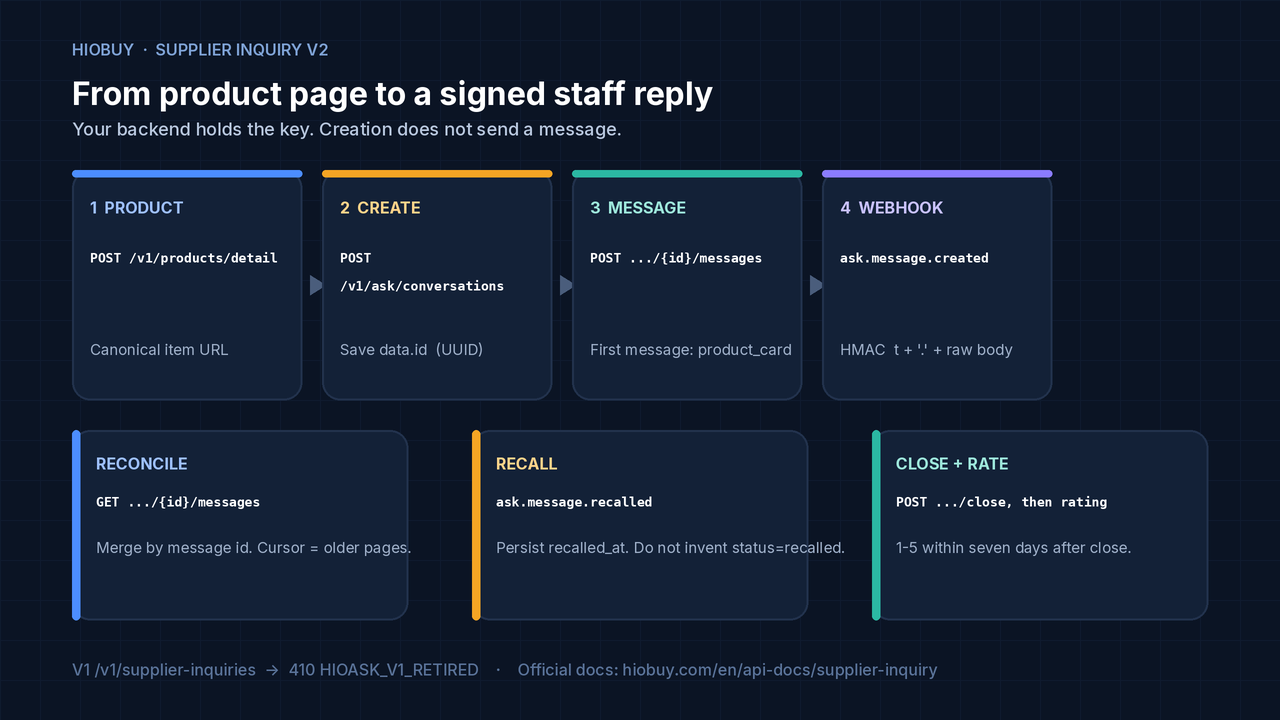
Creation alone does not send a message and does not mean a supplier has answered. Save data.id from the create response, then post the first customer message.
Prerequisites
- Node.js 24 or newer to run the demo's local host (
npm start). The repo has no runtime npm dependencies;npm ciinstalls dev tooling for tests and Workers deploy. - A production HioBuy App API key. HioBuy administration must enable supplier inquiry on that App and provision the V2 binding.
- Scopes:
supplier_inquiry:readandsupplier_inquiry:write. - An HTTPS webhook endpoint registered in Developer Center for the same App.
- Product access depends on the App's channel entitlements. Taobao product calls require an active paid subscription; a 7-day trial includes 1688 and Weidian only.
GET /v1/ask/identity accepts any valid key and is the right first check. A test key reports api_key.environment = sandbox and cannot start real chat (403 INQUIRY_SANDBOX_UNAVAILABLE).
Keep the API key and the webhook signing secret on the server only. Do not put them in browser storage, frontend code, URLs, or logs. Do not send X-External-App-Id — HioBuy derives the App from the key. Your backend must also enforce which signed-in customer owns each conversation: App isolation is not end-user authorization.
Step 1: Try the hosted demo, or run it locally
Open inquiry.demo.hiobuy.com to see one fixed product, a Contact Supplier button, and the chat. That deployment uses HioBuy's demo App and key. Do not send sensitive data through the public demo. The repository documents conservative demo rate limits (sessions, contact attempts, and sends); those limits apply to the hosted demo, not to your own App.
To run the same codebase against your key and product:
git clone https://github.com/hiobuy/supplier-inquiry-demo.git
cd supplier-inquiry-demo
npm ci
cp .dev.vars.example .dev.vars
chmod 600 .dev.vars
# Set HIOBUY_API_KEY, HIOBUY_CHANNEL (1688 or taobao),
# HIOBUY_PRODUCT_ID, and optional HIOBUY_PRODUCT_LANGUAGE (default en).
npm start
Open http://localhost:18800. The default upstream is the real https://api.hiobuy.com Gateway. There is no mock fallback: a missing key or an upstream error surfaces as an error.
In Developer Center, open the same App and register https://your-domain.example/hooks/hiobuy for:
ask.message.createdask.conversation.updatedask.conversation.closedask.message.recalled(subscribe to all four before you rely on post-send recall)
Save the once-displayed signing secret as HIOBUY_WEBHOOK_SECRET (or the Node host's webhook config file). It is distinct from the API key. Existing webhook subscriptions are not expanded automatically.
The repo also includes a Cloudflare Worker host and docs/DEPLOYMENT.md if you want to deploy your own copy. Third-party deployments use the public Gateway; they do not need access to HioBuy's Cloudflare account.
Step 2: Confirm identity, then load the product
GET /v1/ask/identity
Authorization: Bearer YOUR_HIOBUY_PRODUCTION_KEY
A ready App looks like the official example (values will be yours):
{
  "data": {
    "app": { "id": "app_example", "name": "Example integration" },
    "api_key": {
      "environment": "production",
      "scopes": ["supplier_inquiry:read", "supplier_inquiry:write"]
    },
    "inquiry": {
      "enabled": true,
      "mapped": true,
      "read": true,
      "write": true,
      "webhook_configured": true
    }
  }
}
inquiry.webhook_configured = true only means there is an active subscription to one of the three foundational events (created, updated, or closed). It is not a recall or media capability flag, and it does not prove that every event is subscribed or that delivery is succeeding.
Then load a real listing. For a 1688 offer, id and product_id are both the numeric offer id:
POST /v1/products/detail
Authorization: Bearer YOUR_HIOBUY_PRODUCTION_KEY
Content-Type: application/json

{
  "channel": "1688",
  "id": "673124809943",
  "language": "en"
}
Use a canonical HTTPS item URL later on the conversation and product card: https://detail.1688.com/offer/{id}.html, or a Taobao/Tmall /item.htm?id= URL. The demo allowlists official product image hosts when it renders the gallery; your own app should similarly avoid passing through untrusted image URLs.
Step 3: Create the conversation, then send the first message
Keep external_user_id stable for your customer, and external_conversation_id stable for that customer + product + conversation generation. Both are 1–128 characters matching [A-Za-z0-9][A-Za-z0-9._:@-]{0,127}.
Every write requires Idempotency-Key (1–128 printable ASCII). Persist the body and the key before you send. After a timeout, retry the same request. A changed payload with the same key returns 409. A closed conversation stays closed — start a new generation id for a new inquiry.
language is an optional BCP 47 customer-language hint such as en or en-US. target_language on the response is the customer-facing reply language. There is no public translation-preview API; do not call one.
POST /v1/ask/conversations
Authorization: Bearer YOUR_HIOBUY_PRODUCTION_KEY
Content-Type: application/json
Idempotency-Key: create-customer-42-product-1

{
  "external_conversation_id": "customer-42-1688-673124809943-1",
  "external_user_id": "customer-42",
  "language": "en",
  "context": {
    "type": "product",
    "product_url": "https://detail.1688.com/offer/673124809943.html",
    "product_id": "673124809943",
    "product_title": "Knitted shoulder bag"
  }
}
The official example returns data.id as a conversation UUID and status: "pending". Save that UUID. Then send the first customer message. Only the first customer message may include product_card. client_message_id is another stable 1–128 character identifier. type is text. content supports up to 10,000 Unicode code points and must not be blank unless a product card is supplied. Title on the card is 1–200 plain characters; optional price_label is at most 64.
POST /v1/ask/conversations/11111111-1111-4111-8111-111111111111/messages
Authorization: Bearer YOUR_HIOBUY_PRODUCTION_KEY
Content-Type: application/json
Idempotency-Key: send-customer-message-001

{
  "client_message_id": "customer-message-001",
  "type": "text",
  "content": "Can the supplier provide neutral packaging?",
  "product_card": {
    "url": "https://detail.1688.com/offer/673124809943.html",
    "title": "Knitted shoulder bag",
    "price_label": "CNY 6.50"
  }
}
IDs in these examples are illustrative — substitute the UUID the create call returned. Later messages on the same conversation omit the card. A product card on a later message returns 409 PRODUCT_CARD_NOT_FIRST.
On refresh, reuse the saved conversation UUID. Do not create a second thread because a previous response was uncertain.
Step 4: Verify signed webhooks, then reconcile with the message API
Register the HTTPS endpoint in Developer Center → Webhooks for the same App. The public envelope has id, type, created_at, livemode, app_id, and data. Portal test events have livemode: false and are not proof of a real supplier reply.
Verify HioBuy-Signature: t=<unix_seconds>,v1=<hex_hmac_sha256> over the exact raw body bytes:
HMAC-SHA256(secret, timestamp + "." + rawBody)
Reject missing or malformed signatures, timestamps outside ±300 seconds, and mismatched App IDs. Compare MACs in constant time. Parse JSON only after verification — do not reserialize the body and then sign. The official helper and the demo's src/webhook.mjs follow this contract. For a fuller walk-through of HMAC verification on Cloudflare, see Receive and Verify HioBuy Webhooks: Cloudflare Demo.
Delivery is at least once and can be delayed or out of order. Deduplicate durably by the outer event id, apply the message update in the same transaction as acceptance, then return 2xx. Reject reuse of an event ID with a different body. If durable acceptance fails, return non-2xx so HioBuy can retry.
Still reconcile with the message API on page load, reconnect, and a periodic backoff. List endpoints take limit (default 20, max 100) and an opaque cursor. There is no since / updated_since change feed. Results are newest first; follow pagination.next_cursor for older pages, then reverse for chronological display. Re-read the first page for new messages and merge by App + conversation + message ID.
Public history contains original customer text and published customer-facing staff replies (sender_type is customer or staff). Private staff drafts, originals, and internal notes are excluded. Do not overwrite the customer's original text. translation_status: "pending" on an incoming staff reply is not a delivery failure.
Step 5: Handle recall, images, close, and ratings
Recall
For integrations explicitly enabled for post-send recall, staff replies publish immediately after translation (no fixed 30-second hold). Staff may recall a reply for 30 seconds from the server publication transaction. That deadline is not exposed by the public API — do not infer it from created_at or webhook delivery time. Legacy integrations keep a pre-publication hold until HioBuy confirms compatibility.
A recalled reply remains as a terminal placeholder: same message ID and created_at, empty content, no media, and a recalled_at timestamp. Do not invent a status: "recalled" value. Persist the tombstone even if ask.message.recalled arrives before ask.message.created. Later created events, delayed polls, or reloads must not restore the recalled content. There is no public developer recall endpoint; recall applies to eligible staff replies, not customer messages.
Images (when enabled for your App)
Static PNG, JPEG, and WebP are supported when image permission is enabled. Videos, SVG, GIF, and arbitrary remote attachment URLs are not supported for new uploads. Each image must be at most 10 MiB, with width and height each at most 2400 pixels, and at most four attachments per message. The public API does not resize for you. Uploads also count toward the existing client daily media quota (100 MiB). Confirm permission with HioBuy before you build an upload UI.
Upload raw bytes from your backend (Content-Type matching the file, Idempotency-Key, optional X-Image-Filename). Do not use multipart, base64 JSON, or a remote URL. The response is metadata plus content_path — not a public bucket URL. Uploading alone does not send a message. Then POST attachment_ids on .../messages (type: "image" with empty content, or type: "text" with caption text). Fetch content_path against https://api.hiobuy.com with your server-side key and relay bytes only to the authorized customer.
The official contract does not promise antivirus scanning, metadata removal, or automatic re-encoding. The hosted demo currently enables PNG/JPEG/WebP and keeps video disabled; treat that as demo configuration, not a guarantee for every App.
Close and rate
Closing is terminal and idempotent. Send {} with an Idempotency-Key. A retry does not reopen the thread or reset the rating window. A new customer message after close returns 409 CONVERSATION_CLOSED.
POST /v1/ask/conversations/11111111-1111-4111-8111-111111111111/close
Authorization: Bearer YOUR_HIOBUY_PRODUCTION_KEY
Content-Type: application/json
Idempotency-Key: close-customer-42-product-1

{}
Then GET /v1/ask/conversations/{id}/rating. status is not_closed, available, expired, or submitted; eligible_until is the server deadline. Submit one integer 1–5 within seven days after closure, with an optional comment of at most 1,000 Unicode code points. A different second submission returns 409 RATING_ALREADY_SUBMITTED; a late one returns 410 RATING_WINDOW_CLOSED.
Never reopen a closed conversation because an older webhook arrived late.
Common errors
| HTTP | Code | What to do |
|---|---|---|
| 400 | MISSING_IDEMPOTENCY_KEY, VALIDATION_ERROR, INVALID_CURSOR | Fix the request. Writes always need Idempotency-Key. |
| 401 | INVALID_API_KEY | Check the key on the server; never log it. |
| 403 | SUPPLIER_INQUIRY_NOT_ENABLED, INSUFFICIENT_SCOPE, INQUIRY_SANDBOX_UNAVAILABLE | Enablement, scopes, and production environment. Test keys cannot start real chat. |
| 404 | CONVERSATION_NOT_FOUND | Wrong id, or a conversation that belongs to another App (this is 404, not 403). |
| 409 | IDEMPOTENCY_KEY_REUSED, CONVERSATION_CONFLICT, CLIENT_MESSAGE_ID_CONFLICT, CONVERSATION_CLOSED, PRODUCT_CARD_NOT_FIRST, RATING_ALREADY_SUBMITTED | Reuse the original intent, or start a new generation after a close. |
| 410 | HIOASK_V1_RETIRED, RATING_WINDOW_CLOSED | Move integrations to /v1/ask/* and ask.* events. Ratings expire after seven days. |
| 429 | RATE_LIMIT_EXCEEDED, DAILY_QUOTA_EXCEEDED | Honor Retry-After when provided. |
| 502 / 503 | HIOASK_INTEGRATION_REJECTED, HIOASK_BINDING_NOT_READY, HIOASK_UNAVAILABLE | Bounded backoff. HIOASK_BINDING_NOT_READY is a HioBuy configuration issue. Disabled media may also surface as 502 HIOASK_INTEGRATION_REJECTED — that does not by itself mean the key is invalid. |
Source: Webhooks & delivery.
If you still call /v1/supplier-inquiries, expect 410 HIOASK_V1_RETIRED. Historical V1 data is retained without automatic conversion.
Next steps
- Open the hosted demo, then clone hiobuy/supplier-inquiry-demo and point
.dev.varsat your own production key and product. - Ask HioBuy to enable Supplier Inquiry V2 on your App if
GET /v1/ask/identityshows it is not enabled or not mapped. - Register all four
ask.*webhook events, verify signatures on the raw body, and add message-API reconciliation before you depend on live staff replies. - If you need post-send recall, adapt every receiver first, then ask HioBuy to confirm recall enablement for your integration.
- Keep catalog work on the Product API. Use Supplier Inquiry for the seller questions that product detail cannot answer.
Need integration help? Contact Developer Support at support@hiobuy.com.
Next step
If you already understand the workflow, move to the API reference for exact request and response fields, or open the developer console to create your application.
Ready to build?
Open the API documentation or create your HioBuy developer application.