 HioBuy
Receive and Verify HIOBuy Webhooks: Cloudflare Demo
Open-source Cloudflare demo that receives HIOBuy fulfillment webhooks, verifies HioBuy-Signature on the raw body, deduplicates by event.id, and inspects test events in a developer dashboard.
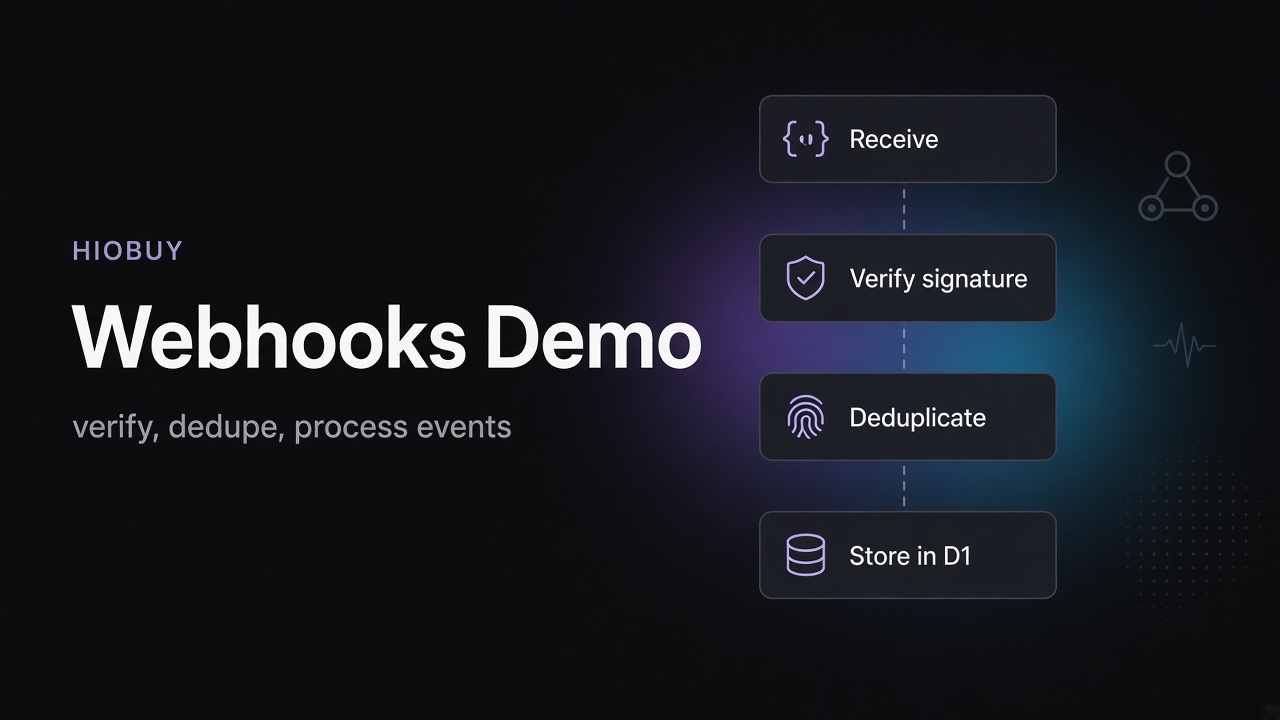
For teams that already have a website or app, and need warehouse fulfillment lifecycle updates pushed into their backend — not a white-label storefront, and not a C-end shopping widget.
You already have orders, an ERP, or an ops dashboard. Packages arrive at a China warehouse. Consolidation finishes. A shipment is ready for payment, then dispatched, then delivered — or something fails along the way. Polling every few minutes works until it does not. The extra piece some teams want is a signed HTTPS webhook: HioBuy pushes the event; your server verifies it, deduplicates it, and updates your own systems.
That is a fulfillment integration problem, not a storefront-skin problem. HIOBuy powers the China-side warehouse and the webhook protocol behind it. Your backend owns the endpoint, the secret, and the business handlers. The open-source reference is github.com/hiobuy/webhooks-demo (MIT). Live demo: webhooks.demo.hiobuy.com. Docs: HioBuy Webhooks. Developer portal: developers.hiobuy.com. The rest of this post is how the Cloudflare demo receives, verifies, deduplicates, and inspects those events — and where it stops.
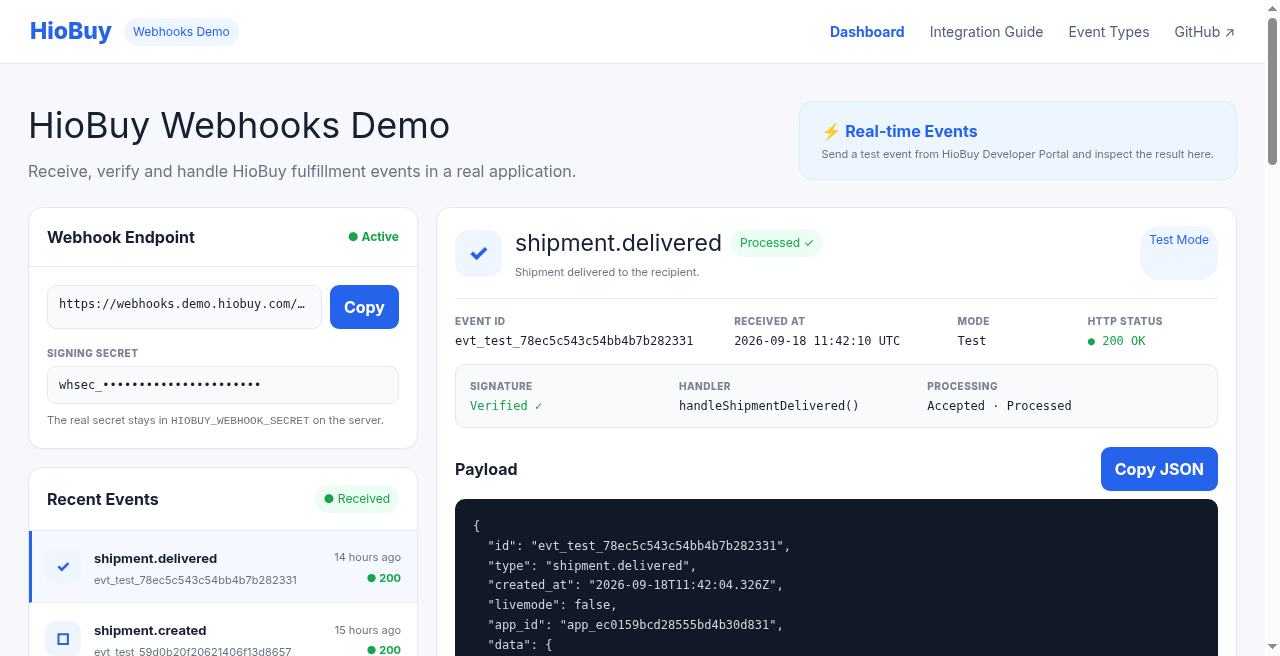
Dashboard at webhooks.demo.hiobuy.com. Left: endpoint URL, masked whsec_… hint, recent events. Right: a selected test event (livemode: false) with signature verified, handler name, and sanitized payload. Public inspector shows test events only.
Who this is for
B-end builders wiring warehouse fulfillment into their own order or ERP systems. You need:
- Channel Auth fulfillment mode = HioBuy warehouse. Self-fulfillment apps can view the portal intro but cannot create or enable webhook endpoints.
- An HTTPS receiver you control (this demo uses Cloudflare Workers).
- A place to map event types into your order status, notifications, or billing — not a HioBuy-hosted storefront.
If you are looking for catalog search, shipping estimates, or package tracking lookups, those are separate demos (linked at the end). This one is push-based lifecycle events.
What webhooks push vs polling
Same developer portal. Different delivery model.
| Approach | How you learn status | This demo |
|---|---|---|
| Poll Public Fulfillment APIs | Your job asks HioBuy on a schedule | No |
| Webhooks | HioBuy POSTs JSON to your HTTPS URL | Yes |
| Endpoint management | Create / rotate / retry in portal | Portal only — no Public /v1/webhooks/* in v1 |
Public API responses never wait on your webhook server. Delivery is at-least-once. You must verify signatures and dedupe on event.id.
Official transport constraints (cite docs):
| Item | Value |
|---|---|
| Method / body | POST JSON |
| Timeout | 10 seconds |
| Success | HTTP 2xx |
| Retries | Up to 5: immediate, then 1m / 5m / 30m / 2h |
| Payload size | ≤ 64 KB |
| Retention | ~30 days events / ~14 days attempts |
Portal Send test produces livemode: false events with ids like evt_test_*. Use that path to validate a receiver before live warehouse push is enabled for your channel (docs: progressive rollout).
Demo architecture
Cloudflare-native stack from the README: Next.js App Router + TypeScript, vinext on Cloudflare Workers, Cloudflare D1, pnpm, Node.js 20+, MIT.
HioBuy
  → POST /api/webhooks/hiobuy
  → verify HioBuy-Signature (raw body)
  → dedupe event.id (D1 unique)
  → handler (lib/event-handler.ts)
  → D1
  → demo UI
Key files:
| File | Role |
|---|---|
app/api/webhooks/hiobuy/route.ts | Receive raw body → verify → dedupe → handle |
lib/hiobuy-webhooks.ts | Signature parse, tolerance, HMAC-SHA256 |
lib/event-handler.ts | Thin per-type handlers |
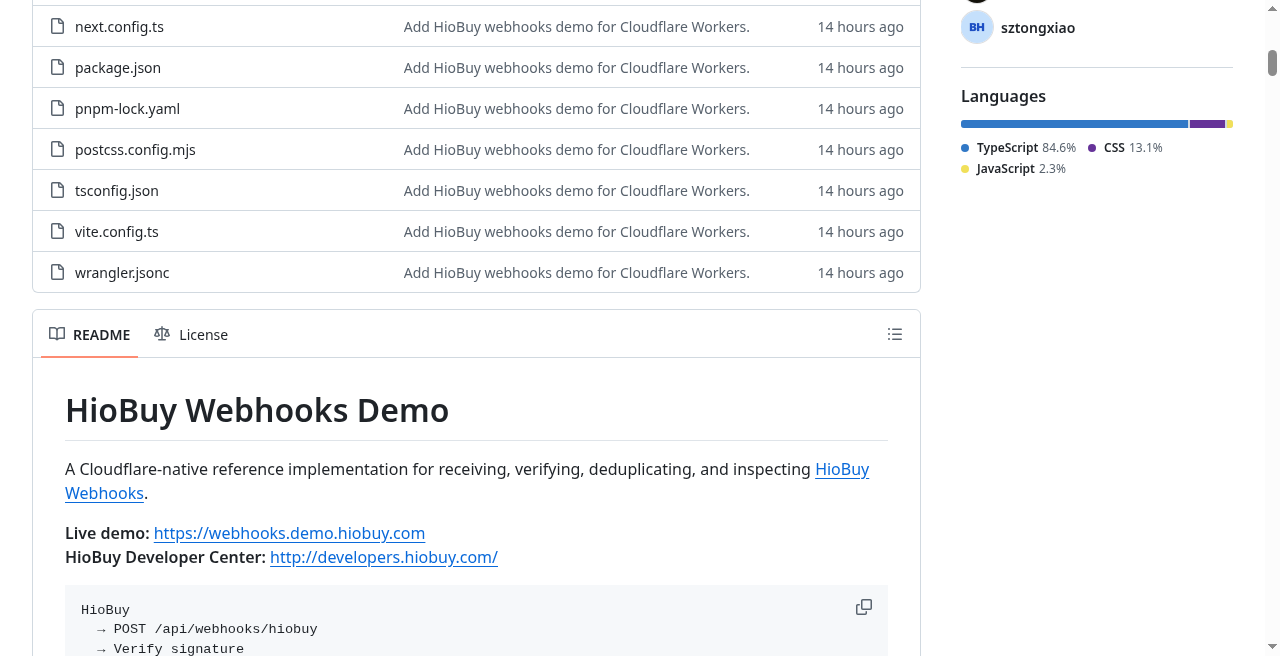
Source at github.com/hiobuy/webhooks-demo: Cloudflare Workers config (wrangler.jsonc), Next/vinext app, MIT reference for verify → dedupe → inspect.
Signature verification (raw body)
HioBuy delivers headers like:
POST /api/webhooks/hiobuy HTTP/1.1
Content-Type: application/json
User-Agent: HioBuy-Webhooks/1.0
HioBuy-Event-Id: evt_01HXYZ…
HioBuy-Signature: t=<unix_seconds>,v1=<hex_hmac>
Secret format: whsec_… (shown once at create/rotate in the portal).
Signed payload (exact raw body bytes — do not JSON-parse then re-serialize):
{t}.{raw_body}
Expected digest: HMAC-SHA256(secret, signed_payload), hex-encoded. Compare with a timing-safe equality check. Reject if |now - t| > 5 minutes (300 seconds) to limit replay.
Conceptual Node.js shape (aligned with docs and lib/hiobuy-webhooks.ts):
import crypto from "node:crypto";

const TOLERANCE_SEC = 300;

export function verifyHioBuyWebhook({
  rawBody,
  signature,
  secret,
}: {
  rawBody: string;
  signature: string | null;
  secret: string;
}) {
  const match = /^t=(\d+),v1=([0-9a-f]+)$/i.exec(signature || "");
  if (!match) return false;

  const timestamp = Number(match[1]);
  const expected = match[2].toLowerCase();
  if (!Number.isFinite(timestamp)) return false;

  const now = Math.floor(Date.now() / 1000);
  if (Math.abs(now - timestamp) > TOLERANCE_SEC) return false;

  const signedPayload = `${timestamp}.${rawBody}`;
  const digest = crypto
    .createHmac("sha256", secret)
    .update(signedPayload, "utf8")
    .digest("hex");

  const a = Buffer.from(digest, "utf8");
  const b = Buffer.from(expected, "utf8");
  return a.length === b.length && crypto.timingSafeEqual(a, b);
}
Preserve the raw body before verify. Parse JSON only after the signature check succeeds. Keep HIOBUY_WEBHOOK_SECRET on the server — never in browser JS.
Idempotency and retries
Docs: treat delivery as at-least-once. Deduplicate on envelope id (and optionally HioBuy-Event-Id).
The demo enforces uniqueness on event.id in Cloudflare D1. If a duplicate arrives after acceptance:
- Return
200again so HioBuy does not keep retrying an already-accepted event. - Do not re-run business logic.
Receive → Check event.id
  ├─ Exists → 200 OK (no reprocess)
  └─ New → Process → Store → 200 OK
Retries (docs): up to 5 attempts — immediate, then 1 minute, 5 minutes, 30 minutes, 2 hours. Respond 2xx within 10 seconds once the event is safely accepted.
Envelope and event catalog
Public envelope fields: id, type, created_at, livemode, app_id, data.
| Field | Notes |
|---|---|
id | evt_… live; evt_test_… portal tests |
type | Catalog event name |
livemode | false for Send test |
data | Event-specific payload |
Events the demo surfaces (aligned with docs catalog):
| Category | Event type |
|---|---|
| Procurement | procurement.failed, procurement.out_of_stock |
| Warehouse | package.received, package.exception |
| Consolidation | consolidation.completed |
| Shipping | shipment.created, shipment.ready_for_payment, shipment.dispatched, shipment.delivered, shipment.exception |
| Account | balance.low |
For current data shapes, use the official data shapes section — do not invent fields.
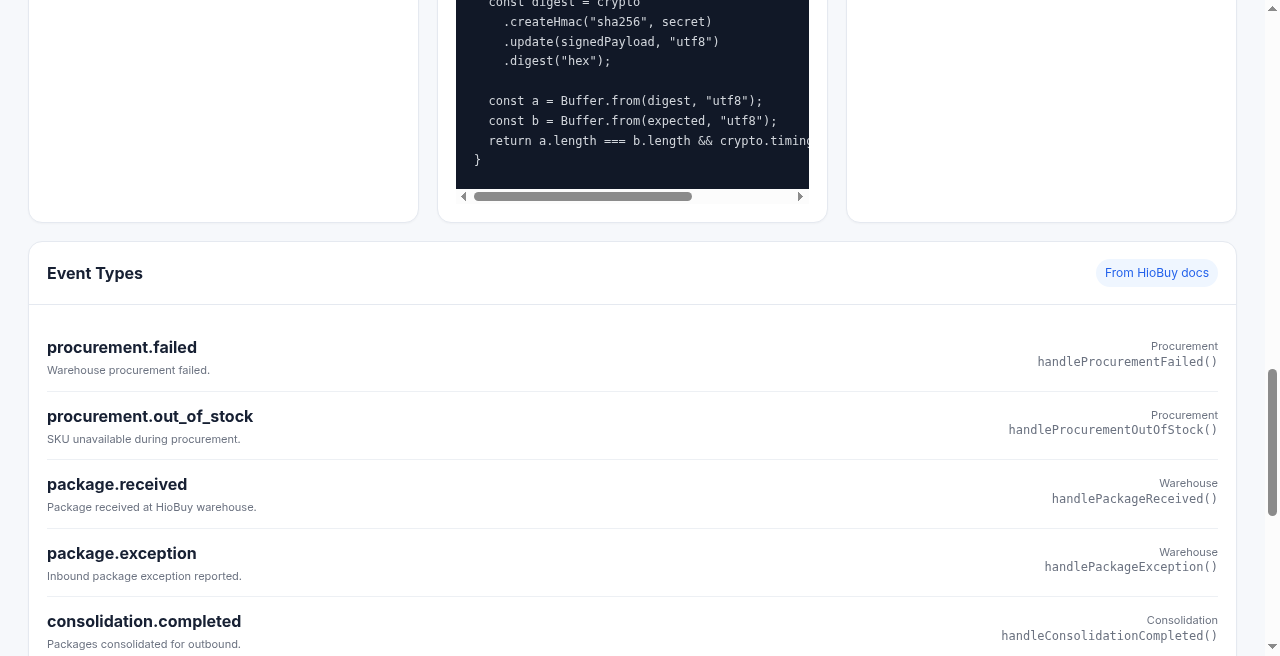
Event Types view in the demo: catalog names mapped to thin handlers such as handlePackageReceived(). Educational wiring for your order/ERP layer — not a claim that every historical step is always present on every order.
Hands-on: local + send:test
1. Prerequisite
In developers.hiobuy.com, set Channel Auth fulfillment mode to HioBuy warehouse. Create a webhook endpoint when you are ready (HTTPS URL, ≥1 subscribed event). Copy whsec_… when the portal shows it.
2. Clone and configure
git clone https://github.com/hiobuy/webhooks-demo.git
cd webhooks-demo
pnpm install
cp .dev.vars.example .dev.vars
Set in .dev.vars:
HIOBUY_WEBHOOK_SECRET=whsec_your_secret_here
Never commit .dev.vars or real secrets.
3. Migrate and run
pnpm d1:migrate
pnpm dev
Open http://localhost:5173 (vinext). Recent Events stays empty until a verified webhook is stored in D1.
4. Signed local test
HIOBUY_WEBHOOK_SECRET=whsec_your_secret_here pnpm send:test
That posts a correctly signed payload to your local receiver so you can exercise verify → dedupe → store without waiting on portal delivery.
Public demo safety
The live host is for illustration:
- Public
GET /api/eventsreturns onlylivemode: falseevents. - Payloads are sanitized for the UI.
- The signing secret stays in Workers secrets /
.dev.vars— never exposed to the browser. - Do not point production traffic at the public demo as a proxy, and do not use a public debugger to display live customer payloads.
Portal endpoint URL for this demo after deploy:
https://webhooks.demo.hiobuy.com/api/webhooks/hiobuy
Deploy notes
High-level path from the README:
wrangler d1 create(then wire the database id as documented in the repo)pnpm d1:migrate:remotewrangler secret put HIOBUY_WEBHOOK_SECRETpnpm buildpnpm deploy
Do not put the production secret in wrangler.jsonc. After deploy, paste https://webhooks.demo.hiobuy.com/api/webhooks/hiobuy (or your own host) into the developer portal, subscribe to events, and use Send test.
Where it stops
This demo stops at receive → verify → dedupe → inspect. It does not:
- create shipments, take payment, or replace your ERP
- expose a Public
/v1/webhooks/*management API (portal-only in v1) - guarantee live warehouse→developer push is enabled for every channel today (use Send test; cite docs)
- quote freight or look up tracking by serial number
If you need estimates before you ship, use the shipping-quotes path. If you need status after an international parcel is moving and you hold a logistics / order / client number, use tracking. If you need async lifecycle push into your own backend — this webhook path is the one.
Links
- Live demo: webhooks.demo.hiobuy.com
- Source (MIT): github.com/hiobuy/webhooks-demo
- API docs: HioBuy Webhooks
- Developer portal: developers.hiobuy.com
- Related: Shipping Quotes Fulfillment API
- Related: Track Packages on Your Own Site
Next step
If you already understand the workflow, move to the API reference for exact request and response fields, or open the developer console to create your application.
Ready to build?
Open the API documentation or create your HioBuy developer application.