 HioBuy
HioBuy Forwarding: Run a Parcel Forwarding Platform on the Fulfillment API
An open-source, self-hosted parcel forwarding app on Cloudflare Workers. Run it locally, keep the HioBuy key on the server, deploy it, and see how pre-alerts, consolidation, HioBuy Pay, tracking, and webhooks map to the HioBuy Fulfillment API.
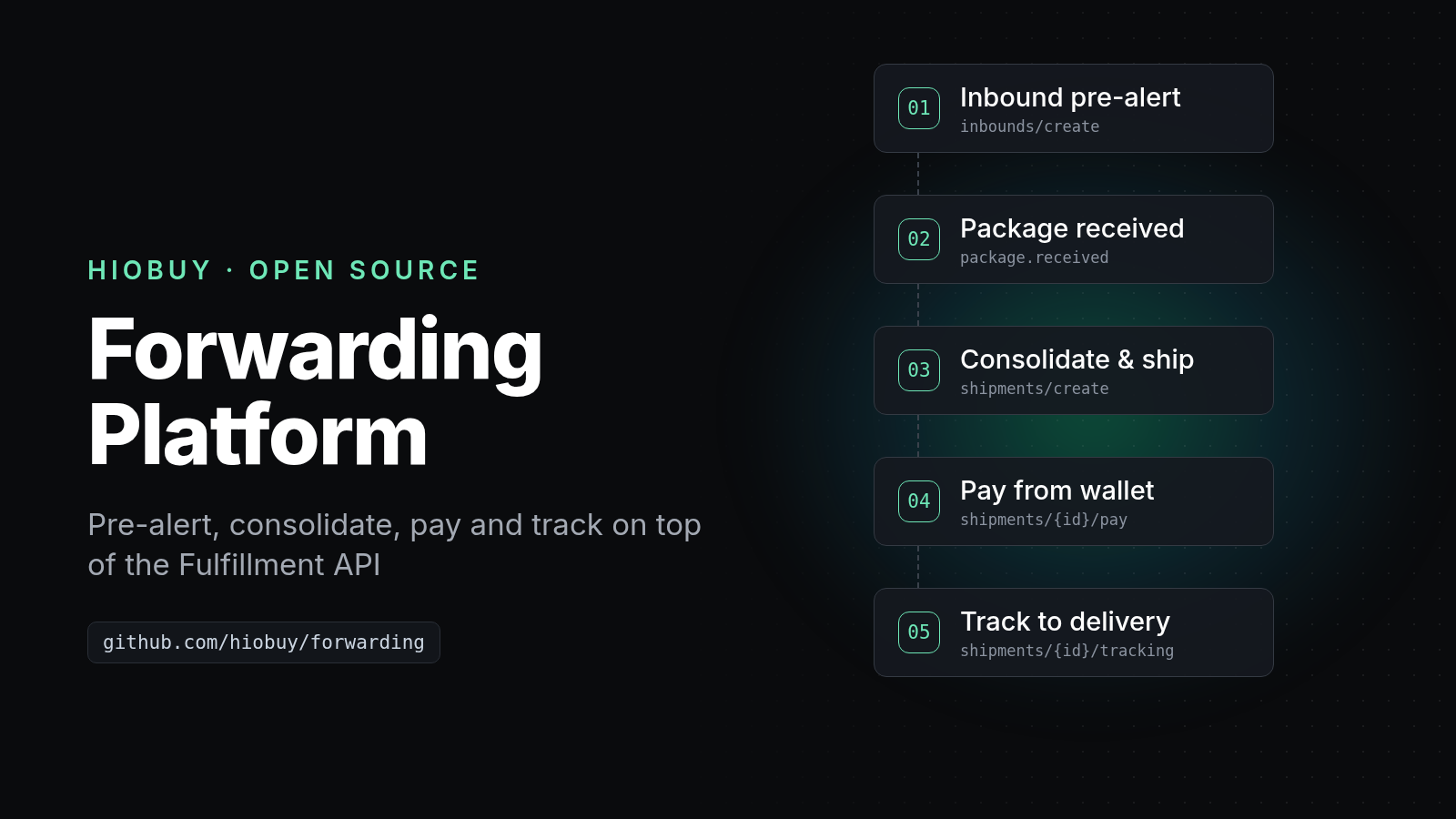
HioBuy Forwarding: Run a Parcel Forwarding Platform on the Fulfillment API
A parcel forwarding business needs more than a shipping calculator. It needs customer accounts, a personal warehouse address for each customer, package pre-alerts, status sync with the warehouse, consolidation, quotes that include your markup, customer payments, freight payment, and tracking.
HioBuy Forwarding is an open-source (Apache-2.0), self-hosted application that covers all of that. It runs on Cloudflare Workers. The physical work (receiving, storage, packing, international dispatch) is done by HioBuy warehouses through the HioBuy Fulfillment API.
You own the customer relationship, the brand, the selling price, and customer payments. HioBuy receives, stores, packs, and ships the parcels.
- Live demo: forwarding.demo.hiobuy.com
- Repository: github.com/hiobuy/forwarding
- API reference: hiobuy.com/en/api-docs
This tutorial covers:
- What the app does and what the public demo shows.
- How to run it locally and configure it, with the API key kept on the server.
- How to deploy it to Cloudflare.
- How each step maps to HioBuy Fulfillment API calls and webhooks.
- Common errors and how to read them.
What you are building
HioBuy Forwarding is a customer business platform. It is not a warehouse management system. It never weighs, packs, or ships anything itself.
It has three surfaces:
- Public website with a shipping calculator (can be turned off with
PUBLIC_SITE_MODE=app-onlyif you already have a marketing site). - Customer portal: warehouse address with member code, pre-alerts (up to 30 at a time), package photos from the warehouse, consolidation with a live quote, checkout from a USD wallet or Stripe Checkout, tracking, and documents.
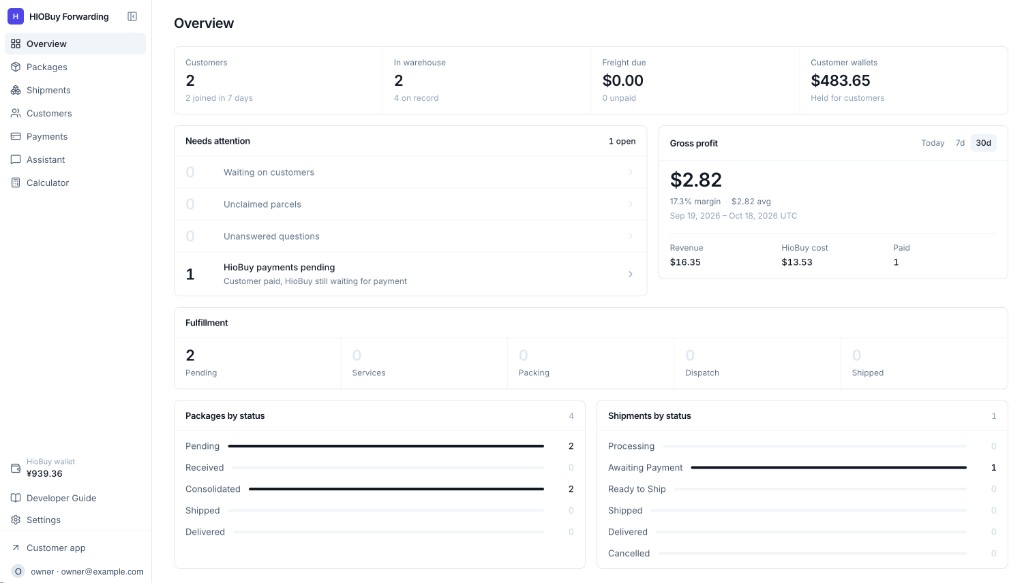
- Admin console: packages, shipments, customers, payments, pricing (one global markup, fixed fee, and exchange rate), destination switches, a read-only view of your HioBuy fulfillment wallet, HioBuy Pay, staff roles, email templates, and a developer guide at
/admin/guide.
What the live demo shows
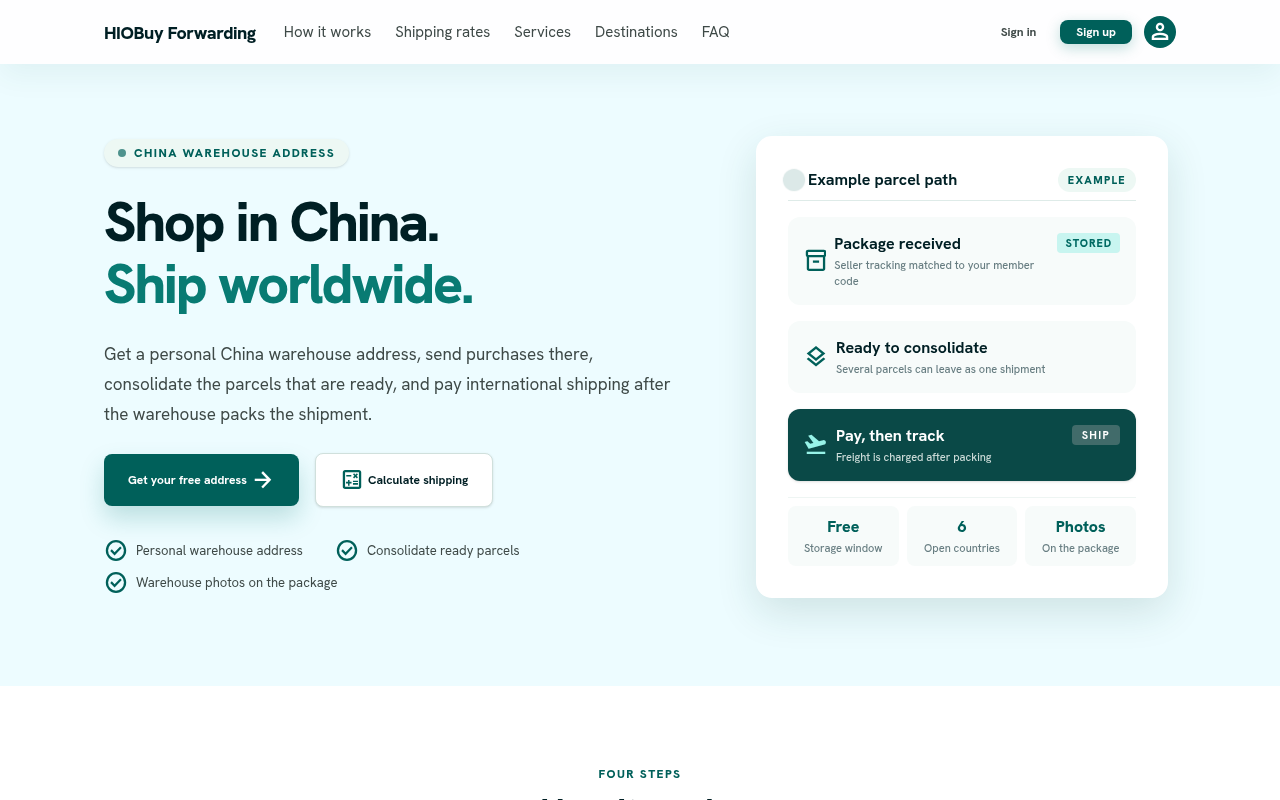
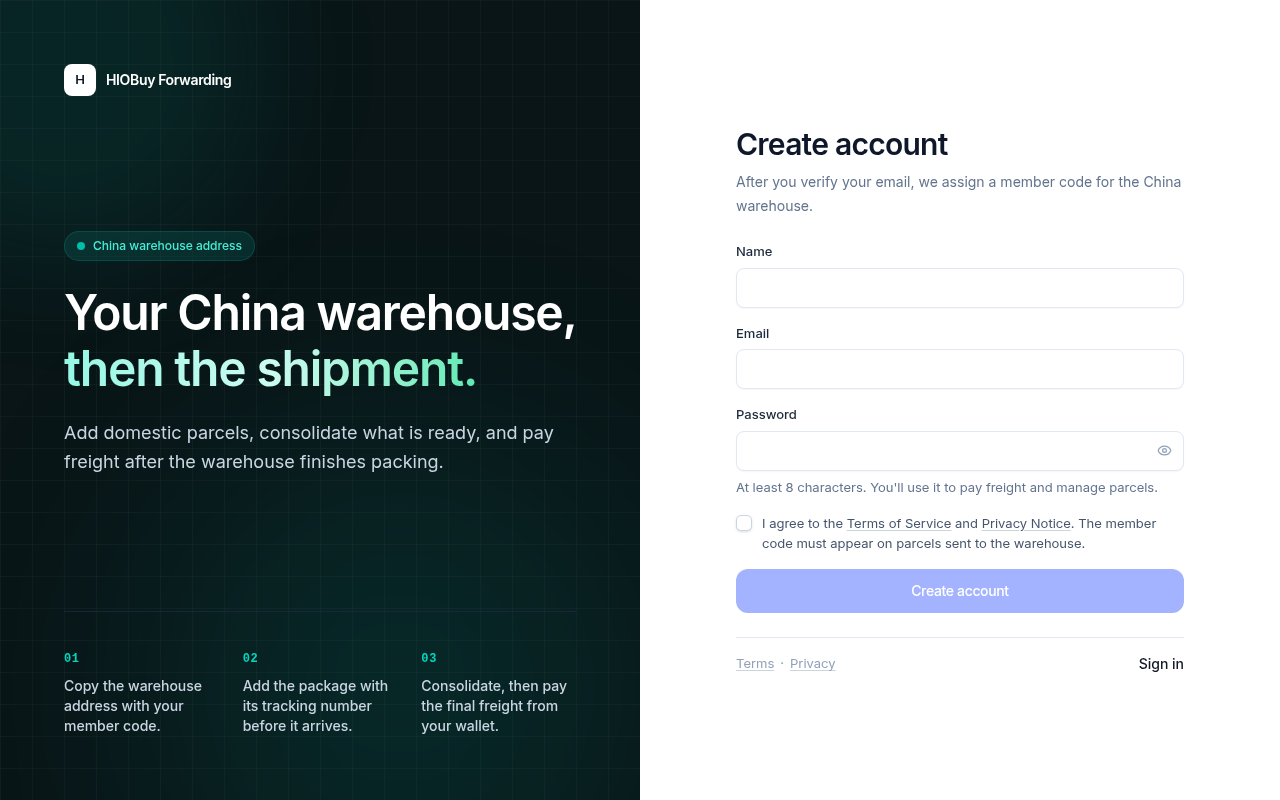
The public demo at forwarding.demo.hiobuy.com runs the same code with DEMO_MODE=false. You can browse the public site, use the calculator, and register a customer account.
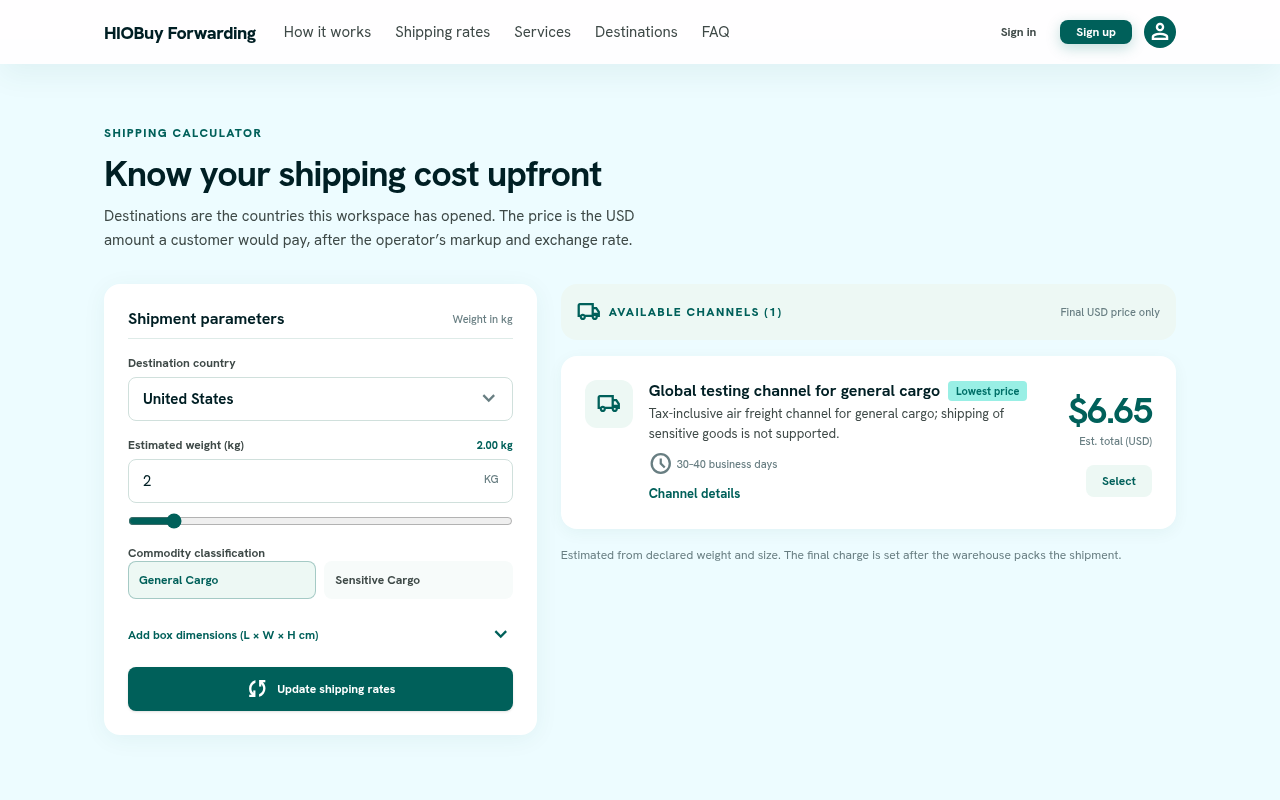
The calculator on the demo is connected to HioBuy. A request goes from the browser to the demo's Worker, which calls POST /v1/fulfillment/shipping/quotes with its own key, then applies the operator markup and exchange rate before it returns a USD price. The channel it returns is a HioBuy testing channel, and the demo pricing is not a commercial offer. As the repository README says, balances, prices, and transactions on the demo are not real financial or logistics records. Do not send real parcels to an address shown on the demo.
The read-only Demo Admin at /admin/demo uses sample data, sends no real email, and refuses HioBuy Pay. It only opens when a deployment sets DEMO_MODE=true. It is turned off on the public demo, so you will see it only on your own local or test deployment.
How the workflow works
The customer-facing flow, as implemented in the repository:
Register → member code + warehouse address
    ↓
Pre-alert domestic tracking numbers   → HioBuy inbound notice (PENDING)
    ↓
Warehouse receives the parcel         → RECEIVED (pull or webhook), weight, photos
    ↓
Customer picks packages + address     → live quote, your markup, USD price
    ↓
Shipment created at HioBuy            → packages CONSOLIDATED, shipment PENDING
    ↓
Warehouse packs, final charge         → WAIT_PAYMENT
    ↓
Customer pays you (wallet or Stripe)
    ↓
Your team pays HioBuy (HioBuy Pay)    → WAIT_SHIP
    ↓
Dispatch and tracking                 → SHIPPED → SIGNED
Customer payment and HioBuy payment are separate. A customer can have paid you while HioBuy still shows payment_status: UNPAID. That is expected, and it does not mean the shipment is ready to leave.
Architecture
Browser (React)
  → Hono API on Cloudflare Workers  (/api/*)
    → domain rules (src/domain) and services (server)
      → Cloudflare D1, R2
      → server/services/hiobuy  → HioBuy Fulfillment API (https://api.hiobuy.com)
Three rules in the code base are worth copying into any HioBuy integration:
- The browser only calls this app. The HioBuy API key stays in the Worker. Settings responses return only the last 4 characters of the key.
- Prices are computed on the server. Eligibility, prices, payable amounts, and profit are calculated server-side. Prices or discounts sent by a client are never trusted, and guest or customer responses never include cost or markup.
- Every HioBuy call lives in one folder:
server/services/hiobuy. Pricing and profit rules live insrc/domain.
Stack: React 19, TypeScript, Vite, Tailwind CSS, Hono, Cloudflare Workers, D1 with Drizzle ORM, R2, Better Auth, Stripe, Zod, Vitest. The optional signed-in assistant uses Cloudflare Agents, Durable Objects, and Workers AI.
Prerequisites
- Node.js 20 or newer, and npm.
- A Cloudflare account (for deployment).
- A HioBuy developer app in HioBuy warehouse fulfillment mode, with a warehouse developer code bound in the portal, and a Production key (
hio_live_*). See Fulfillment setup.
Warehouse fulfillment APIs need a paid plan: Growth ($99/month, 8,000 units/day) or Enterprise ($299/month, 50,000 units/day). Starter does not include fulfillment APIs. Daily units are one shared quota across 1688, Taobao, and Weidian, not a separate allowance per marketplace. See Rate limits.
For testing against a real warehouse configuration without live outbound, HioBuy assigns a WH-DEV code. The repository expects a hio_live_* key with that code, not a Sandbox hio_test_* key: Sandbox fixtures do not match the WH-DEV warehouse. See the WH-DEV testing guide.
Step 1: Run it locally
git clone https://github.com/hiobuy/forwarding.git
cd forwarding
npm install
cp .dev.vars.example .dev.vars
openssl rand -base64 32   # paste the result into BETTER_AUTH_SECRET in .dev.vars
npm run dev
npm run dev applies the local D1 migrations, then serves the pages and the API. Open the URL printed in the terminal.
Then:
- Register with the email you put in
ADMIN_EMAILS. Without SMTP, the verification link appears on the verify page (development only). - Open
/admin. That account becomes the first owner. - Go to Settings → Integration, save your HioBuy API key, then sync the warehouse and destinations.
- Set Settings → Pricing and enable countries in Settings → Destinations.
- Try a quote at
/app/shipping-calculator.
Until the warehouse sync succeeds, customers see no warehouse address. The app never shows placeholder data as a live HioBuy address.
Other useful scripts:
| Command | What it does |
|---|---|
npm run test | Vitest over src/domain and server tests |
npm run typecheck | TypeScript project check |
npm run db:reset | Wipe and recreate local D1 |
npm run db:generate | Generate a Drizzle migration after a schema change |
Step 2: Configure the environment
Local values go in .dev.vars (ignored by Git). Production values are set with wrangler secret put. The important variables:
| Variable | Required | Purpose |
|---|---|---|
BETTER_AUTH_SECRET | Yes | Session signing, and the key used to encrypt secrets saved from the admin |
ADMIN_EMAILS | First run | Promotes the first owner. After that, Settings → Team manages staff |
HIOBUY_API_TOKEN | No | Fallback HioBuy key. A key saved in Settings → Integration wins |
PUBLIC_SITE_MODE | No | integrated (default) or app-only |
DEMO_MODE | No | true opens the read-only Demo Admin. Keep false for a real business |
SMTP_*, GOOGLE_*, TURNSTILE_* | No | Override the matching admin settings |
Stripe keys, the bank account, the HioBuy webhook signing secret, and email templates are configured in the admin and stored in D1.
Keep the HioBuy key on the server
When you save a key in Settings → Integration, the server checks it against both GET /v1/fulfillment/locations (warehouse address) and GET /v1/fulfillment/shipping/channels?include=regions (destinations) before it keeps the key. One success is not enough.
The README lists one trade-off: a key saved from the admin is stored unencrypted in D1. If that matters to you, set the key as a Worker secret instead and leave the admin field empty:
npx wrangler secret put HIOBUY_API_TOKEN --env production
Either way, the key never reaches the browser. Do not add HioBuy calls to React code.
Step 3: Deploy to Cloudflare
The repository ships a wrangler.jsonc with a D1 database, an R2 bucket for photos, a Durable Object for the assistant, a Workers AI binding, and a Cron Trigger that runs every minute.
-
Create a D1 database and an R2 bucket named
hiobuy-forwarding-photos. -
In
wrangler.jsonc, set your owndatabase_idand route in theenv.productionblock. The values in the repository belong to the HioBuy demo (forwarding.demo.hiobuy.com) and will not work in your account. -
Set secrets:
npx wrangler secret put BETTER_AUTH_SECRET --env production npx wrangler secret put ADMIN_EMAILS --env production npx wrangler secret put HIOBUY_API_TOKEN --env production # optional, see above -
Apply migrations and deploy:
npm run db:migrate:remote npm run deploy -
In the admin, configure Integration, Destinations, Pricing, Email, and Payments.
-
Point the HioBuy webhook at
https://<your-domain>/api/webhooks/hiobuyand the Stripe webhook athttps://<your-domain>/api/payments/stripe/webhook.
Auth callbacks, email links, and Stripe return URLs are built from the request origin, so serve the app from the domain your customers will see. Keep ENVIRONMENT=production and DEMO_MODE=false on a real deployment, and work through the repository's production checklist before you accept payments.
Step 4: How the app maps to the HioBuy Fulfillment API
All calls go from the Worker to https://api.hiobuy.com with Authorization: Bearer <key>. The warehouse developer code is never sent in requests. The HioBuy gateway attaches it based on your app's binding.
| App step | HioBuy endpoint | Notes |
|---|---|---|
| Connect key, sync address | GET /v1/fulfillment/locations | Customer warehouse address comes only from this sync |
| Sync destinations | GET /v1/fulfillment/shipping/channels?include=regions | Paged, page_size max 50 |
| Calculator and consolidation quote | POST /v1/fulfillment/shipping/quotes | Declared-weight estimate; final charge comes after packing |
| Cargo types | GET /v1/fulfillment/shipments/item-attributes | Feeds the calculator's cargo selector |
| Pre-alert | POST /v1/fulfillment/inbounds/create | With Idempotency-Key |
| Cancel pre-alert | DELETE /v1/fulfillment/inbounds/{package_id} | Only while waiting for receipt |
| Package status | GET /v1/fulfillment/packages, GET /v1/fulfillment/packages/{package_id} | Manual pull or scheduled pull |
| Consolidate | POST /v1/fulfillment/shipments/create | With Idempotency-Key |
| Shipment status | GET /v1/fulfillment/shipments, GET /v1/fulfillment/shipments/{shipment_id} | |
| HioBuy Pay | POST /v1/fulfillment/shipments/{shipment_id}/pay | Charges your fulfillment wallet |
| Cancel / intercept | POST .../{shipment_id}/cancel, POST .../{shipment_id}/intercept | Cancel before outbound, intercept after |
| Tracking | GET /v1/fulfillment/shipments/{shipment_id}/tracking | Carrier scan events |
| Wallet (read-only) | GET /v1/fulfillment/balance, GET /v1/fulfillment/transactions | Top up in the HioBuy portal |
Writes do not happen inside the customer's HTTP request. They are queued as sync tasks (inbound_create, shipment_create, shipment_pay, and others). The Cron Trigger processes due tasks every minute, and staff can trigger a sync from the admin. Each attempt is logged on the package or shipment with secrets redacted.
4.1 Inbound pre-alert
When a customer pre-alerts a parcel, the app creates an inbound_create task. The request body built by inboundNoticeBody() looks like this:
POST /v1/fulfillment/inbounds/create
Idempotency-Key: <one key per logical notice>

{
  "tracking_number": "YT1234567890",
  "carrier": "YTO",
  "package_count": 1,
  "total_value": 25.00,
  "currency": "USD",
  "external_order_id": "pkg_<local id>",
  "items": [
    { "name": "Parcel", "quantity": "1", "unit_price": "25.00", "currency": "USD" }
  ]
}
This matches the inbound notice docs: items[].quantity and unit_price are strings, total_value is a face amount (not fen), and currency may be CNY, USD, or KRW. The response returns a package_id (pkg_*). There is no separate inbound id. The package stays PENDING until the warehouse receives it.
The local reference is prefixed (pkg_…, and shp_… for shipments). The docs recommend this: numeric-only path values are reserved for HioBuy internal IDs.
On a 409 (INBOUND_TRACKING_ALREADY_EXISTS, EXTERNAL_ORDER_ID_ALREADY_EXISTS, IDEMPOTENCY_CONFLICT), error.details.existing_resource can carry the existing package. If that package matches the app's own reference and tracking number, the app links it instead of creating a second notice. Otherwise the task goes to Needs review.
4.2 Package received
Package status follows the canonical lifecycle from the docs:
PENDING → RECEIVED → CONSOLIDATED → SHIPPED → DELIVERED
side states: TRANSFERRING, DISCARDED, UNCLAIMED, ARCHIVED
Weight, dimensions, and photos arrive by pull (GET /v1/fulfillment/packages) or by the package.received webhook. Package condition (normal or exception) is tracked separately from the lifecycle status.
4.3 Consolidation and shipment create
The customer chooses received packages and an address. The server quotes the channels, adds your markup and fixed fee, converts to USD, and stores the quote. It then queues shipment_create. That task waits until every package has a HioBuy package_id with remote status RECEIVED, a channel code, and a complete address:
POST /v1/fulfillment/shipments/create
Idempotency-Key: <one key per logical shipment>

{
  "tracking_numbers": ["YT1234567890", "SF2026082001"],
  "shipping_channel_code": "<code from channels or quotes>",
  "receiver": {
    "name": "Alex Morgan",
    "mobile": "+12025550123",
    "country_code": "US",
    "postal_code": "10001",
    "province": "New York",
    "city": "New York",
    "address_line1": "123 Example Ave, Apt 4B"
  },
  "external_shipment_id": "shp_<local id>",
  "remark": "optional packing note"
}
Two details match the shipments docs:
tracking_numbers[]are the inbound domestic tracking numbers, not warehouse record IDs or procurement order numbers.- The district is merged into
address_line1, because the create API does not forward a separatereceiver.district.
The response returns the shipment id (the warehouse numeric ID as a string), order_sn, and usually status: PENDING. The app marks the packages CONSOLIDATED.
4.4 Ready for payment, then HioBuy Pay
Shipment lifecycle on HioBuy:
PENDING → WAIT_PAYMENT → WAIT_SHIP → SHIPPED → SIGNED
cancellation: CANCELLED
After the warehouse packs the shipment, it moves to WAIT_PAYMENT with a payable amount (shipment.ready_for_payment webhook, or a status pull). The app then bills the customer in USD.
An admin confirms HioBuy Pay only when all of these are true:
- The customer has paid this app.
- The remote status is
WAIT_PAYMENT. - Your HioBuy fulfillment wallet covers the CNY amount.
- If two-factor confirmation is on, the staff member entered an authenticator code.
The app calls POST /v1/fulfillment/shipments/{shipment_id}/pay with an Idempotency-Key. A successful payment moves the shipment to WAIT_SHIP. Per the docs, retries with the same key return the same result and do not charge twice. After paying, the app reads the shipment detail and stores the confirmed cost for the profit report. HioBuy amounts are in fen (monetary_unit: CNY_minor).
4.5 Dispatch and tracking
shipment.dispatched (or a status pull) moves the shipment to SHIPPED and stores the international tracking number. Carrier scan events come from GET /v1/fulfillment/shipments/{shipment_id}/tracking. shipment.delivered or a pull showing SIGNED closes it.
Cancel works while the shipment is PENDING or WAIT_PAYMENT. After outbound starts, use intercept. Interception has its own status (REQUESTED → PROCESSING → INTERCEPTED / FAILED) and never overwrites the shipment lifecycle status.
4.6 Webhooks
The endpoint POST /api/webhooks/hiobuy verifies the HioBuy-Signature header (t=<unix>,v1=<hex>) the way the webhooks docs describe: HMAC-SHA256 over "{t}.{raw_body}" with your whsec_… secret, a constant-time comparison, and a 5-minute timestamp tolerance. A missing secret or a bad signature returns 401 and stores nothing. Save the signing secret in the admin's fulfillment sync panel.
Deliveries are at-least-once, so the handler deduplicates on the event id. A repeated id that was already processed returns 200 without being applied again. A failed one can be processed again.
Events the app applies:
| Event | Effect in the app |
|---|---|
package.received | Package → RECEIVED, customer notified |
package.exception | Package flagged for the customer to respond |
shipment.ready_for_payment | Shipment → WAIT_PAYMENT, customer billed |
shipment.dispatched | Shipment → SHIPPED, tracking number stored |
shipment.delivered | Shipment delivered |
shipment.exception | Sent to Needs review |
balance.low | Operator alert to top up the fulfillment wallet |
Other catalog events (shipment.created, consolidation.completed, procurement.*) are acknowledged and not used. The docs note that live warehouse-to-developer push is being rolled out progressively, so use Send test in the Developer Portal to check your receiver. The app keeps manual and scheduled pulls for this reason: a webhook does not replace a pull.
Important considerations
- Two ledgers. Customers hold a USD wallet in your app. You hold a CNY fulfillment wallet at HioBuy. The app reads the HioBuy balance but cannot top it up.
- Quotes are estimates. Calculator and consolidation quotes use declared weight and size. The final charge is set after the warehouse packs the shipment.
- Rate limiting. The public calculator has a built-in limit, but it is per Worker isolate, not global. Add Cloudflare rate limiting rules in front of the calculator and auth routes.
- Not included yet. Customers cannot request value-added services from the portal (staff can record one locally), commercial customs invoices are not generated, and procurement orders (
/v1/orders/*) and returns have no client in this version. HioBuy documents a value-added services catalog if you want to add it yourself. - Branding. The Apache-2.0 license does not grant rights to the HioBuy name or logo. Replace them with your own branding when you run your own business.
Common errors
| Error | Likely cause | Fix |
|---|---|---|
401 INVALID_API_KEY | Missing, revoked, or malformed key | Check the key in the Developer Portal. Sync tasks pause instead of retrying a rejected key |
403 FULFILLMENT_MODE_NOT_SUPPORTED | App is in self-fulfillment mode | Switch the app to HioBuy warehouse mode in the portal |
403 WAREHOUSE_AUTH_INVALID | Warehouse rejected developer authentication | Bind the warehouse code HioBuy provides, then test the connection again |
403 INSUFFICIENT_SCOPE | Key lacks the scope for the route (for example shipment:create) | Check the app's permissions in the portal |
| No warehouse address for customers | Warehouse sync has not succeeded | Save the key in Settings → Integration and sync again |
409 INBOUND_TRACKING_ALREADY_EXISTS | That tracking number was already pre-alerted | The app links the existing package when it matches; otherwise check Needs review |
409 PACKAGE_ALREADY_CONSOLIDATED | A parcel is already in another shipment | Review the shipment. The app sends it to Needs review |
404 PARCEL_NOT_FOUND | A tracking number is wrong or not yet received | Wait for RECEIVED, or fix the tracking number |
409 SHIPMENT_NOT_READY_FOR_PAYMENT | The warehouse has not finished packing | Wait for WAIT_PAYMENT |
402 INSUFFICIENT_BALANCE | Fulfillment wallet too low on pay | Top up in the HioBuy portal. The customer is not charged again |
429 RATE_LIMIT_EXCEEDED / QUOTA_EXCEEDED | Per-minute limit, or daily units used up | Back off and retry. Cache data where your rules allow |
Webhook returns 401 | No signing secret saved, or a wrong one | Save the whsec_… secret in the fulfillment sync panel |
Always log request_id (or the x-request-id header) when you contact HioBuy support.
Next steps
- Open the live demo and try the calculator.
- Fork hiobuy/forwarding, run it locally, and connect a WH-DEV key.
- Walk one parcel through pre-alert, receive, consolidate, pay, and tracking before you change pricing or branding.
- Read the HioBuy Fulfillment Integration Guide and the webhooks demo for more detail on each stage.
API reference: hiobuy.com/en/api-docs.
Next step
If you already understand the workflow, move to the API reference for exact request and response fields, or open the developer console to create your application.
Ready to build?
Open the API documentation or create your HioBuy developer application.