 HioBuy
HioBuy Fulfillment Integration Guide
Map your B2B workflow to HioBuy Order, Package, and Shipment objects — covering assisted purchasing, inbound pre-alerts, VAS, service requests, consolidation, and international tracking.
HioBuy Fulfillment Integration Guide
Understand how Orders, Packages, Inbounds, Value-Added Services, Service Requests, and Shipments work together.
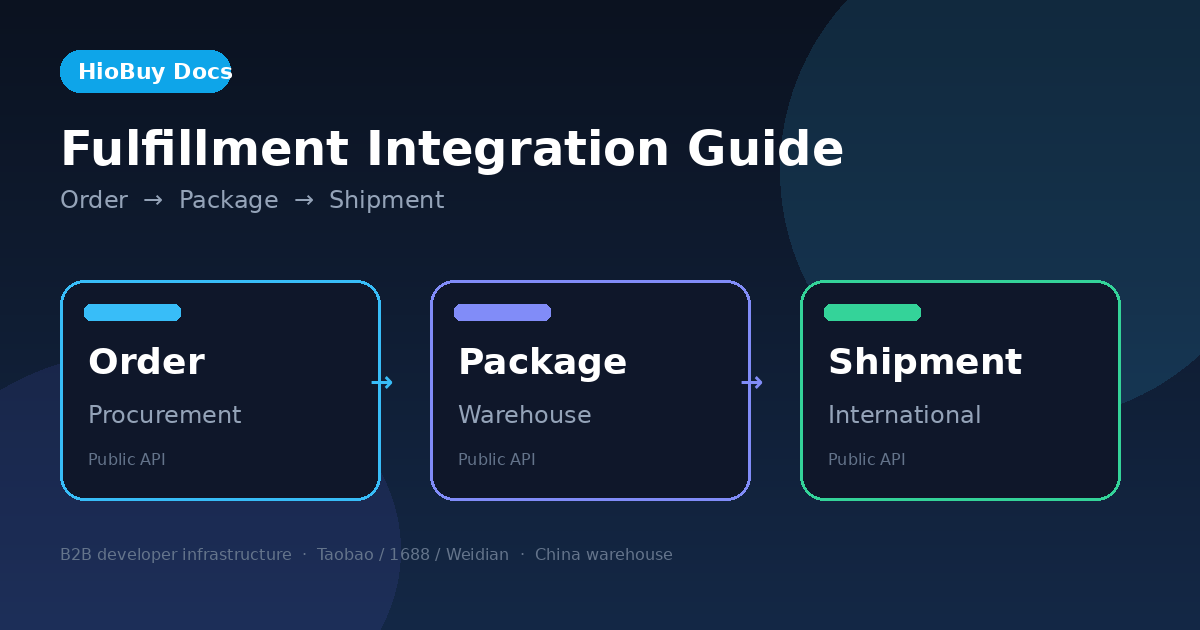
This guide is for B2B developers who build their own frontend and integrate HioBuy through the Public API. HioBuy provides China commerce APIs (Taobao / 1688 / Weidian) plus optional China warehouse fulfillment. It is not a consumer shopping product and not a white-label storefront.
Warehouse fulfillment APIs under /v1/fulfillment/* require warehouse mode on your app. Self-fulfillment apps receive 403 FULFILLMENT_MODE_NOT_SUPPORTED. Procurement (/v1/orders/*) and product APIs remain available in both modes; international outbound is warehouse-mode only.
1. Core concepts
Three objects cover most warehouse integrations:
| Object | What it represents | Primary docs |
|---|---|---|
| Order | Domestic procurement order (HioBuy-assisted purchasing from 1688 / Taobao sellers into a China inbound address) | Create order, Orders overview |
| Package | Physical parcel in the HioBuy warehouse after inbound notice / receiving | Packages, Inbounds |
| Shipment | International outbound from the warehouse (one or more domestic packages consolidated onto a shipping channel) | Shipments |
Order (purchasing)
An Order is a procurement record: channel + product lines (SKU / qty) + receiver + pay. Persist it as Order + Order Items (lines[]), not as a single opaque warehouse task.
Typical call chain:
POST /v1/orders/preview— validate lines, prices, freightPOST /v1/orders/create— place the procurement order; persist returnedorder_idPOST /v1/orders/pay— settle with the marketplace walletPOST /v1/orders/detail/POST /v1/orders/logistics/trace— status and domestic seller → warehouse logistics
Map Product API fields into order lines: product id → lines[].id; selected variants[].sku_id → lines[].spec_id; quantity → lines[].quantity. Do not use Taobao source_product_id as the line id.
Package (warehouse parcel)
A Package is the warehouse unit you list, inspect, service, and eventually put into a Shipment.
Two common sources:
- Order path: Create Order → purchasing → supplier domestic shipping → warehouse receiving → Package
- External / self-purchased path: You already bought goods → create Inbound pre-alert (
POST /v1/fulfillment/inbounds/create) with the domestictracking_number→ warehouse receiving → Package (pkg_*)
Documented package lifecycle statuses include: PENDING, RECEIVED, CONSOLIDATED, SHIPPED, DELIVERED, TRANSFERRING, DISCARDED, UNCLAIMED, ARCHIVED.
Shipment (international outbound)
A Shipment is the outbound stage, not the purchase order. You select packages (by domestic tracking_numbers[]), choose a shipping_channel_code, create the shipment, wait for warehouse packing / final measurement, pay from the fulfillment wallet, then track internationally.
Documented shipment statuses: PENDING → WAIT_PAYMENT → WAIT_SHIP → SHIPPED → SIGNED (cancel → CANCELLED).
Exact freight for the shipment is returned on create / detail after warehouse processing; catalog quotes are budgets, not locked prices.
2. Flow A — HioBuy-assisted purchasing
Use this when HioBuy (or your warehouse-bound procurement path) should buy from the Chinese marketplace for you.
Create Order
  → Order Items / SKU
  → HioBuy Purchasing (+ Pay)
  → Supplier Domestic Shipping
  → Warehouse Receiving
  → Package
  → Optional VAS (Service Request)
  → Shipment / Consolidation
  → International Shipping
  → Tracking
Persist purchasing as Order + Order Items. Do not collapse the buy into a single warehouse “task” object. The warehouse Package appears after goods are expected / received; the Order remains the procurement source of truth.
Concrete example (documented calls only)
# 1) Preview (optional but recommended)
POST /v1/orders/preview
{ "channel": "1688", "flow": "general", "receiver": { ... }, "lines": [ { "id": "...", "spec_id": "...", "quantity": 5 } ] }

# 2) Create procurement order
POST /v1/orders/create
{
  "channel": "1688",
  "flow": "general",
  "receiver": { "name": "...", "mobile": "...", "province": "...", "city": "...", "district": "...", "address": "..." },
  "lines": [ { "id": "554456348334", "spec_id": "b266e0726506185beaf205cbae88530d", "quantity": 5 } ],
  "external_order_id": "MY-ORDER-20260101"
}
# → persist order_id

# 3) Pay procurement
POST /v1/orders/pay
Idempotency-Key: <unique-per-payment>
{ "channel": "1688", "order_id": "<order_id>" }

# 4) Follow domestic logistics (seller → warehouse)
POST /v1/orders/logistics/trace
{ "channel": "1688", "order_id": "<order_id>" }

# 5) After warehouse receiving, work with Packages
GET /v1/fulfillment/packages?external_order_id=MY-ORDER-20260101
GET /v1/fulfillment/packages/{package_id}

# 6) When ready to ship overseas — see Flow: Consolidation
POST /v1/fulfillment/shipments/create
In warehouse mode, order detail may expose domestic parcel information used for fulfillment; always confirm current fields in the order detail and fulfillment overview docs.
3. Flow B — Self-purchased goods
Use this when you purchase from the supplier and only need HioBuy for warehouse receiving and international outbound.
Customer purchases externally
  → Supplier gives domestic tracking number
  → Create Inbound Pre-alert
  → Supplier ships to warehouse
  → Receiving
  → Package
  → Optional VAS
  → Shipment
  → Shipping
  → Tracking
Usually no HioBuy procurement Order is required. Inbound + Package are the core of receiving. Create the inbound notice so the warehouse can expect the parcel.
Concrete example
POST /v1/fulfillment/inbounds/create
Authorization: Bearer <API_KEY>
Idempotency-Key: <unique-per-inbound>
Content-Type: application/json

{
  "tracking_number": "YT1234567890",
  "carrier": "YTO",
  "package_count": 1,
  "total_value": 128.5,
  "currency": "CNY",
  "external_order_id": "MY-ORD-001",
  "items": [
    {
      "name": "Cotton T-Shirt",
      "quantity": "2",
      "unit_price": "64.25",
      "currency": "CNY"
    }
  ],
  "services": [
    { "service_code": "photo", "quantity": 1 }
  ]
}
Success (HTTP 201) returns a package_id (pkg_*) and a status aligned with pending receipt (docs note create may return pending_receive, mapped to lifecycle PENDING). Persist package_id and the domestic tracking_number — shipment create later selects packages by tracking_numbers[].
Cancel a pre-advise that has not been received yet with DELETE /v1/fulfillment/inbounds/{id}.
If a parcel arrives without a matchable notice, use Unclaimed packages (GET /v1/fulfillment/unclaimed-packages + POST /v1/fulfillment/unclaimed-packages/claim with the full tracking number).
4. Value-Added Services (VAS)
VAS extends standard warehouse operations (photos, inspection-style work, reinforcement, packing options, and similar). Always list the live catalog — do not hard-code sandbox mock codes against production.
GET /v1/fulfillment/value-added-services?stage=INBOUND
GET /v1/fulfillment/value-added-services?stage=OUTBOUND
Documented facts from the catalog API:
- Stages:
INBOUND|OUTBOUND - Stage → resource for service requests:
INBOUND→PACKAGE,OUTBOUND→SHIPMENT - Live warehouse
codevalues are numeric strings (for example"1"/"2"), unique per stage, not globally - Sandbox mock may expose stable codes such as
PHOTO/WOODEN_FRAME— do not use those mock codes against the live warehouse - Pricing fields include
pricing_type,unit,price(yuan on this route),currency,status(ACTIVEby default filter)
Placement in the flow: after the Package exists (or while preparing outbound on a Shipment) — typically Package → VAS → Shipment, or during consolidation preparation.
You can also attach inbound-stage services on inbound create via services[].service_code (see Inbounds). For later requests, use Service Requests (next section).
For the currently supported list and rates, call the catalog and read Value-added services. This guide does not invent service codes.
5. Service Requests
In the Public API, Service Requests are how you apply catalog VAS to a warehouse resource — a Package (inbound stage) or a Shipment (outbound stage).
| Method | Path | Purpose |
|---|---|---|
POST | /v1/fulfillment/service-requests | Create service request(s) |
GET | /v1/fulfillment/service-requests | List (filter by resource_type, resource_id, service_code, stage, status, …) |
GET | /v1/fulfillment/service-requests/{id} | Detail (status, pricing, results such as photos when available) |
POST | /v1/fulfillment/service-requests/{id}/confirm | Confirm when status is AWAITING_CONFIRMATION |
Documented statuses: PENDING · AWAITING_CONFIRMATION · PROCESSING · COMPLETED · FAILED · CANCELLED. IDs use the svc_* prefix.
Decision rule that matches the API:
- Need a documented warehouse service from the VAS catalog → create a Service Request (or attach inbound
services[]at inbound create). - Need something not expressible as a catalog
service_code→ do not invent codes. Re-checkGET /v1/fulfillment/value-added-services, and use Developer Support for non-catalog work. The Public API does not document a separate “free-form special task” endpoint beyond this VAS request flow.
6. Consolidation and international shipping
Shipment is the outbound stage. Multiple received packages can be consolidated into one international shipment (subject to warehouse rules and channel capabilities).
Package A ─┐
Package B ─┼─→ Shipment ─→ Shipping channel / quote ─→ Pay ─→ Shipped ─→ Tracking
Package C ─┘
Recommended sequence (per fulfillment overview)
- Ensure packages are received (
RECEIVED) and ready. - List channels:
GET /v1/fulfillment/shipping/channels(optionalcountry_code,include=regions,services,...). - Budget estimate:
POST /v1/fulfillment/shipping/quotes(alias:POST /v1/fulfillment/shipments/freight/estimate). Prefer/v1/fulfillment/shipping/quotes. Quotes are not price locks. - Create shipment:
POST /v1/fulfillment/shipments/createwithtracking_numbers[],receiver,shipping_channel_code(optionalexternal_shipment_id,remark, outboundservices). - Wait for warehouse packing / final measurement → status moves toward
WAIT_PAYMENT. Paying too early can return409 SHIPMENT_NOT_READY_FOR_PAYMENT. - Pay:
POST /v1/fulfillment/shipments/{shipment_id}/pay(charges fulfillment wallet) → typicallyWAIT_SHIP. - Track:
GET /v1/fulfillment/shipments/{shipment_id}/trackingorGET /v1/fulfillment/tracking?sn=....
Create (shape from docs)
POST /v1/fulfillment/shipments/create
Idempotency-Key: <unique-per-shipment>

{
  "tracking_numbers": ["SF2026082001", "YT2026082002"],
  "shipping_channel_code": "PUHUO",
  "external_shipment_id": "shp_MY-INTL-ORDER-001",
  "receiver": {
    "name": "John Doe",
    "mobile": "+12025550123",
    "email": "john@example.com",
    "country_code": "US",
    "province": "California",
    "city": "Los Angeles",
    "postal_code": "90001",
    "address_line1": "123 Main St",
    "address_line2": "Apt 4B"
  }
}
Use channel code values from the channels / quotes APIs — treat names as display-only. Prefix developer external ids (for example shp_...) so path lookups are not ambiguous with numeric internal ids.
Lifecycle statuses (shipments)
PENDING → WAIT_PAYMENT → WAIT_SHIP → SHIPPED → SIGNED · CANCELLED
Cancel while PENDING or WAIT_PAYMENT via POST /v1/fulfillment/shipments/{shipment_id}/cancel with required cancel_reason. After outbound has started, use POST .../intercept (interception state is independent of top-level shipment status).
Tracking layers (do not mix)
| Leg | API |
|---|---|
| Seller → China warehouse | POST /v1/orders/logistics/trace |
| Package warehouse timeline | GET /v1/fulfillment/packages/{package_id}/tracking |
| Warehouse → overseas | GET /v1/fulfillment/shipments/{id}/tracking or GET /v1/fulfillment/tracking?sn=... |
7. Mapping your existing system to HioBuy
You do not need to delete your internal Task / Order / WMS tables. Keep them. When calling HioBuy, map fields onto standard objects:
| Your system concept | Recommended HioBuy object |
|---|---|
| Purchase Order | Order (/v1/orders/*) |
| Purchase Items | Order Items (lines[] on create/preview) |
| Incoming supplier parcel | Inbound notice → Package |
| Warehouse inventory parcel | Package |
| Warehouse service task | Value-Added Service (+ Service Request) |
| Special manual task | Keep as your Task; only call HioBuy if a matching VAS service_code exists — otherwise support / ops, not an invented API field |
| Consolidation / international delivery | Shipment |
Example: an internal task “Inspect package and take 5 photos” can stay a Task in your system. When talking to HioBuy, attach it to the Package and request the corresponding inspection / photo service if that service appears in GET /v1/fulfillment/value-added-services (or inbound services[]). If it is not listed, do not guess a code.
8. Decision tree
Need HioBuy fulfillment?
│
├─ Want HioBuy to purchase from Taobao / 1688?
│     YES → Create Order (preview → create → pay) → domestic trace → Package after receiving
│     NO  → Did you purchase yourself and ship to the HioBuy warehouse?
│              YES → Create Inbound Pre-alert (tracking_number + items)
│              NO  → Procurement/inbound may not apply; clarify ownership of goods first
│
Goods in warehouse → work with Package (list / detail / tracking)
│
Need warehouse processing?
├─ Standard catalog service → VAS catalog + Service Request (or inbound services[])
└─ Not in catalog → do not invent service_code; contact Developer Support
│
Ready to consolidate / ship internationally → Create Shipment → quote/channels → pay → tracking
9. Architecture diagram
flowchart TD
  A[Need fulfillment] --> B{Who purchases the goods?}
  B -->|HioBuy assisted| C[Create Order /v1/orders/create]
  B -->|Customer self-purchased| D[Create Inbound Pre-alert /v1/fulfillment/inbounds/create]
  C --> E[Pay Order /v1/orders/pay]
  E --> F[Domestic logistics /v1/orders/logistics/trace]
  F --> G[Warehouse receiving]
  D --> G
  G --> H[Package /v1/fulfillment/packages]
  H --> I{Need warehouse services?}
  I -->|Catalog VAS| J[Service Request /v1/fulfillment/service-requests]
  I -->|Not in catalog| K[Support / ops — no invented codes]
  I -->|No| L[Ready for shipment]
  J --> L
  K --> L
  L --> M[Channels + Quotes]
  M --> N[Create Shipment /v1/fulfillment/shipments/create]
  N --> O[Pay Shipment .../pay]
  O --> P[International tracking]
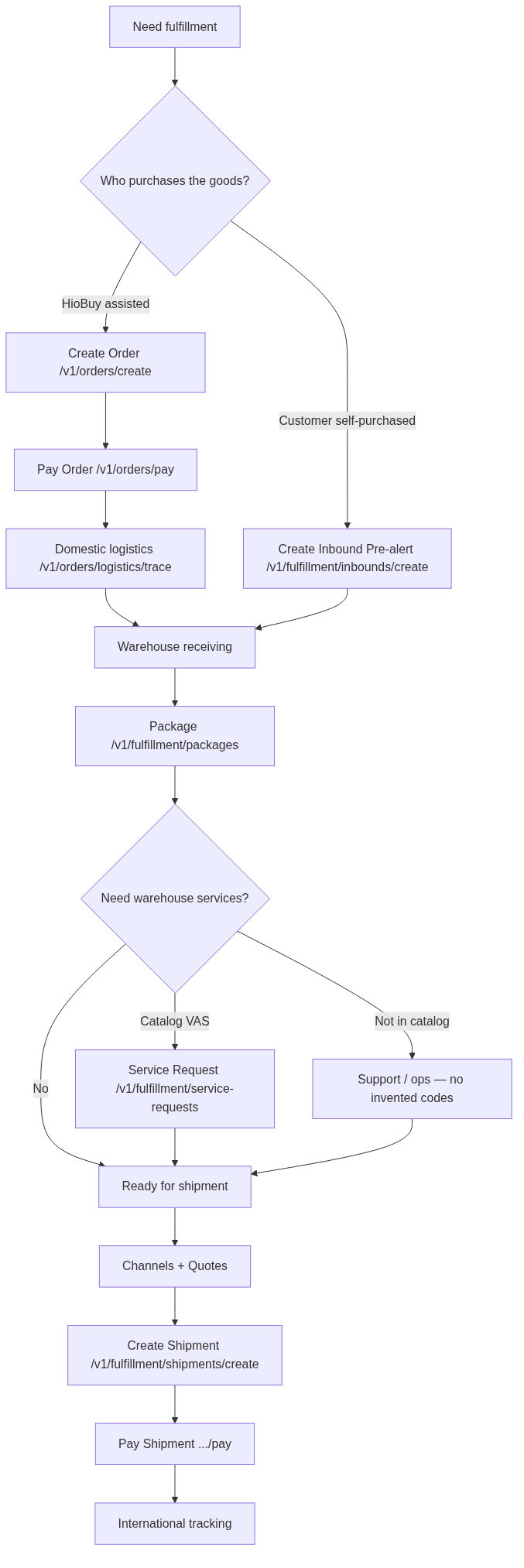
ASCII equivalent:
                 ┌─ HioBuy purchase ─ Order ─ Pay ─ Domestic trace ─┐
Need fulfillment ┤                                                    ├─ Receiving ─ Package ─┬─ VAS / Service Request ─┐
                 └─ Self purchase ─ Inbound pre-alert ───────────────┘                       └─ (none) ────────────────┤
                                                                                                                       ▼
                                                                              Channels / Quotes → Shipment → Pay → Tracking
10. FAQ
When should I create an Order?
When HioBuy should procure from Taobao / 1688 (or the documented procurement channels) into a China inbound address. Use /v1/orders/preview → create → pay.
When should I create an Inbound?
When you already purchased goods and have a domestic carrier tracking_number headed to the HioBuy warehouse — call POST /v1/fulfillment/inbounds/create so receiving can match the parcel.
What is a Package?
The warehouse parcel object (pkg_*) after inbound notice / receiving. List and inspect it with /v1/fulfillment/packages*; consolidate it into a Shipment later.
When should I use VAS?
When you need a catalog warehouse service (inbound or outbound). List codes from GET /v1/fulfillment/value-added-services first.
When should I use a Service Request?
When you want to apply one or more catalog VAS items to a Package or Shipment and track execution (PENDING … COMPLETED). It is not a free-form ticket API.
When should I create a Shipment?
When one or more received packages are ready for international outbound: pick a channel, create with tracking_numbers[], wait until payable, then pay and track.
How do I map my existing task / order system?
Keep your internal models. Map purchase data to Order/lines, inbound parcels to Inbound/Package, warehouse services to VAS + Service Request, and international delivery to Shipment (see the mapping table above).
11. API reference
Verified pages used for this guide:
Field-level request/response schemas live in those references — this guide focuses on when to call which API and how the objects relate.
Base URL: https://api.hiobuy.com · Auth: Authorization: Bearer <API_KEY>.
Next step
If you already understand the workflow, move to the API reference for exact request and response fields, or open the developer console to create your application.
Ready to build?
Open the API documentation or create your HioBuy developer application.