 HioBuy
Shipping Channels vs Quotes: Estimate Freight Before Checkout (and Why a Country Looks Missing)
Empty shipping channels, INVALID_COUNTRY_CODE, and how to show freight estimates before checkout with GET /shipping/channels and POST /shipping/quotes — budgets, not locked prices.
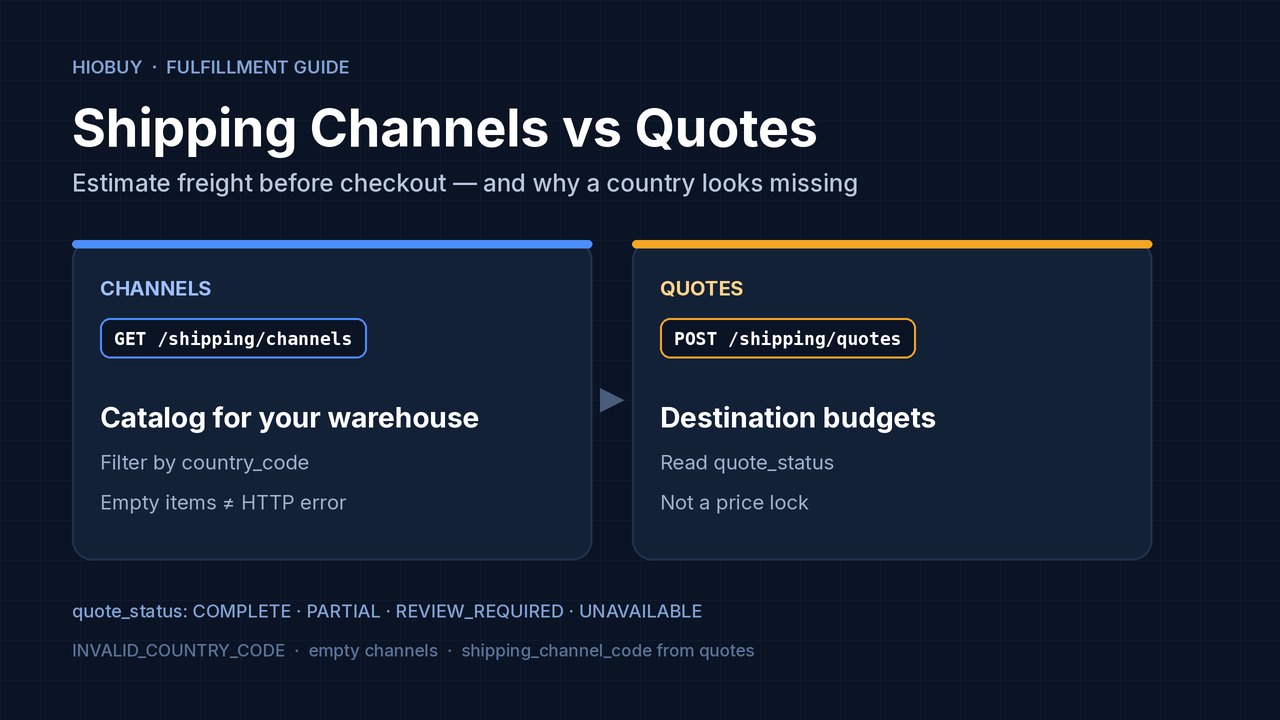
Your checkout (or parcel-forwarding calculator) needs a shipping estimate. You call the channels API with a destination country and get an empty items array — or a 422 INVALID_COUNTRY_CODE. Or quotes return available: true but total is null.
This guide covers one workflow: list shipping channels for a destination, quote budgets before checkout, then pass a real shipping_channel_code into shipment create. It does not invent warehouse pricing from rate cards, and it does not treat a quote as a locked price.
Official references: Shipping channels, Shipping quotes, Shipments.
The short answer
| Symptom | What it usually means | What to do |
|---|---|---|
GET .../shipping/channels?country_code=XX → items: [] | Success: no active, price-configured channel matches the filters for the warehouse bound to your app | Confirm ISO 3166-1 alpha-2; confirm warehouse fulfillment is authorized; ask support if the route should exist |
422 INVALID_COUNTRY_CODE | Destination country is invalid or unsupported | Fix country_code / destination.country_code — this is not the same as an empty catalog |
Quote quote_status: UNAVAILABLE | That channel cannot carry this shipment | HTTP still succeeded; show the reason and keep other channels |
Quote COMPLETE with a total | Displayable budget, not a locked price | Exact freight comes back on shipment create after warehouse measure |
Channels vs quotes
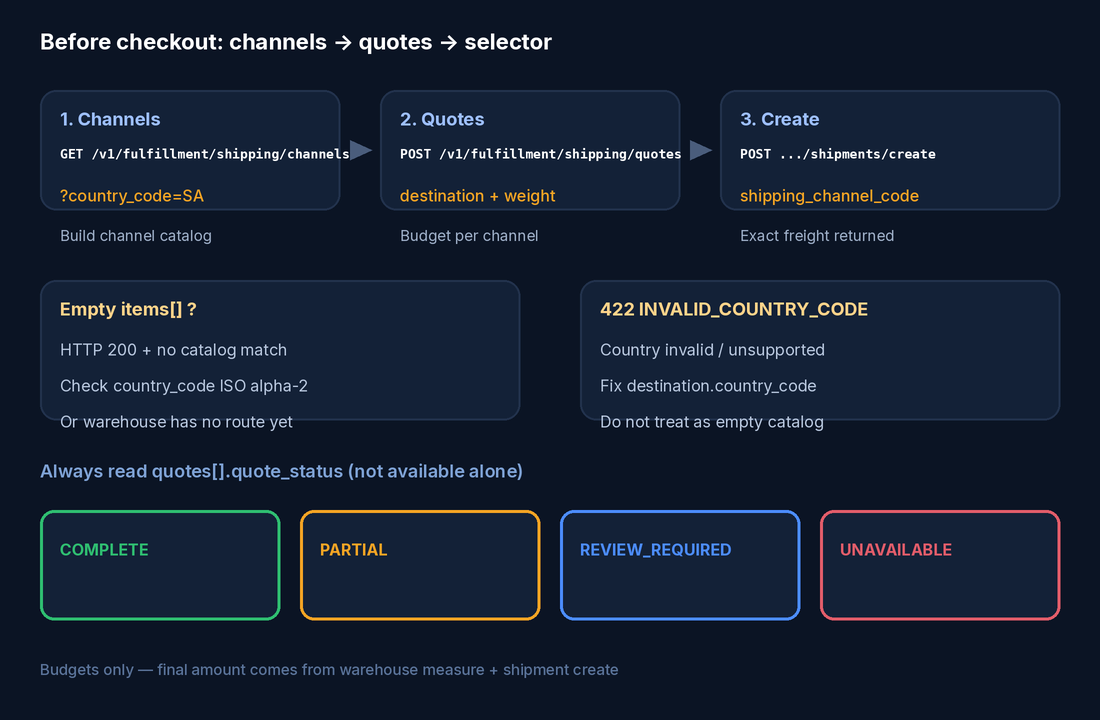
Channels = catalog of routes your warehouse can sell
Quotes   = destination + weight (+ dims/services) → per-channel budgets
Create   = shipping_channel_code from that set → exact freight on the shipment
1. List channels for a destination
GET /v1/fulfillment/shipping/channels?country_code=SA&include=regions,services,rate_cards,rules&page=1&page_size=20
Authorization: Bearer hio_live_xxx
Language: en
Source: Shipping channels API.
Facts that matter for this FAQ:
- The list is active, price-configured channels for the warehouse connected to your app.
- Filter with
country_code(ISO 3166-1 alpha-2). Channels for other countries are omitted when the filter is present. - Display language is the
Languageheader only (en,zh-CN, …). Do not putlanguagein the query string or body. include=regions,services,rate_cards,rulesexpands coverage, value-added services, reference price rows, and rules.rate_cardsare alwaysreference_only. They explain the billing model. They must not replace quotes, and you should not re-implement warehouse pricing from them.- An empty
itemsarray means no catalog match for the current filters — a successful miss, not an HTTP failure by itself.
Channel-specific ineligibility is not an HTTP error on this endpoint. Errors that are HTTP failures include:
| HTTP | error.code | When |
|---|---|---|
| 400 | VALIDATION_ERROR | Bad pagination, country syntax, or include value |
| 403 | FULFILLMENT_MODE_NOT_SUPPORTED | App uses self fulfillment |
| 403 | WAREHOUSE_AUTH_INVALID | Warehouse authorization missing, rejected, or expired |
| 422 | INVALID_COUNTRY_CODE | Destination country invalid or unsupported |
| 502 | WAREHOUSE_UPSTREAM_ERROR | Warehouse upstream failed; retry with backoff |
Use items[].code (stable channel code) everywhere downstream — not a warehouse database ID, not a display name.
2. Quote before checkout
POST /v1/fulfillment/shipping/quotes
Authorization: Bearer hio_live_xxx
Content-Type: application/json
Language: en
Prefer /v1/fulfillment/shipping/quotes. A compatibility alias exists at POST /v1/fulfillment/shipments/freight/estimate with the same behavior.
Source: Shipping quotes API.
Two request formats — never mix them (mixed → 400 VALIDATION_ERROR):
Format A — single-package shorthand (warehouse split unknown):
{
  "destination": { "country_code": "SA" },
  "weight_kg": 2.05,
  "length_cm": 30,
  "width_cm": 20,
  "height_cm": 10
}
Provide all three dimensions or omit all three. Prefer this format when the final warehouse split is unknown.
Format B — known packages:
{
  "destination": { "country_code": "SA", "postal_code": "11564" },
  "packages": [
    {
      "reference": "box-1",
      "weight": { "value": 2.05, "unit": "KG" },
      "dimensions": { "length": 30, "width": 20, "height": 10, "unit": "CM" }
    }
  ]
}
Shared fields you will often need: destination.country_code (required, ISO alpha-2), optional postal_code / subdivision_code, declared_value in CNY fen, attributes[], services, and optional channel_codes to restrict the set.
Money is integer CNY fen (monetary_unit: "CNY_minor"). 5000 means ¥50.00.
3. Read quote_status, not available alone
quote_status | available | total | Meaning |
|---|---|---|---|
COMPLETE | true | Money object | Full budget you may display. Still not locked. |
PARTIAL | true | usually null | Missing inputs — add dimensions, postal code, or declared value |
REVIEW_REQUIRED | true | usually null | Warehouse measurement or human review required |
UNAVAILABLE | false | null | This channel cannot quote. HTTP request still succeeded |
UNAVAILABLE on one quote is not an HTTP failure. Keep other channels in the UI and surface unavailable_reason when useful.
Quotes are budgets. Warehouse weighing, volume measurement, re-packing, and service review can change the final amount. Even COMPLETE is not a price lock.
4. Pass the channel into shipment create
On shipment create, shipping_channel_code must be a channel code available for that app and destination from channels/quotes — not a warehouse ID and not a free-text name.
Exact freight is returned when the shipment is created / measured by the warehouse. Treat pre-checkout quotes as estimates for UI and budget gates.
Empty channels vs invalid country
These two look similar in a UI that only shows “no shipping options,” but they are different:
Empty items[]          → 200 OK, catalog miss for filters / warehouse
INVALID_COUNTRY_CODE   → 422, country string invalid or unsupported
Checklist before opening a support ticket:
- Is
country_codeexactly two letters (ISO 3166-1 alpha-2)? - Are you on a warehouse-capable app with valid warehouse authorization (not self-fulfillment-only)?
- Are you using the Production key bound to the right warehouse / WH-DEV config when testing assigned warehouses? See the WH-DEV vs Sandbox guide (slug
wh-dev-vs-sandbox-warehouse-testing) and WH-DEV fulfillment testing for key mixing. - Did quotes return other channels as
UNAVAILABLEwith a reason (DESTINATION_NOT_SUPPORTED,POSTAL_CODE_REQUIRED,ATTRIBUTE_NOT_SUPPORTED, …)?
Suggested UI flow
- On destination country change →
GET /shipping/channels?country_code=…(lightweight; expand only what the selector needs). - When weight/dims are known →
POST /shipping/quoteswith Format A or B. - Render only
COMPLETE(and carefully labeledPARTIAL/REVIEW_REQUIRED) totals; hide or explainUNAVAILABLE. - On confirm →
POST /fulfillment/shipments/createwithshipping_channel_code = quotes[].channel.code. - Show the shipment’s returned freight as the charged amount; keep the pre-checkout number labeled as an estimate.
Optional open demo for a calculator-style UI: hiobuy/shipping-quotes · shipping-quotes.demo.hiobuy.com.
Plans and testing notes
Warehouse fulfillment generally needs a warehouse-capable plan and a correctly bound warehouse (including WH-DEV for assigned test warehouses). Daily billable units for product/order APIs follow the combined 1688 + Taobao + Weidian quota (Trial 100/day · Starter $59/mo 1,000/day · Growth $99/mo 8,000/day · Enterprise $299/mo 50,000/day). Do not invent per-marketplace quotas or free-until-order browsing.
What not to do
- Do not price from
rate_cardsalone. - Do not mix shorthand
weight_kg/dims withpackages[]. - Do not decide from
availablewithoutquote_status. - Do not treat
COMPLETEas a locked rate. - Do not put a warehouse ID into
shipping_channel_code. - Do not put
languagein the query or JSON body — use theLanguageheader.
Next steps
- Call channels with your real destination ISO code and inspect
itemsvsINVALID_COUNTRY_CODE. - Quote with Format A using estimated weight; add dims if volumetric channels return
PARTIAL. - Wire the selected
channel.codeinto shipment create and compare estimate vs exact freight. - If the catalog is empty for a country that should be served, contact support@hiobuy.com with the app id, warehouse mode, and country code (no customer PII required).
Next step
If you already understand the workflow, move to the API reference for exact request and response fields, or open the developer console to create your application.
Ready to build?
Open the API documentation or create your HioBuy developer application.