 HioBuy
Fix INSUFFICIENT_BALANCE: Check the Fulfillment Wallet Before Shipment Pay
Shipping quotes do not debit the wallet. Read GET /v1/fulfillment/balance (CNY fen), compare available to shipment total.payment, then pay — or handle HTTP 402 INSUFFICIENT_BALANCE.
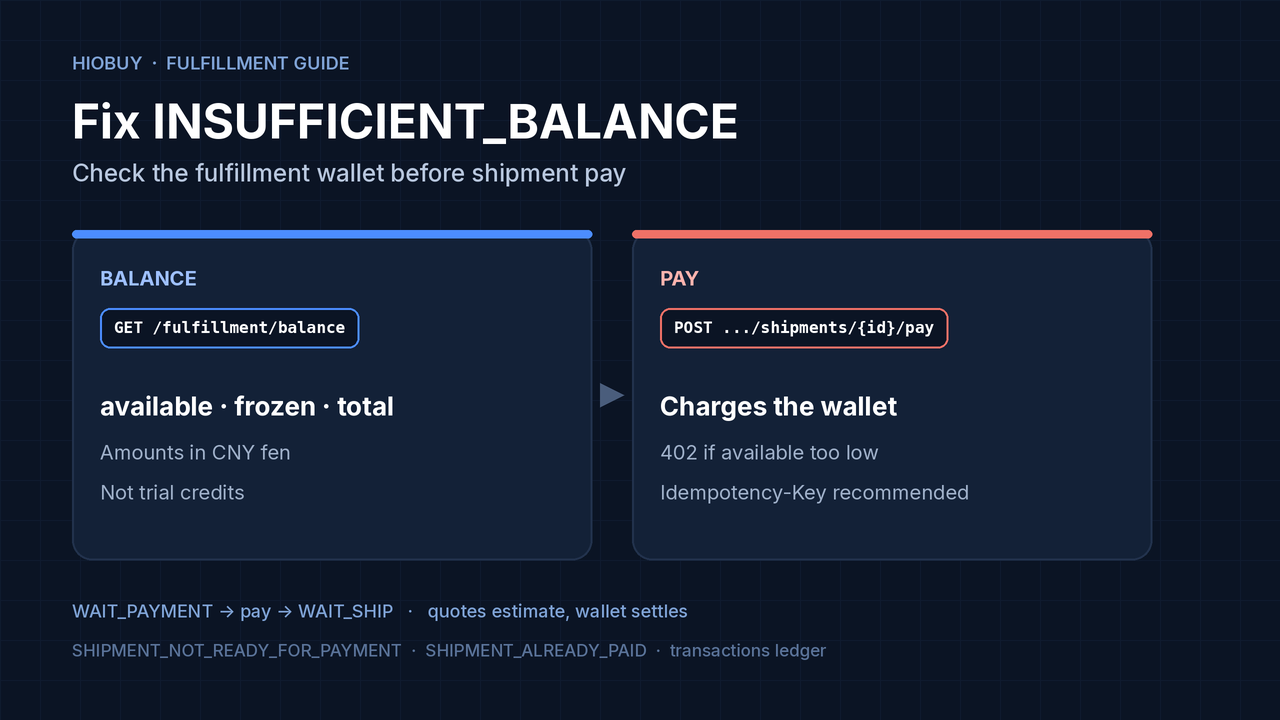
Your international shipment is in WAIT_PAYMENT. You call pay and get HTTP 402 with INSUFFICIENT_BALANCE — or ops asks you to fund the HioBuy fulfillment wallet before outbound can settle. This is not a marketplace order-pay failure, and it is not the same as “shipping quote looked fine.”
This guide covers one workflow: read the fulfillment wallet, compare available to the shipment’s total.payment, pay only when the shipment is ready, and use the transaction ledger to confirm credits and charges. Amounts are CNY fen. Do not invent top-up endpoints that are not in the public API.
Official references: Wallet balance, Finance / transactions, Shipments, Fulfillment overview, Errors.
The short answer
| Symptom | What it usually means | What to do |
|---|---|---|
402 INSUFFICIENT_BALANCE on shipment pay (or return confirm) | Fulfillment wallet available is below the amount to charge | GET /v1/fulfillment/balance, top up the wallet through your HioBuy account process, re-check available, retry pay with the same Idempotency-Key only for the identical logical pay |
409 SHIPMENT_NOT_READY_FOR_PAYMENT | Packing / final weight not done — shipment not billable yet | Wait for WAIT_PAYMENT; read the error message; do not treat this as a wallet problem |
409 SHIPMENT_ALREADY_PAID | Pay already succeeded | Inspect error.details.existing_resource (transaction_id, shipment_id, payment_status, paid_at) and resume |
Quote COMPLETE with a total | Displayable budget only | Quotes do not debit the wallet; exact freight settles on shipment pay after warehouse measure |
Wallet ≠ marketplace order pay
POST /v1/orders/pay          → marketplace procurement payment
POST /v1/fulfillment/shipments/{id}/pay
                             → charges the HioBuy fulfillment wallet
GET  /v1/fulfillment/balance → available / frozen / total (CNY fen)
Procurement payment and shipment payment can both spend real funds once you leave estimates behind. Shipping quotes estimate costs without creating or paying a shipment. Persist business identifiers and use Idempotency-Key where documented; after an uncertain response, query the existing result instead of submitting a new payment. Source: Fulfillment overview.
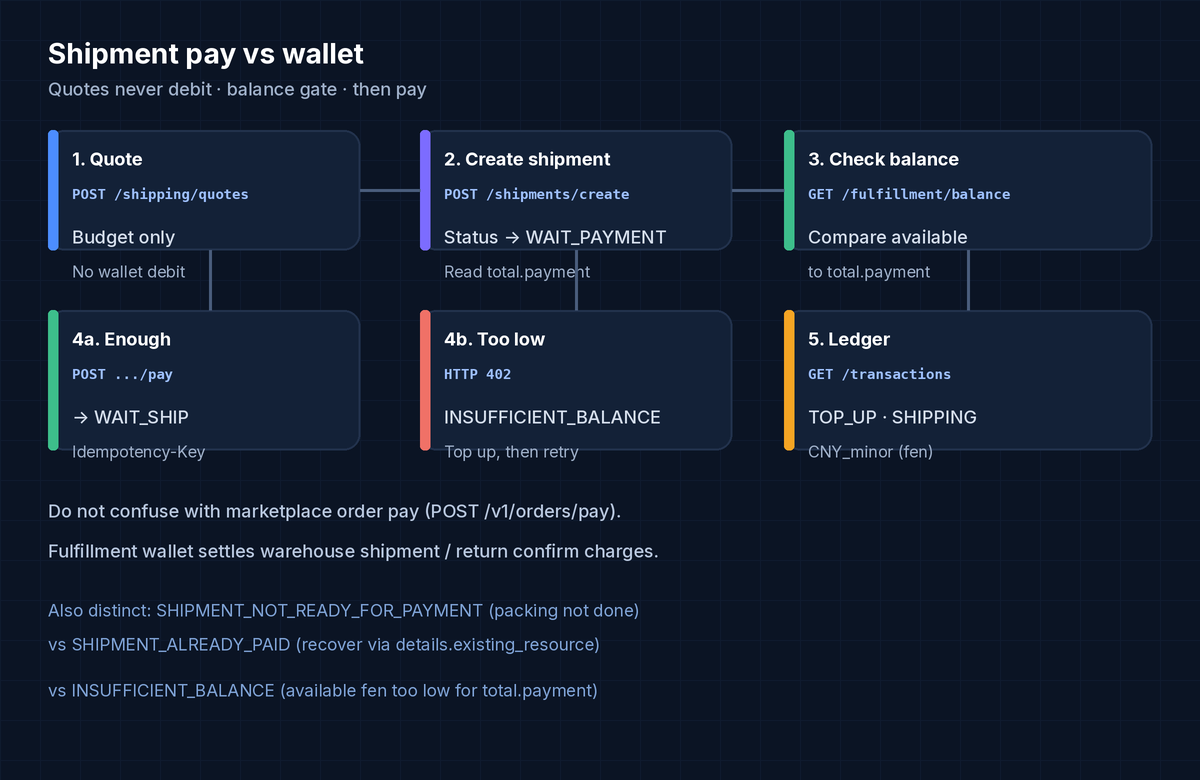
Workflow
1. Treat quotes as budgets, not wallet holds
POST /v1/fulfillment/shipping/quotes returns per-channel budgets for UI and gating. It does not lock a rate and does not move wallet funds. When the warehouse has measured the parcel, shipment create returns the charge summary you will settle on pay (total.freight / services / discount / payment). See Shipping quotes and Shipments.
2. Create the shipment and wait for WAIT_PAYMENT
Public shipment statuses:
PENDING → WAIT_PAYMENT → WAIT_SHIP → SHIPPED → SIGNED
                 ↘ CANCELLED
Create with POST /v1/fulfillment/shipments/create (optional Idempotency-Key). The create/pay summary includes total.payment — that is the amount charged on pay. Paying before the shipment is ready returns 409 SHIPMENT_NOT_READY_FOR_PAYMENT, not a balance error.
3. Read the fulfillment wallet before pay
GET /v1/fulfillment/balance
Authorization: Bearer hio_live_xxx
Illustrative shape (amounts are not trial credits or a promised starting balance — read your account):
{
  "balance": {
    "available": { "amount": 500000, "currency": "CNY" },
    "frozen": { "amount": 12000, "currency": "CNY" },
    "total": { "amount": 512000, "currency": "CNY" }
  },
  "request_id": "req_..."
}
Facts that matter:
- All amounts are fen (CNY minor units).
500000means ¥5,000.00. Money-bearing fulfillment routes also advertisemonetary_unit: "CNY_minor". - Gate on
available, nottotal.frozenis not spendable for a new charge. - Balance (and the transaction list) are available after production fulfillment activation for warehouse-mode apps. Source: Wallet balance, Fulfillment overview.
Compare balance.available.amount to the shipment’s total.payment.amount from create/detail before you call pay.
4. Pay the shipment (wallet debit)
POST /v1/fulfillment/shipments/{shipment_id}/pay
Authorization: Bearer hio_live_xxx
Idempotency-Key: d7ade627-41ea-416c-89f9-da4693dc73ac
Body may be empty. {shipment_id} may be the HioBuy shipment id or the external_shipment_id you supplied at create (numeric-only path values resolve as internal ids).
- Successful pay charges the fulfillment wallet and moves the shipment to
WAIT_SHIP. Idempotency-Keyis optional but strongly recommended. Concurrent retries with the same key return the same successful payment and do not charge twice; replayed responses may includeIdempotency-Replayed: true.
Pay error table (from the Shipments docs):
| HTTP | error.code | Typical meaning |
|---|---|---|
| 404 | NOT_FOUND | Shipment missing / not owned |
| 409 | SHIPMENT_NOT_READY_FOR_PAYMENT | Not billable yet (packing / final weight) |
| 409 | SHIPMENT_ALREADY_PAID | Already paid — recover via details.existing_resource |
| 402 | INSUFFICIENT_BALANCE | Wallet too low |
INSUFFICIENT_BALANCE is also documented for other wallet-settled fulfillment actions such as return confirm. Source: Shipments, Errors.
5. Confirm credits and charges on the ledger
GET /v1/fulfillment/transactions?category=SHIPPING&page=1&page_size=20
Authorization: Bearer hio_live_xxx
Implemented for activated production accounts. Useful enums:
| Field | Values |
|---|---|
type | CREDIT · DEBIT · REFUND · ADJUSTMENT |
category | TOP_UP · PROCUREMENT · SHIPPING · VALUE_ADDED_SERVICE · RETURN · STORAGE · TRANSFER · REFUND · MANUAL_ADJUSTMENT · OTHER |
Money fields use monetary_unit: CNY_minor (fen), same as balance. Filter with a single type / category / invoice_status / related_resource_type value (no comma multi-select). Transaction ids look like txn_*. Source: Finance.
There is no public “create top-up” mutation in the Finance reference — TOP_UP appears as a ledger category after funds are credited through your HioBuy account / support process. After a top-up lands, re-read GET /v1/fulfillment/balance and retry pay.
Suggested integration checks
- After shipment create (or when status becomes
WAIT_PAYMENT), storetotal.payment.amount. - Call
GET /v1/fulfillment/balance; ifavailable.amount < total.payment.amount, block pay in your UI and show a wallet-funding state. - On pay, send a stable
Idempotency-Keyper logical payment. - Map
402 INSUFFICIENT_BALANCEseparately from409 SHIPMENT_NOT_READY_FOR_PAYMENTand409 SHIPMENT_ALREADY_PAID. - Optionally list
GET /v1/fulfillment/transactions?category=TOP_UP/SHIPPINGso ops can see credits vs outbound charges without opening every shipment.
Plans and activation notes
Warehouse fulfillment routes (including balance and transactions) require a warehouse-capable setup and production fulfillment activation for live keys. Product/order daily billable units remain the combined 1688 + Taobao + Weidian quota (Trial 100/day · Starter $59/mo 1,000/day · Growth $99/mo 8,000/day · Enterprise $299/mo 50,000/day). Do not invent per-marketplace quotas or free-until-order browsing.
What not to do
- Do not treat a shipping quote
COMPLETEtotal as a wallet reservation. - Do not gate on
balance.totalwhile ignoringfrozen. - Do not retry pay with a new idempotency key after
INSUFFICIENT_BALANCEuntil you intend a distinct logical attempt — fix funding first; reuse the same key only for the identical pay request. - Do not confuse
POST /v1/orders/pay(marketplace procurement) with shipment wallet pay. - Do not invent a public top-up API — credit the wallet through the documented account process, then verify with balance + transactions.
Next steps
- Call
GET /v1/fulfillment/balanceon your production warehouse app and confirm fen scaling. - Create a shipment to
WAIT_PAYMENT, comparetotal.paymenttoavailable, then pay withIdempotency-Key. - List recent
GET /v1/fulfillment/transactionsand matchSHIPPINGdebits to paid shipments. - If
availablestays at zero after you expect a credit, contact support@hiobuy.com with the app id and approximate top-up time (no customer PII required).
Next step
If you already understand the workflow, move to the API reference for exact request and response fields, or open the developer console to create your application.
Ready to build?
Open the API documentation or create your HioBuy developer application.