 HioBuy
WH-DEV vs Sandbox: Test Warehouse Fulfillment Without Mixing Keys
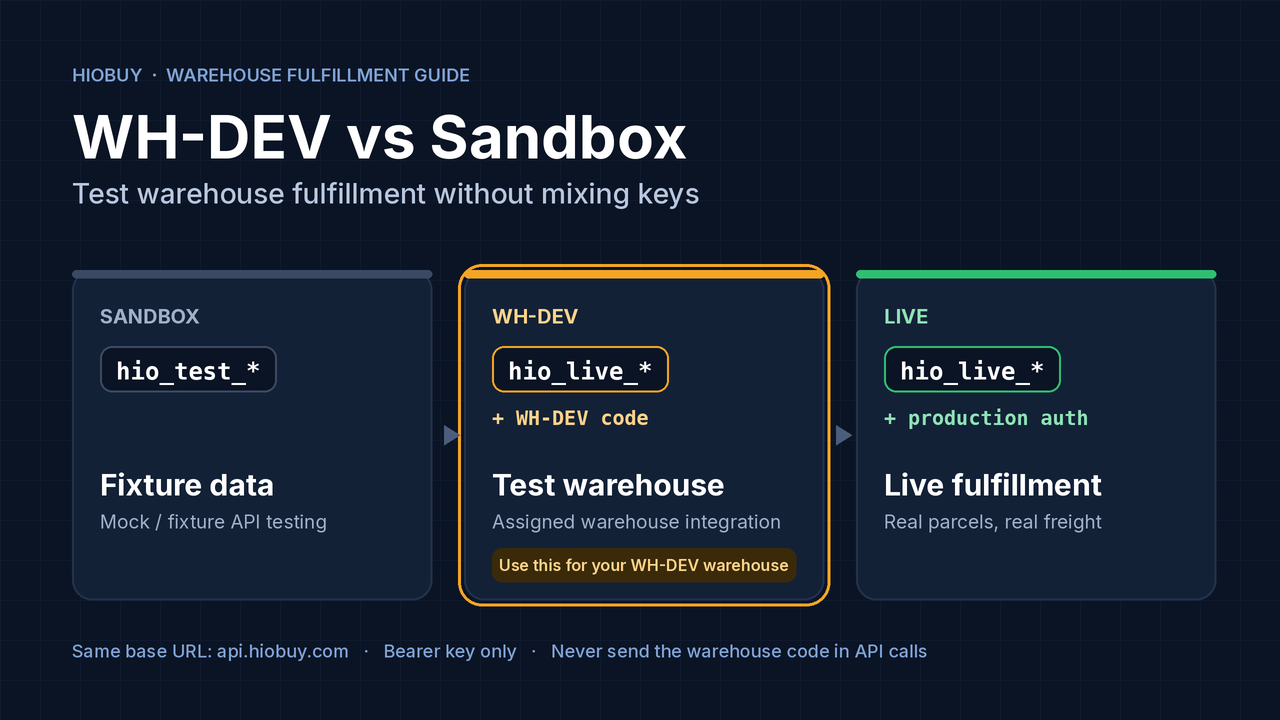
Sandbox keys (hio_test_*) return fixtures, not your assigned warehouse. Test WH-DEV with hio_live_* plus the bound WH-DEV code, and know which errors are expected along the way.
You have a Growth or Enterprise plan. HioBuy has approved warehouse fulfillment for your app and issued a WH-DEV warehouse developer code. You start testing, and the results look wrong: the warehouse locations are not the ones you expected, the wallet balance is a round number you never topped up, and shipment ids look like sbs_… instead of the numeric ids in the docs.
In almost every case the cause is the same. The requests are signed with a Sandbox key (hio_test_*). Sandbox never reads your WH-DEV configuration. It returns fixtures.
This guide covers one decision: which key and which configuration to use when you test warehouse fulfillment. For the full fulfillment flow, see the Fulfillment overview. For Sandbox product search behavior, see our earlier guide on fixture data vs the live catalog.
The short answer
To test your assigned WH-DEV warehouse, use your Production API key (hio_live_*) on an app that has the WH-DEV code bound in the portal.
WH-DEV is still a test warehouse configuration. Using hio_live_* with WH-DEV does not mean your app is performing live warehouse fulfillment.
Do not use a Sandbox key to test an assigned WH-DEV warehouse.
Three configurations, three purposes
All three use the same base URL, https://api.hiobuy.com. The difference is the key and the warehouse binding on the app.
| Configuration | Purpose | What /v1/fulfillment/* returns |
|---|---|---|
hio_test_* (Sandbox) | Mock / fixture API testing | Predefined or simulated data, the same for every Sandbox user |
hio_live_* + WH-DEV code | Assigned warehouse integration testing | Test warehouse data from the WH-DEV warehouse configured for your app |
hio_live_* + production warehouse authorization | Live warehouse fulfillment | Real parcels, real packing, real freight |
Source: Sandbox environment & fixtures.
What Sandbox actually gives you
Sandbox is built to be repeatable: the same request returns the same response. That makes it useful for CI, error handling and UI states. It also means it knows nothing about your warehouse.
From the Sandbox reference, fulfillment fixtures include:
GET /v1/fulfillment/balancereturns a mock available balance of500000CNY minor units (fen).GET /v1/fulfillment/locationsreturnsloc_wh_001,loc_sz_001andloc_yw_001. Live warehouse mode uses the warehouse numeric id, for example"1".POST /v1/fulfillment/shipments/createreturns dynamicsbs_*ids. Live warehouse shipment ids are the numeric primary key as a string, for example"115".- Fixed ids such as
sb_shp_unpaid,sb_pkg_receivedorsb_shp_pay_insufficientforce specific states and errors. - Channel OAuth is treated as authorized, and quotas and rate limits are skipped for test keys.
- Sandbox resources do not auto-emit webhooks. Use Send test in the portal.
If any of these values show up while you think you are testing WH-DEV, check the key first.
Sandbox is the right tool when you want to:
- Exercise error paths (
INSUFFICIENT_BALANCE,PARCEL_NOT_FOUND,SHIPMENT_NOT_INTERCEPTABLE) on demand. - Build UI for every shipment and package status without waiting for a warehouse.
- Run deterministic regression tests.
It is the wrong tool for checking your warehouse locations, your shipping channels, your test wallet or package arrival at your assigned warehouse.
Before you test WH-DEV
From the WH-DEV fulfillment testing guide:
| Requirement | Where |
|---|---|
| Developer subscription with warehouse fulfillment access | Growth or Enterprise plan; see Warehouse authorization |
| WH-DEV warehouse developer code | Provided by HioBuy after approval |
| App configured for HioBuy warehouse fulfillment | Portal → Authorizations |
Production API key (hio_live_*) | Authentication |
| Test wallet balance | Wallet balance; top up before paying a shipment |
| Test destination address and shipping channels | Configured by HioBuy on your WH-DEV warehouse |
Free plans include documentation and Sandbox access. Warehouse fulfillment requires a paid plan (Growth or Enterprise).
Bind the code once, then forget it
In the portal: Authorizations → Use HioBuy fulfillment → pick a procurement mode → enter the warehouse code. The binding is app-level, not per channel.
After that, your requests carry only the Bearer key. The Gateway attaches the warehouse code server-side.
curl https://api.hiobuy.com/v1/fulfillment/balance \
  -H "Authorization: Bearer hio_live_xxxxxxxx"
Never send these in Public API calls:
- The warehouse developer code
- Taobao, 1688 or Weidian access or refresh tokens
- Portal session JWTs
The WH-DEV test path
Portal: bind WH-DEV code to the app (once)
        │
        ▼
 ┌──────────────────────────────┐      ┌──────────────────────────────────┐
 │ POST /v1/orders/create       │  or  │ POST /v1/fulfillment/inbounds/   │
 │ (procurement → warehouse)    │      │ create (parcel you control)      │
 └──────────────┬───────────────┘      └────────────────┬─────────────────┘
                └──────────────┬────────────────────────┘
                               ▼
        GET /v1/fulfillment/packages/{package_id}
        poll until status = RECEIVED      ← warehouse receiving (may be simulated)
                               │
                               ▼
        POST /v1/fulfillment/shipping/quotes
        pick quotes[].channel.code
                               │
                               ▼
        POST /v1/fulfillment/shipments/create
        tracking_numbers[], receiver, shipping_channel_code → status PENDING
                               │
                               ▼
        GET /v1/fulfillment/shipments/{id}
        poll while warehouse packs and measures   ← may be simulated
                               │  status = WAIT_PAYMENT
                               ▼
        POST /v1/fulfillment/shipments/{id}/pay
                               │
                               ▼
        GET /v1/fulfillment/shipments/{id}/tracking
Shipment status progression: PENDING → WAIT_PAYMENT → WAIT_SHIP → SHIPPED → SIGNED.
Money on fulfillment routes is in CNY fen. Responses include top-level monetary_unit: "CNY_minor", and every { amount, currency } field uses 1 yuan = 100 fen.
Common mistakes
1. Testing WH-DEV with hio_test_*
Symptom: locations, balance, channels or package states do not match what HioBuy configured for your app.
Fix: switch to hio_live_* on the app that has the WH-DEV code bound. Keep hio_test_* for fixture tests only.
A useful habit: log the key prefix (never the full key) with every fulfillment request in your test environment. If the log says hio_test_, you are on fixtures.
2. Expecting Sandbox fixtures to match WH-DEV
Symptom: a test suite written against sb_shp_* or sb_pkg_* ids fails when pointed at WH-DEV.
Fix: treat them as two suites. Sandbox ids are magic values that only exist for test keys. WH-DEV returns ids created by your own inbound notices, orders and shipments.
3. Calling fulfillment on a self-fulfillment app
Symptom:
| HTTP | error.code |
|---|---|
| 403 | FULFILLMENT_MODE_NOT_SUPPORTED |
Cause: the app is still in self-fulfillment mode (the default). /v1/fulfillment/* is not available in that mode.
Fix: in the portal, switch the app to Use HioBuy fulfillment and bind the warehouse code. Check you are using the key for that same app. Each app has one key, and channel access follows that app's plan.
4. Paying a shipment right after creating it
Symptom:
| HTTP | error.code |
|---|---|
| 409 | SHIPMENT_NOT_READY_FOR_PAYMENT |
This is expected. A new shipment starts in PENDING. The warehouse still has to retrieve, consolidate and pack the packages, then measure final weight and dimensions and calculate final freight.
Poll shipment detail and pay when these signals are present:
| Signal | Ready for payment |
|---|---|
status | WAIT_PAYMENT |
payment_status | UNPAID with total.outstanding > 0 |
times.packed_at | Not null |
boxes[] | Non-empty, with final weight and dimensions |
Other pay errors to handle: 404 NOT_FOUND, 409 SHIPMENT_ALREADY_PAID, 402 INSUFFICIENT_BALANCE (top up the wallet).
In Sandbox you can reproduce these with fixtures such as sb_shp_pay_insufficient. In WH-DEV, the 409 usually just means packing is not finished.
5. Waiting for a "ready for payment" webhook
There is no such event today. Fulfillment webhooks include package.received, package.exception, consolidation.completed, shipment.created, shipment.dispatched, shipment.delivered, shipment.exception and balance.low.
Use webhooks to trigger a GET of shipment detail, and decide payability from the detail response:
Webhook (package.received / shipment.dispatched / …)
   → your system
   → GET /v1/fulfillment/shipments/{id}
   → business logic: pay / notify customer
6. Treating WH-DEV shipping channels as production specs
WH-DEV channels exist to test quote integration, channel selection, shipment creation, settlement and tracking. Channel names, prices, delivery times, customs and tax models in a test warehouse are not commercial commitments. Production channels may differ.
When to contact support
WH-DEV is not a continuously running warehouse. These events may need HioBuy to simulate them while you test:
- Package received, inspected or stored
- Shipment packing
- Final weight and dimension measurement
- Shipment dispatch
- Tracking progression and delivery completion
If your test has been waiting on one of these, email support@hiobuy.com or open a support ticket. Use the format from the WH-DEV guide:
Subject: WH-DEV Fulfillment Test Assistance

Application:
WH-DEV Code:
Package ID:
Shipment ID:
Order SN:
Current Status:
Expected Next Test Step:
Request ID:
Every API response carries a request_id (and an x-request-id header). Include it.
Do not email support for Sandbox fixtures. Sandbox state is controlled entirely by the ids and triggers you send.
In production, these warehouse steps run through the normal workflow. You do not contact support for each shipment; your app monitors status, waits for payability, pays and reads tracking.
A simple environment setup
CI / unit tests        → HIOBUY_KEY=hio_test_…   (fixtures, deterministic)
WH-DEV integration     → HIOBUY_KEY=hio_live_…   (app with WH-DEV code bound)
Production             → HIOBUY_KEY=hio_live_…   (app with production warehouse authorization)
Keep keys server-side. Do not expose them in browser JavaScript, mobile apps or public repositories.
Checklist
- Plan includes warehouse fulfillment (Growth or Enterprise)
- App set to Use HioBuy fulfillment, WH-DEV code bound once
- Requests use
hio_live_*for that app, Bearer header only - Package polled to
RECEIVEDbefore quoting and creating a shipment - Shipment polled to
WAIT_PAYMENTbefore calling pay - Amounts read as CNY fen (
CNY_minor) - Sandbox used only for fixture and error-path tests
Next steps
- WH-DEV fulfillment testing guide
- Sandbox environment & fixtures
- Portal authorization and warehouse setup
- Fulfillment overview
- Authentication
- HioBuy API docs
The API Reference is the source of truth for fields and statuses. If anything here differs, follow the reference.
Next step
If you already understand the workflow, move to the API reference for exact request and response fields, or open the developer console to create your application.
Ready to build?
Open the API documentation or create your HioBuy developer application.