 HioBuy
Fix QUOTA_EXCEEDED: Daily Billable Units and Product Caching
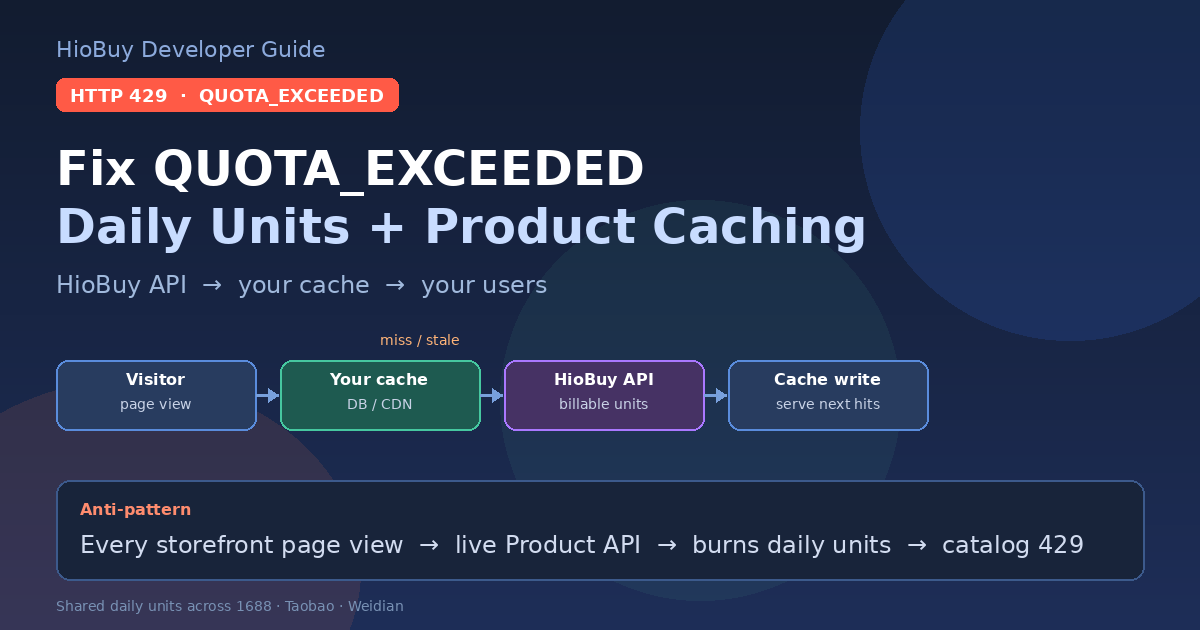
HTTP 429 QUOTA_EXCEEDED usually means daily billable units are exhausted—often because every storefront page view hits Product APIs live. Cache first; distinguish rate limits from daily quota.
Fix QUOTA_EXCEEDED: Daily Billable Units and Product Caching
Your marketplace storefront went live. Product pages load fine for a few hours. Then production starts returning HTTP 429 with QUOTA_EXCEEDED, and catalog browse fails for the rest of the day.
That error is usually not a broken API key. It means your app used up its daily billable units. Search, detail, and image search consume units even when nobody places an order. If every visitor page view hits HioBuy Product APIs live, a busy storefront will burn the daily cap quickly.
This guide explains the difference between per-minute rate limits and daily quota, how shared daily units work across 1688 / Taobao / Weidian, the recommended cache architecture, and what to send support when you still need help.
Base URL: https://api.hiobuy.com/v1.
Portal usage dashboard: https://developers.hiobuy.com.
What you are solving
You need a storefront (or sourcing UI) that:
- Shows product search results and detail pages to many visitors.
- Stays within your plan's daily billable units.
- Still refreshes stale catalog data when prices or stock change.
The durable pattern is:
Visitor page view
      │
      ▼
Your app / CDN / DB cache
      │ miss / stale
      ▼
HioBuy Product API (billable units)
  search / detail / image search
      │
      ▼
Write through to your cache
      │
      ▼
Serve next visitors from cache
Anti-pattern: live API on every page view
Visitor page view
      │
      ▼
HioBuy Product API  ← billable on every hit
      │
      ▼
Daily units exhausted
      │
      ▼
HTTP 429 QUOTA_EXCEEDED
      │
      ▼
Catalog browse fails for everyone
If your Next.js / Rails / Node handler calls POST /v1/products/detail (or search) on every uncached page render, unit cost scales with traffic—not with orders. A few thousand anonymous browses can exhaust Starter or Growth for that calendar day.
RATE_LIMIT_EXCEEDED vs QUOTA_EXCEEDED
Both return HTTP 429. Branch on error.code.
| Code | What it means | Typical cause | First fix |
|---|---|---|---|
RATE_LIMIT_EXCEEDED | Too many requests per minute (burst) | Parallel crawlers, missing backoff, fan-out | Slow down; exponential backoff; default is 60 req/min per API key (subject to plan) |
QUOTA_EXCEEDED | Daily billable units exhausted | Live Product API on every browse; no cache | Serve from your DB/cache; refresh selectively; check plan headroom |
PLATFORM_QUOTA_EXCEEDED | Rare shared upstream capacity limit | Temporary platform capacity | Retry later; contact support if it persists |
Official references: Rate limits, Errors.
Example protocol error shape:
{
  "error": {
    "code": "QUOTA_EXCEEDED",
    "message": "Daily quota exhausted.",
    "request_id": "req_...",
    "category": "RATE_LIMIT_ERROR"
  }
}
How daily billable units work
Many Product and Order routes consume billable units against a daily cap. Typical weights from the public docs:
| Route | Typical units |
|---|---|
POST /v1/products/detail | 1 |
POST /v1/products/search | 2 |
POST /v1/products/upload-image | 2 |
POST /v1/orders/preview, create | Higher weight — see plan |
Successful billable calls may include:
| Header | Meaning |
|---|---|
X-Quota-Billable-Units | Units consumed by this request |
X-Quota-Channel | Channel charged (e.g. 1688) |
x-request-id | Correlation id (all routes) |
Important for planning: daily units are one combined quota shared across 1688, Taobao, and Weidian—not a separate bucket per marketplace. Search, detail, and image search consume units even when no order is created.
Plan table (daily units, shared)
| Plan | Price | Daily units (total, shared) | Access |
|---|---|---|---|
| Trial | Free | 100/day | Product + order APIs; 30-day trial |
| Starter | USD 59/month | 1,000/day | Product + order APIs; no warehouse fulfillment APIs |
| Growth | USD 99/month | 8,000/day | Product + order + warehouse fulfillment APIs |
| Enterprise | USD 299/month | 50,000/day | Full API + warehouse + technical support |
If Growth's 8,000/day is still insufficient after reasonable caching, the standard higher-volume option is Enterprise (50,000/day). Do not assume automatic custom quota raises, per-marketplace multipliers, or "unlimited browse until order."
Recommended architecture: API → your cache → your users
- On miss or stale TTL, call HioBuy Product APIs from your backend only.
- Persist the fields your UI needs (ids, title, images, SKU matrix snapshot, price snapshot, fetched_at).
- Serve subsequent visitors from your DB, Redis, or CDN edge cache.
- Refresh on a schedule, on buyer intent (add-to-cart / checkout), or when your ops tools force a re-fetch.
- Reuse
image_idafterupload-imageinstead of re-uploading the same file. - Back off on 429; log
error.request_idand quota headers. - Monitor the developer portal usage dashboard so you see unit burn before the day ends.
Your storefront / app
        │
        ▼
┌───────────────────┐
│  Cache layer      │  hit → return immediately
│  Redis / DB / CDN │
└─────────┬─────────┘
          │ miss / stale
          ▼
┌───────────────────┐
│  HioBuy Product   │  detail / search / image search
│  API (billable)   │
└─────────┬─────────┘
          │
          ▼
   Write-through cache
This matches the public recommendations on Rate limits: cache product detail where business rules allow; reuse image_id; back off on 429; watch the usage dashboard.
Product surface overview: Products.
Sandbox does not prove production quota headroom
Sandbox keys (hio_test_*) skip normal quotas and per-minute rate limits. You can exercise request shapes and UI error handling there (including sandbox_trigger fixtures for 429), but sandbox traffic does not show whether Starter 1,000/day or Growth 8,000/day will survive real storefront browse.
Validate quota architecture with production keys (hio_live_*) and the portal usage dashboard. See Sandbox.
Practical checklist before raising the plan
- Confirm the 429 code is
QUOTA_EXCEEDED, not onlyRATE_LIMIT_EXCEEDED. - Find which routes burn units (search vs detail vs upload-image vs orders).
- Count how many uncached Product API calls you make per visitor session.
- Add cache TTL + write-through for detail and search result pages you actually show.
- Deduplicate concurrent requests for the same
product_id/ search key (singleflight). - Stop calling Product APIs from browser-exposed clients with a live key.
- Re-check portal usage after caching ships for a full day.
- If you still need more than Growth after that, evaluate Enterprise.
What to send support
If catalog calls still fail after caching and backoff, email support@hiobuy.com with:
request_id/x-request-idfrom the failing response- Endpoint path (e.g.
POST /v1/products/detail) - Approximate timestamp (with timezone)
- Environment: sandbox (
hio_test_*) vs production (hio_live_*) error.code(QUOTA_EXCEEDED,RATE_LIMIT_EXCEEDED, orPLATFORM_QUOTA_EXCEEDED)X-Quota-Billable-UnitsandX-Quota-Channelif present on recent successful calls- Whether the traffic path is live page-view → API or cache-backed
Do not paste API keys in email threads.
Next steps
- Instrument every Product API call with
request_idand unit headers. - Put a cache in front of search/detail for storefront browse.
- Watch the portal usage dashboard for a full production day.
- Size the plan from real cached traffic—not from uncached page views.
API home: https://hiobuy.com/api-docs.
Next step
If you already understand the workflow, move to the API reference for exact request and response fields, or open the developer console to create your application.
Ready to build?
Open the API documentation or create your HioBuy developer application.