 HioBuy
Why Sandbox Product Search Looks Broken: Fixture Data vs Live Catalog
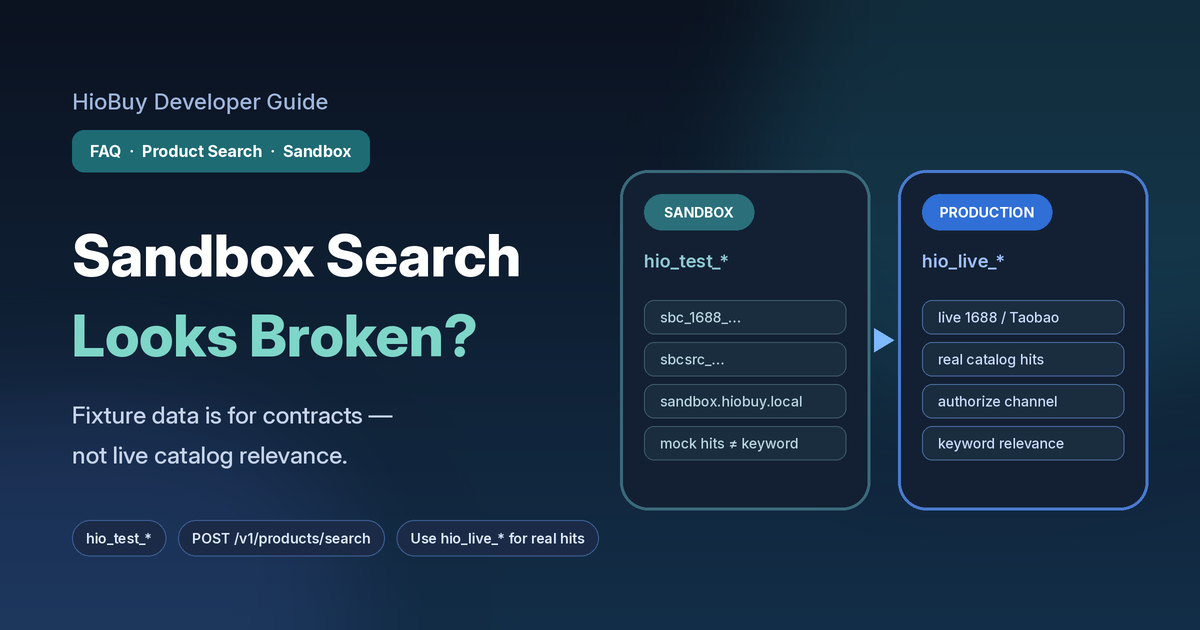
Sandbox (hio_test_*) product search returns fixture rows for contract testing—not live 1688/Taobao keyword relevance. Spot sbc_ ids, then retest on hio_live_* with channel auth.
Why Sandbox Product Search Looks Broken: Fixture Data vs Live Catalog
You wired POST /v1/products/search against the public base URL. The call returned HTTP 200. total looked healthy. Then you opened the titles — and none of them matched the keyword you typed.
That pattern is common on sandbox keys (hio_test_*). It is usually not a broken search index, a bad channel string, or a missing permission. Sandbox product search returns fixture / mock rows so you can finish client wiring. Those rows are contract-shaped, not live 1688 or Taobao relevance.
This guide explains how to spot sandbox fixture responses, what sandbox search is for, when to switch to production for real catalog hits, and how this differs from CHANNEL_NOT_AUTHORIZED or quota errors.
Base URL (sandbox and production): https://api.hiobuy.com/v1
Portal: https://developers.hiobuy.com
What you are solving
Your backend needs to:
- Prove that keyword (and image) search request shapes parse correctly.
- Render a product list UI from a stable JSON contract.
- Later show real marketplace hits that match buyer keywords on your storefront.
Steps 1–2 belong in sandbox. Step 3 needs a production key (hio_live_*) plus channel authorization.
hio_test_*  →  fixture / mock catalog
               good for clients, parsers, UI
               titles may not match keyword

hio_live_*  →  live 1688 / Taobao / Weidian data
               needs channel authorization
               use for relevance and launch QA
How to tell you are on sandbox fixtures
Same host does not mean live catalog. Key type decides the data path.
| Signal | What it usually means |
|---|---|
API key starts with hio_test_ | Sandbox fixtures (documented on the Sandbox page) |
Product id / source_product_id look like sandbox prefixes (e.g. sbc_…, sbcsrc_…) | Mock catalog ids, not production offer ids |
source_url points at a sandbox host (e.g. sandbox.hiobuy.local) | Fixture URL for contract testing |
| Keyword returns plenty of rows, but titles are unrelated | Expected for ordinary sandbox search text — mocks are not a live ranking engine |
Exact keyword sb_search_empty | Documented empty-list fixture (items: [], total: 0) |
Official sandbox rules: Sandbox environment & fixtures.
Example request shape (fields from the Products / Sandbox docs — do not invent extras):
POST /v1/products/search
Authorization: Bearer hio_test_...
Content-Type: application/json

{
  "channel": "1688",
  "keyword": "phone case",
  "page": 1,
  "page_size": 15,
  "language": "en"
}
In sandbox, channel, keyword, page, page_size, and language apply. 1688 filter / sort / price filters may be accepted but ignored for mock rows. Ordinary text still returns a mock list; it is not guaranteed to be keyword-relevant.
Empty-list fixtures (exact keyword):
keyword (exact) | Result |
|---|---|
| ordinary text | Mock list with hits |
sb_search_empty | items: [], total: 0 |
sb_search_not_found | Alias of empty |
Use those keywords to test empty states — not to debug “why hoodie returned nail polish.”
What sandbox is for (and what it is not)
From the official sandbox design goals: responses should be repeatable, contract-aligned, and happy-path by default. Values differ from production; JSON shapes match the standard schema.
Use sandbox to:
- Validate auth headers and JSON body fields
- Paginate and render list / detail UI
- Exercise empty and error fixtures (
sb_*ids,sandbox_trigger) - Wire parsers without burning production daily units
Do not use sandbox to:
- Judge catalog relevance for a launch keyword set
- Quote fixture warehouse cities, balances, or VAS codes as live ops data
- Test an assigned WH-DEV warehouse configuration (that path uses
hio_live_*+ WH-DEV, nothio_test_*)
Sandbox also treats channel OAuth as authorized for hio_test_*, and skips normal quotas and per-minute rate limits. That is convenient for CI — and another reason sandbox traffic does not prove production catalog quality or quota headroom.
Production: real hits need a live key and channel auth
When you need titles that match the buyer’s keyword:
- Create or use a production API key (
hio_live_*) in the developer portal. - Authorize the marketplace channel (1688 / Taobao / …) for that app — self-fulfillment OAuth or warehouse bind, depending on mode. See Authentication and Fulfillment setup.
- Call the same path:
POST /v1/products/search(and detail / image search as needed). - Confirm capabilities with
GET /v1/products/channelsbefore assuming keyword or image search exists for that marketplace.
Weidian supports detail and parse, but not keyword or image search in the Public API. Product surface overview: Products.
If production search fails with CHANNEL_NOT_AUTHORIZED while sandbox “worked,” that is expected until portal authorization is complete. See the companion guide on channel authorization.
Do not confuse this with quota or rate-limit failures
| Symptom | Likely cause | First move |
|---|---|---|
| HTTP 200, weird / unrelated titles, sandbox-looking ids | Fixture search on hio_test_* | Switch to hio_live_* + channel auth for relevance QA |
HTTP 403 CHANNEL_NOT_AUTHORIZED | Channel not authorized for the app | Finish portal OAuth / warehouse bind |
HTTP 429 QUOTA_EXCEEDED | Daily billable units exhausted (production) | Cache product responses; check plan usage |
HTTP 429 RATE_LIMIT_EXCEEDED | Burst over per-minute limit | Back off; reduce concurrency |
Sandbox keys skip quota and rate limits, so you will not prove production unit burn while staying on hio_test_*. For daily units and caching, see the QUOTA_EXCEEDED guide and Rate limits.
Recommended integration checklist
- Keep a sandbox key for contract tests and UI fixtures.
- Keep a production key for catalog QA and go-live traffic.
- Log
key_type/ key prefix in your backend so “irrelevant search” tickets show environment immediately. - Treat sandbox
source_urlhosts andsbc_-style ids as non-production. - For empty-state tests, use documented keywords such as
sb_search_empty. - For forced platform errors in sandbox, use documented
sandbox_triggervalues (e.g.sb_plat_quota_exceeded) — production keys ignore that field. - Never paste live API keys into email threads or client-side code.
CI / local UI
   │  hio_test_*
   ▼
POST /v1/products/search  →  fixture rows
   │
   ▼
Staging / launch QA
   │  hio_live_* + channel authorized
   ▼
POST /v1/products/search  →  live marketplace hits
   │
   ▼
Your cache → your storefront users
What to send support
If production search still looks wrong after you confirm a live key and channel auth, email support@hiobuy.com with:
- Environment: sandbox (
hio_test_*) vs production (hio_live_*) — state which you used - Endpoint (
POST /v1/products/searchorsearch-by-image) channel, approximatekeyword(no need to paste full catalog dumps)request_id/x-request-idfrom the response- Timestamp with timezone
- Whether ids look like sandbox fixtures (
sbc_…) or production offer ids
Do not paste API keys.
Next steps
- Confirm which key prefix your failing client uses.
- If it is
hio_test_*, treat irrelevant titles as fixture behavior — finish the client, then retest onhio_live_*. - Authorize the channel in the portal before judging production relevance.
- Put a cache in front of storefront browse so production unit burn stays intentional.
Official references: Sandbox · Products · API docs home.
Next step
If you already understand the workflow, move to the API reference for exact request and response fields, or open the developer console to create your application.
Ready to build?
Open the API documentation or create your HioBuy developer application.