 HioBuy
Import 1688 Products into Shopify: Open-Source HioBuy Importer
Run the open-source Shopify Embedded App that searches, edits, optionally translates with Commerce AI, and imports real 1688 products into Shopify using HioBuy public Product APIs.
Import 1688 Products into Shopify: Open-Source HioBuy Importer
If you run your own Shopify storefront and need real 1688 catalog data—titles, SKUs, prices, and images—you still have to bridge three systems: the marketplace product API, your editing workflow, and Shopify Admin GraphQL.
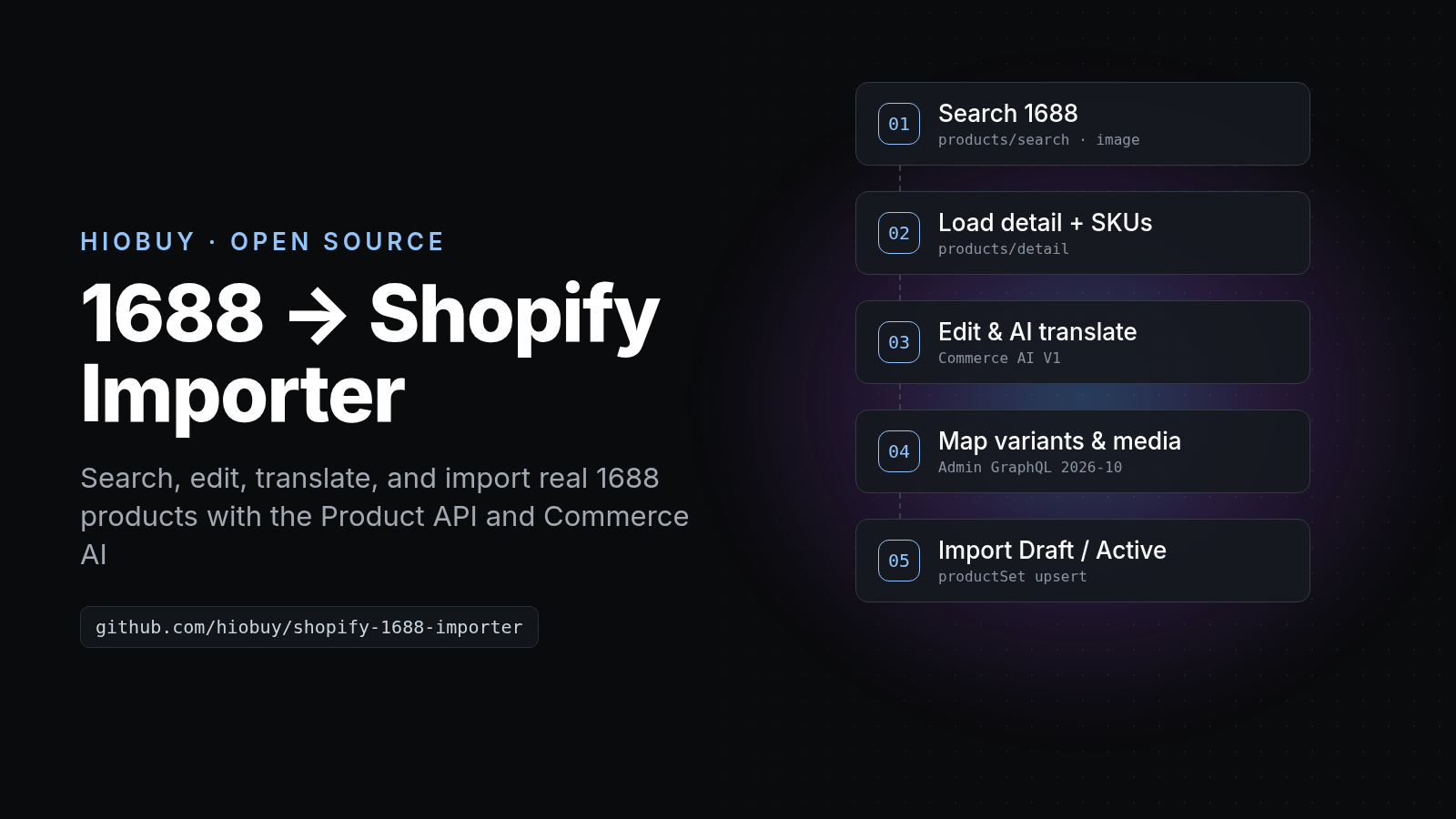
hiobuy/shopify-1688-importer is an open-source (MIT) Shopify Embedded App that does that end to end. You create your own Shopify app, paste a HioBuy production API key, search or image-search 1688, edit a draft, optionally run Commerce AI text/image jobs, then import a Draft or Active product with productSet (Admin GraphQL 2026-10).
- Repository: github.com/hiobuy/shopify-1688-importer
- Product API: hiobuy.com/en/api-docs
- Commerce AI V1: hiobuy.com/en/api-docs/commerce-ai
- Register a key: developers.hiobuy.com
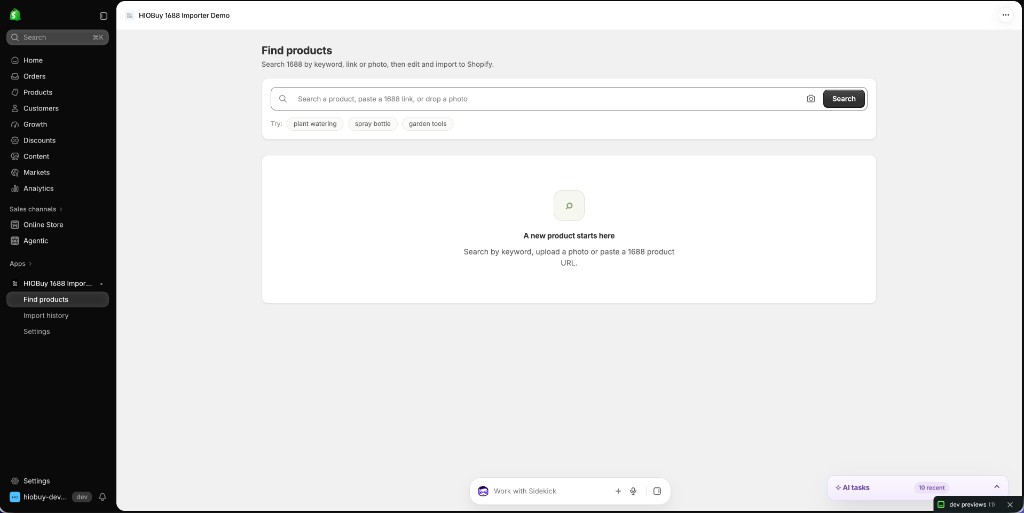
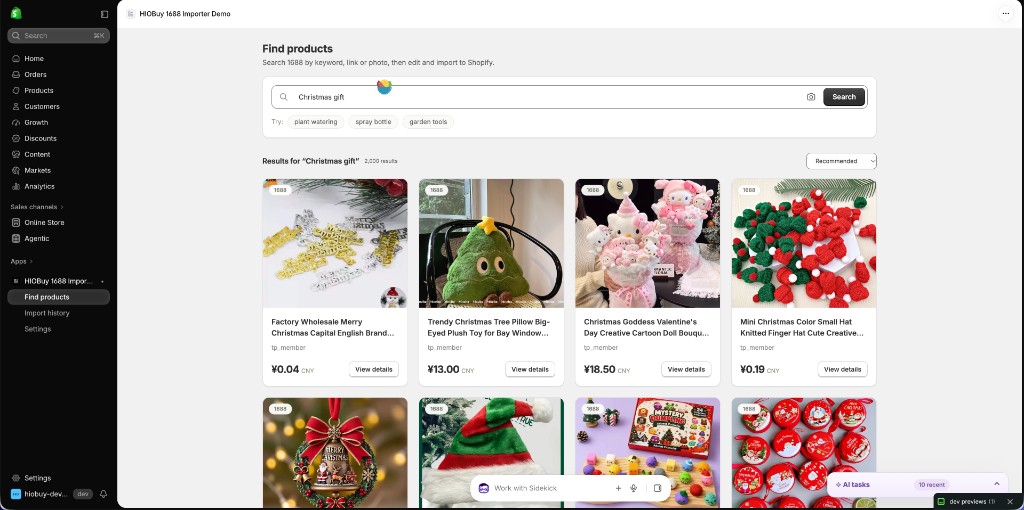
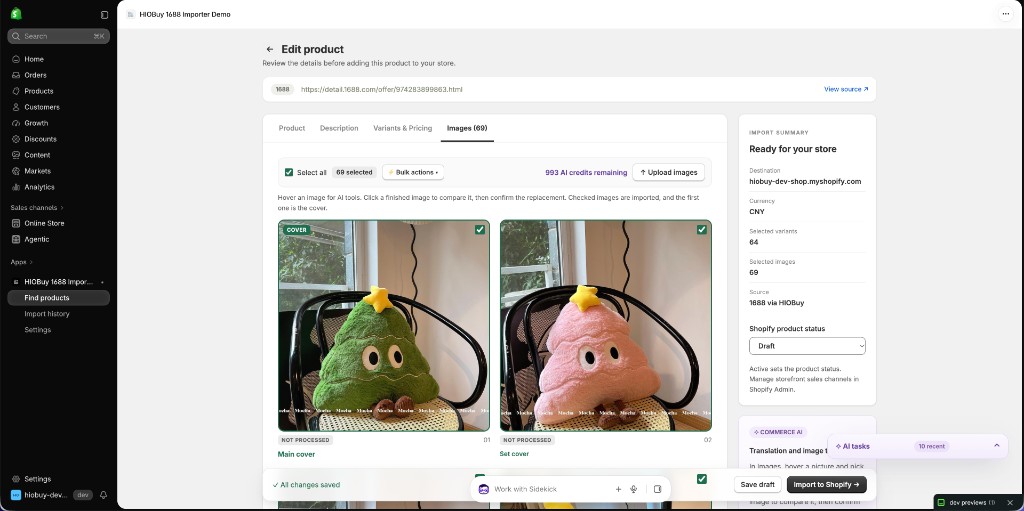
There is no hosted public demo URL. Screenshots below are from a development store calling the public HioBuy product API. You run the app with Shopify CLI on your machine (or Docker behind HTTPS).
This tutorial covers:
- What the app does (and what it is not).
- Architecture and security boundaries.
- How to run it and connect a HioBuy production key.
- How search → detail → edit → AI → Shopify import maps to public APIs.
- Quotas, AI Credits, limitations, and common errors.
What you are building
The app is a developer-owned Shopify Embedded App, not a HioBuy-hosted SaaS importer and not a white-label storefront. HioBuy does not sell C-end shopping sites. You keep the Shopify Partner app, the encrypted API key, and the catalog writes in your store.
What it does:
- Search 1688 by keyword, uploaded image, or a validated
https://detail.1688.com/offer/….htmlURL. - Open product detail on demand (summary cards are not treated as authoritative checkout data).
- Edit Product, Description, Variants & Pricing, and Images with SQLite autosave and optimistic concurrency.
- Price from CNY cost with a manual exchange rate, multiplier, and rounding.
- Optionally translate titles/descriptions/attributes and process images (remove Chinese text, translate image text, white background) via Commerce AI V1 Credits.
- Import into Shopify as Draft or Active (Active is status only; sales channels are still chosen in Shopify Admin).
- Keep import history with safe retry of the same snapshot, or reopen as a new draft (new product).
What it does not do:
- Fulfillment, tax, shipping, inventory sync, or procurement/order APIs.
- Grant AI Credits or bypass product quota.
- Call private HioBuy endpoints outside the public Product + Commerce AI contracts.
How the workflow works
Shopify Admin (embedded app)
    ↓ authenticate.admin
App server (React Router + Prisma/SQLite)
    ↓ Bearer hio_live_…   channel: "1688"
HioBuy Product API
    POST /v1/products/search
    POST /v1/products/upload-image → search-by-image
    POST /v1/products/detail
    ↓ optional
HioBuy Commerce AI V1  (/v1/ai/…)
    estimate → execute → poll / download assets
    ↓
Shopify Admin GraphQL 2026-10
    stagedUploadsCreate / fileCreate → productSet
Merchant flow in the UI:
Search / image / offer URL
    ↓
Open product → Edit & import
    ↓
Edit four tabs (options, prices, images, description)
    ↓ optional AI translate / image jobs
Import as Draft (recommended first) or Active
    ↓
Finish import / Safe retry if media still processing
Architecture worth copying
From the repository’s architecture notes:
- HioBuy calls stay on the server. The browser never receives the full API key. Settings return a safe projection; keys and Shopify tokens are AES-256-GCM encrypted at rest with
ENCRYPTION_KEY. - Shop identity comes from the Shopify session, not from a browser-supplied shop selector.
- Editor persistence is app-owned. Autosave (~900 ms), version checks, and import snapshots prevent silent overwrite. Import freezes one
ImportRecordper draft. - Deterministic Shopify handle
hiobuy-1688-<sourceId>supports upsert/recovery instead of blind create. - AI result bytes are downloaded only from
https://api.hiobuy.com/v1/ai/assets/…. Arbitrary result hosts are rejected. Local uploads are not sent to the image AI API (HTTPS approved URL only).
Stack: Node 22.12+ (24 LTS fine), React Router 7, TypeScript, Prisma + SQLite, @shopify/shopify-app-react-router, Shopify Admin GraphQL 2026-10.
Prerequisites
- Node.js 22.12 or newer, npm, and a Shopify Partner / development store account.
- A HioBuy developer account and a production API key (
hio_live_…) from developers.hiobuy.com. - For AI features: enable Commerce AI on the app and create/top up the prepaid AI account in Developer Center → AI Enhancement. AI Credits are separate from product API quota (Commerce AI V1).
Getting started today (platform rules)
As of the October 27, 2026 Developer Platform update (aligned with current rate-limits docs and company subscription policy §6.0):
- New integrations use real production APIs with a 7-day free trial (100 shared billable units/day). Sandbox and WH-DEV are discontinued for new integrations.
- New customers use HioBuy-managed procurement for 1688/Taobao; there is no separate customer marketplace OAuth step for new accounts.
- Paid plans for product APIs start at Starter $59/month (1,000 units/day). Daily units are one combined quota across 1688, Taobao, and Weidian—not per marketplace. Growth is $99 / 8,000/day; Enterprise $299 / 50,000/day. See Rate limits.
Repo note: the importer still recognizes an older hio_test_… key shape and labels those drafts locally (Active import blocked). That is a local safeguard, not a current HioBuy Sandbox API. Use hio_live_… for real catalog work. Automated tests use synthetic fixtures, not HioBuy product data.
Docs lag: docs/SETUP.md still mentions completing “1688 channel authorization” for search. For new integrations after 2026-10-27, managed procurement removes that separate marketplace auth step. Prefer portal onboarding + production key; if an older grandfathered app still requires channel auth, follow the authentication page for that account. The API Reference wins over README/SETUP when they disagree.
Step 1: Run the app locally
Do not run npm init @shopify/app@latest inside the clone. This repository is already the app.
git clone https://github.com/hiobuy/shopify-1688-importer.git
cd shopify-1688-importer
npm ci
cp .env.example .env
node -e "console.log(require('crypto').randomBytes(32).toString('base64'))"
Paste the printed value after ENCRYPTION_KEY= in .env. Leave SHOPIFY_API_KEY, SHOPIFY_API_SECRET, and SHOPIFY_APP_URL empty, and leave client_id empty in shopify.app.toml. Fake placeholders make the CLI look up a non-existent app.
npm run dev
Answer the CLI prompts: log in to Shopify, create this project as a new app, override app URLs when asked, then press p (or open the Preview URL). Use the Shopify Admin link—not a raw localhost browser tab.
Useful checks from the repo:
| Command | Purpose |
|---|---|
npm run typecheck | TypeScript |
npm test | Unit/integration with fixtures |
npm run build | Production build |
npm run check:security | Secret-pattern scan |
docker compose up --build -d | Single-replica Docker (bind 127.0.0.1:3000, put HTTPS in front) |
Step 2: Connect HioBuy
In the embedded app, open Settings. Paste a production key (hio_live_…) and Save and test connection. The currency follows the Shopify store; if the store is not CNY, set the exchange rate before the first import.
Connection test uses the public product search path. The server sends Authorization: Bearer <key>, channel: "1688", and response_format: "standard" against https://api.hiobuy.com.
Recommended caching pattern for any production catalog UI built around this API:
HioBuy Product API → your DB/cache → storefront users
Do not call search/detail on every page view. Search, detail, upload-image, and search-by-image consume billable units even when you never place an order (Rate limits).
Step 3: First import
- Search by keyword, upload a product photo (≤ 4 MB JPEG/PNG/WebP in the app), or paste a 1688 offer URL.
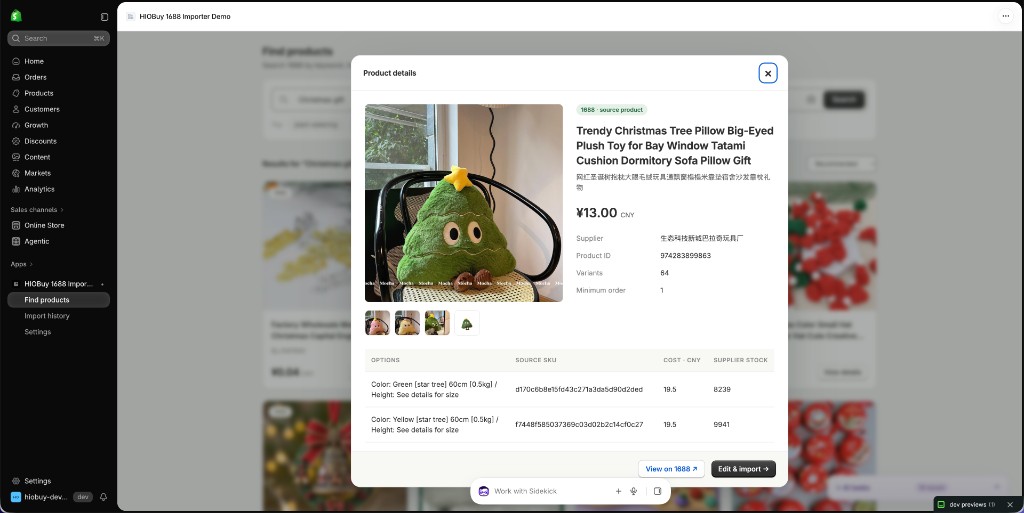
- Open a result, inspect supplier fields and SKUs, then Edit & import.
- Edit all four tabs. Missing source prices must be entered manually. Supplier stock is informational only (Shopify inventory stays untracked).
- Import as Draft first, confirm the store write, then open the Shopify product.
- If media is still processing, wait or use Finish import / Safe retry (same snapshot and product identifier). Re-edit creates a new draft → a separate product on import.
Limits enforced by the demo: at most 100 selected variants, 3 options, and 50 images per import.
Step 4: Map to HioBuy Product APIs
Only these documented product endpoints are used (API integration; verify against the public docs):
| App step | HioBuy endpoint | Notes |
|---|---|---|
| Keyword search / connection test | POST /v1/products/search | channel: "1688", keyword, page, page_size (app uses 20), language: "en" (docs) |
| Image upload for search | POST /v1/products/upload-image | Raw image_base64 (no data-URL prefix) → image_id |
| Image search | POST /v1/products/search-by-image | Reuses image_id for pagination |
| Detail / URL lookup / draft seed | POST /v1/products/detail | Pass search id (1688 offer id). Prefer fresh detail when opening the editor (docs) |
Example search body (matches the public contract):
POST /v1/products/search
Authorization: Bearer hio_live_…
Content-Type: application/json

{
  "channel": "1688",
  "keyword": "phone case",
  "page": 1,
  "page_size": 20,
  "language": "en"
}
Example detail:
POST /v1/products/detail
{
  "channel": "1688",
  "id": "554456348334",
  "language": "en"
}
CNY amounts are major yuan units. The app prefers promotion_amount (including zero), then display_amount, then original_amount. Variants keep sku_id identity. Opening the editor re-fetches detail rather than trusting browser-supplied JSON—that is an extra billable detail call by design.
No HioBuy product call is auto-retried: a lost response can still consume quota. Surface request_id / x-request-id when debugging.
Step 5: Optional Commerce AI V1
AI is optional. The same product API key discovers the prepaid account with GET /v1/ai/account (no X-Shop-Domain on discovery). The returned shop is cached per Shopify installation and sent as X-Shop-Domain on estimate/execute/poll. Do not invent a Shopify domain as the AI billing shop (Commerce AI V1).
| Editor action | Feature / request |
|---|---|
| Translate title | POST /v1/ai/text/translate · scene e-commerce-title |
| Translate description | same · scene e-commerce-description, format_type: html |
| Translate attributes | same · scene e-commerce-cpv |
| Remove Chinese text | POST /v1/ai/image/jobs · remove_chinese_text |
| Translate image text | replace_chinese_text · target_language: en |
| White background | white_background (pricing key image.background) |
Each task is estimated with POST /v1/ai/credits/estimate first. If can_afford is false, no job is created. Execution uses a persisted X-Idempotency-Key. Standard published prices are 2 Credits / 1,000 UTF-16 text units and 1 Credit / image; the live GET /v1/ai/credits/pricing response is authoritative. SEO generation and general image optimization are not public V1 and are rejected by the app.
Step 6: Shopify publishing path
Required scopes: read_products, write_products, read_files, write_files.
High-level mapping:
- Stage local uploads (
stagedUploadsCreate) orfileCreatefrom approved HTTPS supplier URLs. - Poll file readiness (
fileStatus); PROCESSING can leave the import in Finish import / Safe retry. - Upsert with
productSetusing the frozen snapshot: options (≤ 3), selected variants, ordered files (first = cover), variant image file IDs, Draft/Active status, SEO description, escaped attribute table indescriptionHtml. - Inventory remains untracked; supplier stock is display-only.
Active does not auto-publish to Online Store or any sales channel—choose channels in Shopify Admin.
Important considerations
- Quota vs Credits. Product search/detail/image routes consume the shared daily plan units. Commerce AI burns prepaid Credits. Neither substitutes for the other.
- Trial units. Typical costs from the rate-limits doc: detail ≈ 1 unit; search / upload-image / search-by-image ≈ 2 units each. Exhaustion returns HTTP 429
QUOTA_EXCEEDED. - Not the commercial Importer. This MIT example is not the commercial HioBuy 1688 AI Importer and does not include that product’s private services or billing.
- Content rights. Marketplace content fetched with your key is your responsibility to use legally. AI Credit charges bill your AI account.
- Single SQLite replica for the Docker demo. Back up the volume together with
ENCRYPTION_KEY.
Common errors
| Symptom / code | Likely cause | Fix |
|---|---|---|
401 INVALID_API_KEY | Missing/revoked/malformed key | Create or rotate a production key in the Developer Portal |
429 QUOTA_EXCEEDED | Shared daily units exhausted | Wait for UTC day reset, cache product data, or move to a higher plan (rate limits) |
429 RATE_LIMIT_EXCEEDED / AI rate codes | Per-minute or AI concurrency | Back off; reuse idempotency keys; avoid parallel image jobs |
AI_ACCOUNT_NOT_FOUND | No prepaid AI account | Create one under Developer Center → AI Enhancement |
AI_TEST_KEY_NOT_ALLOWED / Active blocked on hio_test_… | Test-shaped key | Use hio_live_…; Sandbox is not offered for new integrations |
AI_FEATURE_NOT_PUBLIC | SEO / non-public image ops | Stick to the four public V1 capabilities |
| Shopify media stuck | fileCreate still PROCESSING or lost response | Finish import / Safe retry; unused Shopify files are not auto-deleted |
| Blank app frame / empty 404 on tunnel | Local cloudflared config overrides quick tunnel | See docs/SETUP.md |
Always log request_id when contacting support@hiobuy.com.
Next steps
- Clone hiobuy/shopify-1688-importer and run
npm run devagainst a development store. - Connect a production key under a 7-day trial or paid plan and import one product as Draft.
- Optionally enable Commerce AI, estimate a title translation, then apply only after preview.
- Read Product response models, Authentication, and Commerce AI V1 before extending the adapter.
API reference: hiobuy.com/en/api-docs.
Next step
If you already understand the workflow, move to the API reference for exact request and response fields, or open the developer console to create your application.
Ready to build?
Open the API documentation or create your HioBuy developer application.