 HioBuy
Ecommerce Image AI: Run Commerce AI Text and Image Jobs Locally
Run the open-source ecommerce-image-ai demo: discover the AI billing shop, estimate Credits, execute text.translate or image jobs, and poll until settlement — without mixing Product API units.
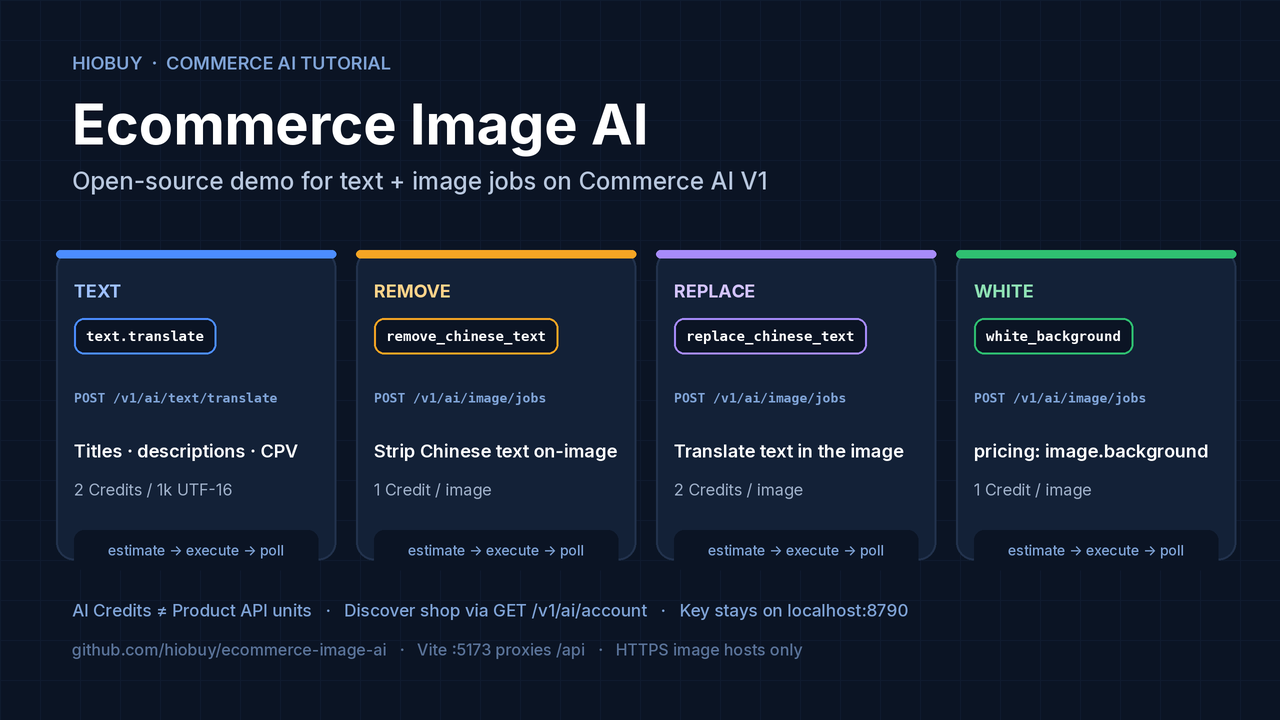
Ecommerce Image AI: Run Commerce AI Text and Image Jobs Locally
China catalog images often arrive with Chinese overlay text, busy backgrounds, and titles that still need localization. Before you wire that into a storefront or importer, you need a small loop that can estimate AI Credits, run one of the four public Commerce AI V1 operations, and poll the job until it settles.
hiobuy/ecommerce-image-ai is an open-source (MIT) developer demo for exactly that. A Vite page talks to a local Node server on 127.0.0.1:8790. The App API key never leaves the server. Automated tests use mocks; they do not prove a live HioBuy account accepted a request.
- Repository: github.com/hiobuy/ecommerce-image-ai
- Commerce AI V1: hiobuy.com/en/api-docs/commerce-ai
- Public API index: hiobuy.com/en/api-docs
- Register a key: developers.hiobuy.com
There is no hosted public demo. You run npm run dev and open http://127.0.0.1:5173.
This tutorial covers:
- When to call which Commerce AI operation.
- Local setup, shop discovery, and env vars.
- Credits: pricing rules, estimate vs charge, and why they are not Product API units.
- Image URL constraints and job polling.
- Common errors and safe retries.
What this demo is (and is not)
It is a local developer playground for the four public V1 capabilities. It does not sign people in, take payment, or sell credits. It does not expose an open URL proxy. The browser only calls /api/* on the local server; Authorization is added in server/.
What it exercises:
| Capability | Feature key | Request | Standard published unit |
|---|---|---|---|
| Text translation | text.translate | POST /v1/ai/text/translate | 2 Credits / 1,000 UTF-16 |
| Remove Chinese text | image.remove_chinese_text | POST /v1/ai/image/jobs · remove_chinese_text | 1 Credit / image |
| Translate image text | image.replace_chinese_text | POST /v1/ai/image/jobs · replace_chinese_text | 2 Credits / image |
| White background | image.background | POST /v1/ai/image/jobs · white_background | 1 Credit / image |
Source: Commerce AI V1. Effective App prices come from GET /v1/ai/credits/pricing (rules[].credits when rules[].enabled is true). Do not use default_credits as the price. Private operations such as image.lifestyle are not included.
What it is not:
- A white-label storefront or C-end shopping blog.
- A product search/order/fulfillment integration (those are separate Product / Fulfillment APIs).
- A public image upload API — you must host
image_urlyourself on a Gateway-approved HTTPS host.
When to use which operation
Need localized title / description / attributes?
  → POST /v1/ai/text/translate
     scene: e-commerce-title | e-commerce-description | e-commerce-chat | e-commerce-cpv
     format_type: text | html

Need a catalog photo without Chinese overlay?
  → POST /v1/ai/image/jobs  type=remove_chinese_text

Need the same photo with translated on-image text?
  → POST /v1/ai/image/jobs  type=replace_chinese_text  + target_language

Need a clean white-canvas product shot?
  → POST /v1/ai/image/jobs  type=white_background
     (pricing feature key: image.background)
Text accepts 1–50 non-empty strings. Trimmed total must be at most 50,000 UTF-16 units. The demo page sends the textarea as one string. Source language defaults to auto on the API; the README curl examples often set zh → en explicitly.
Image jobs are one image per job. Creation returns HTTP 200 (idempotent replay) or 202 (new recorded job). Neither code alone means success — inspect job.status, job.billing_state, and job.error.
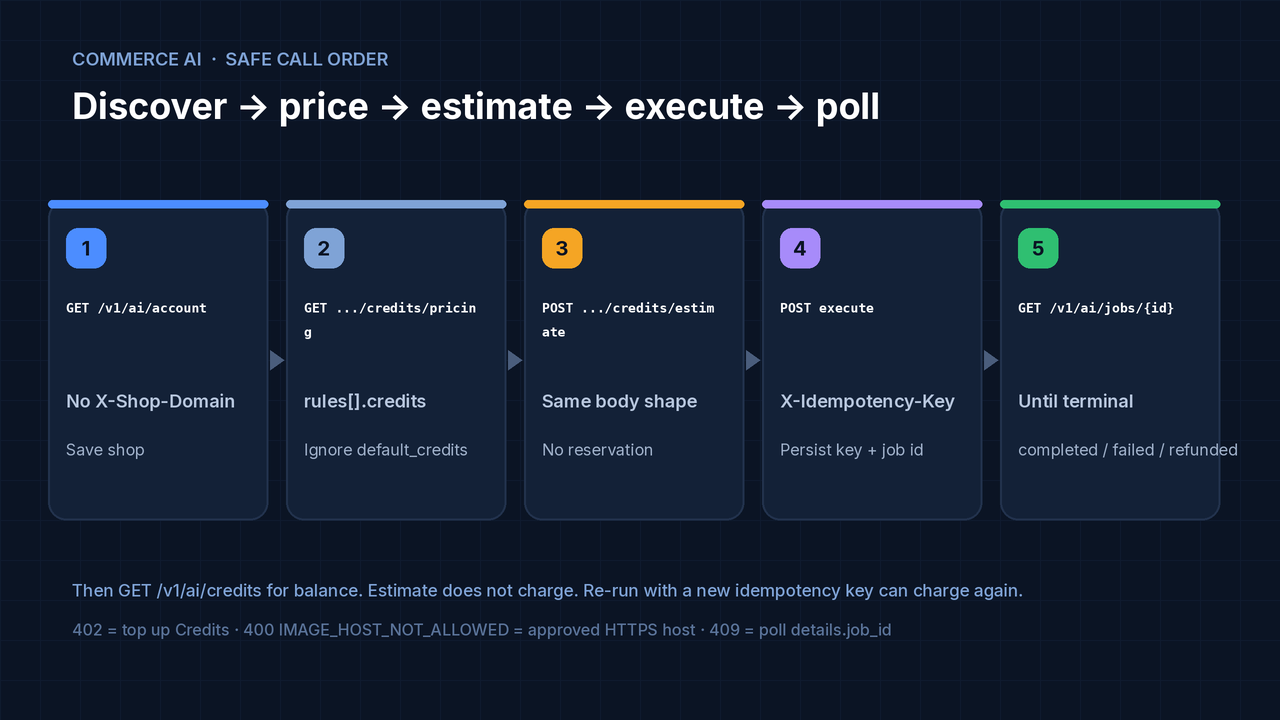
Safe call order
1. GET  /v1/ai/account                 # no X-Shop-Domain — save shop
2. GET  /v1/ai/credits/pricing         # rules[].credits + enabled
3. GET  /v1/ai/credits                 # credits_balance (with X-Shop-Domain)
4. POST /v1/ai/credits/estimate        # no reservation, no model call
5. POST /v1/ai/text/translate
   or POST /v1/ai/image/jobs           # X-Idempotency-Key per intent
6. GET  /v1/ai/jobs/{job_id}           # until completed | failed | refunded
7. GET  /v1/ai/credits                 # refreshed balance after settlement
Persist one X-Idempotency-Key per processing intent. Network retries reuse the same key, body, and billing account. A deliberate new operation needs a new key and can charge again. If the API returns 409 AI_REQUEST_IN_PROGRESS or AI_RECONCILIATION_REQUIRED, poll details.job_id — do not create a replacement paid task for the same outcome.
Prerequisites
- Node.js 20+ and npm.
- A HioBuy App API key with Commerce AI access enabled. A Product API subscription alone does not enable AI.
- Prepaid AI calls need the
product:translatescope. Test keys are rejected by live AI (AI_TEST_KEY_NOT_ALLOWED). - The prepaid AI account
shopfor that same key (billing identifier — not an App ID, Workspace ID, or a domain you invent).
AI Credits are independent of Product API daily units. Product trial units (for example Trial 100/day, Starter $59 / 1,000/day, Growth $99 / 8,000/day, Enterprise $299 / 50,000/day) do not fund AI jobs. Do not conflate the two quotas.
Step 1: Clone and configure
git clone https://github.com/hiobuy/ecommerce-image-ai.git
cd ecommerce-image-ai
npm install
cp .env.example .env
Edit .env (server-side only):
HIOBUY_API_KEY=
HIOBUY_AI_SHOP=
HIOBUY_API_BASE_URL=https://api.hiobuy.com
PORT=8790
Do not paste the key into frontend code, tickets, or screenshots. Do not commit .env.
Step 2: Discover the AI billing shop
Call account discovery with the App key and no X-Shop-Domain header:
curl --fail --silent 'https://api.hiobuy.com/v1/ai/account' \
  --header "Authorization: Bearer $HIOBUY_API_KEY"
Copy the returned shop into HIOBUY_AI_SHOP. You can also copy the same value from that App’s HTTP example in Developer Center. If the call returns 404 AI_ACCOUNT_NOT_FOUND, create the prepaid account under Developer Center → AI Enhancement.
On startup, and before any shop-scoped call, this demo compares HIOBUY_AI_SHOP with GET /v1/ai/account. If they differ, it stops (DEMO_ACCOUNT_MISMATCH). A different shop selects a different account.
Illustrative discovery response (always use the value returned for your key):
{
  "request_id": "req_example",
  "workspace_id": "aiw_example",
  "shop": "app-0123456789abcdef01234567.ai.hiobuy.invalid",
  "account_type": "prepaid",
  "status": "active",
  "currency": "USD",
  "credits_balance": 0
}
A zero balance still returns HTTP 200 on discovery. Paid operations still require sufficient Credits.
Step 3: Run locally
npm run dev
Open http://127.0.0.1:5173. The Vite page proxies /api to http://127.0.0.1:8790. The API process listens on localhost only.
Production-style check on one port:
npm run build
npm start
npm start serves the built page and the API on port 8790. Also available: npm run typecheck, npm test.
Step 4: Credits — pricing, estimate, charge
The page shows:
credits_balancefromGET /v1/ai/credits- the selected feature’s
rules[].creditswhenrules[].enabledis true credits_requiredfromPOST /v1/ai/credits/estimatecredits_usedafter the operation, then a fresh balance read
Estimate does not reserve Credits and does not guarantee the later charge. The demo does not invent a local balance by subtracting, and it does not sell credits.
New developers may receive 100 free AI Credits, subject to current eligibility. That is not a promise that every account has 100 Credits. Product API trial units are a different quota. Published purchase reference on the Commerce AI page: 1 USD = 100 Credits for listed top-up offers in Developer Center; available offers and gates are server-authoritative. This tutorial does not invent additional AI credit prices.
Text billing is ceil(total_utf16 / 1000) × effective unit price, rounded once over the batch. At the V1 standard price: 1–1,000 units = 2 Credits; 1,001–2,000 = 4; and so on. Confirm live with estimate + pricing.
Example text estimate body (same shape as execution):
POST /v1/ai/credits/estimate
Authorization: Bearer YOUR_APP_API_KEY
X-Shop-Domain: SHOP_RETURNED_BY_AI_ACCOUNT
Content-Type: application/json

{
  "feature": "text.translate",
  "texts": ["纯棉短袖T恤", "白色"],
  "target_language": "en",
  "format_type": "text",
  "scene": "e-commerce-title"
}
Example image estimate:
{
  "feature": "image.remove_chinese_text",
  "count": 1
}
Step 5: Execute text or an image job
Text (server-side; key never in the browser):
curl --request POST "$HIOBUY_API_BASE_URL/v1/ai/text/translate" \
  --header "Authorization: Bearer YOUR_APP_API_KEY" \
  --header "X-Shop-Domain: $HIOBUY_AI_SHOP" \
  --header "X-Idempotency-Key: text-translation-001" \
  --header "Content-Type: application/json" \
  --data '{"texts":["纯棉短袖T恤"],"source_language":"zh","target_language":"en","format_type":"text","scene":"e-commerce-title"}'
Remove Chinese text on an image:
curl --request POST "$HIOBUY_API_BASE_URL/v1/ai/image/jobs" \
  --header "Authorization: Bearer YOUR_APP_API_KEY" \
  --header "X-Shop-Domain: $HIOBUY_AI_SHOP" \
  --header "X-Idempotency-Key: remove-image-001" \
  --header "Content-Type: application/json" \
  --data '{"type":"remove_chinese_text","image_url":"https://cdn.example.com/product.jpg"}'
replace_chinese_text also sends target_language. white_background does not. Replace the example CDN URL with an approved host before execution.
Image URL requirements
image_url must be HTTPS on a host the Gateway allows. The API rejects local files, base64, multipart uploads, and arbitrary public domains. A URL that opens in a browser can still be rejected (IMAGE_HOST_NOT_ALLOWED / UNSAFE_IMAGE_URL).
This demo does not upload files and does not add storage. Host the image yourself on an approved CDN, or ask HioBuy to review the host. The signed-in Developer Center playground upload is not a public API.
Default download limits published with the API: 10 MiB, 25,000,000 pixels, 3 redirects, 15 seconds. Deployment settings can differ.
After completion, read job.output.url and re-host results before saving permanent catalog URLs. Anyone with the processed asset URL can read it. Prefer that field over inventing paths; GET /v1/ai/assets/{job_id}.webp exists as a public WebP route, but normal clients use job.output.url.
Step 6: Poll until terminal
curl 'https://api.hiobuy.com/v1/ai/jobs/YOUR_JOB_ID' \
  --header "Authorization: Bearer $HIOBUY_API_KEY" \
  --header "X-Shop-Domain: $HIOBUY_AI_SHOP"
| Field | Meaning |
|---|---|
job.status | queued, running, completed, failed, or refunded |
job.output.url | Image result URL after completion |
job.credits_reserved | Held Credits (not an extra fee on top of settlement) |
job.credits_used | Final settled consumption (may be 0 while still running) |
job.billing_state | Includes reserved, executing, provider_succeeded, completed, refunded, reconciliation |
provider_succeeded or reconciliation can still show job.status as running. Keep polling that job. The job query does not refresh balance — call GET /v1/ai/credits after settlement.
Refreshing status reads the same job. “Run again” in the demo creates a new idempotency key and can charge again.
Public V1 tasks have at most 3 execution attempts and a 10-minute window from creation. Terminal failures return failed + billing_state=refunded + credits_used=0 with codes such as AI_JOB_TIMEOUT, AI_RETRY_EXHAUSTED, or AI_PROVIDER_OUTCOME_UNKNOWN. Reserved Credits are returned once.
Rate limits (high level)
Defaults published for Commerce AI (App-shared; overrides can apply): about 60 task-create requests/minute, 1,200 job polls/minute, and 300 metadata requests/minute in separate buckets. Up to 5 image jobs and 10 total jobs may be queued/running per App. Text jobs do not consume the image sub-limit but share the total. Prepaid protection can also share a developer-level in-flight image limit after top-up. Read error.code, error.details, and Retry-After / retry_after_seconds. Source: Commerce AI V1.
Common errors
| What you see | What to check |
|---|---|
Setup needed / DEMO_NOT_CONFIGURED | .env has both HIOBUY_API_KEY and HIOBUY_AI_SHOP. Restart npm run dev. |
DEMO_ACCOUNT_MISMATCH | HIOBUY_AI_SHOP is not the shop from GET /v1/ai/account. |
| 401 | Missing, revoked, or non-Bearer API key. |
| 402 | Not enough Credits. Top up in Developer Center if you want to continue. |
| 403 | AI access, product:translate, or the feature is not enabled. Test keys cannot call live AI. |
400 IMAGE_HOST_NOT_ALLOWED / UNSAFE_IMAGE_URL | Use an approved HTTPS image host. |
409 AI_REQUEST_IN_PROGRESS / AI_RECONCILIATION_REQUIRED | Poll details.job_id. Do not start another paid task for the same outcome. |
| 429 | Wait for Retry-After. Creation, polling, and metadata have separate limits. Codes can include AI_PREPAID_SAFETY_LIMIT, RATE_LIMIT_EXCEEDED, AI_RATE_LIMIT_EXCEEDED. |
| 503 | If nothing was accepted, retry the same idempotency key and body. If a job id exists, poll that job. |
Contact support@hiobuy.com with the request_id. Do not send the API key.
Architecture worth copying
- Key stays on the server. Browser →
/api/*→ local Node →https://api.hiobuy.com. - Shop discovery is automatic. Configure only the key; fetch
shopfrom/v1/ai/accountand bind it to that credential. - Estimate before execute. Gate on affordability, then persist idempotency keys.
- Poll, don’t recreate. In-progress / reconciliation is not a signal to create a second paid job.
- Allow-list image hosts. Reject base64 and local files at the edge of your own API.
Stack from the repo: Node ≥ 20, npm workspaces (client + server), TypeScript, Vite on 5173, API on 8790, MIT license.
Next steps
- Clone hiobuy/ecommerce-image-ai, set
.env, runnpm run dev. - Discover
shop, estimate a title translation, then execute once and confirm Credits moved. - Point an approved HTTPS product image at
remove_chinese_textorwhite_background, poll tocompleted, and re-hostjob.output.url. - When you need catalog search + Shopify import around the same AI ops, see the related open-source shopify-1688-importer tutorial — Product API units and AI Credits remain separate.
API reference: Commerce AI V1 · Public API index.
Next step
If you already understand the workflow, move to the API reference for exact request and response fields, or open the developer console to create your application.
Ready to build?
Open the API documentation or create your HioBuy developer application.