 HioBuy
Self Procurement and China Warehouse Fulfillment: How the Workflow Works
Can you buy on 1688 or Taobao yourself — or have HioBuy buy — and still use a China warehouse plus international shipping via API? Two layers of choice, three paths, and the exact order of calls.
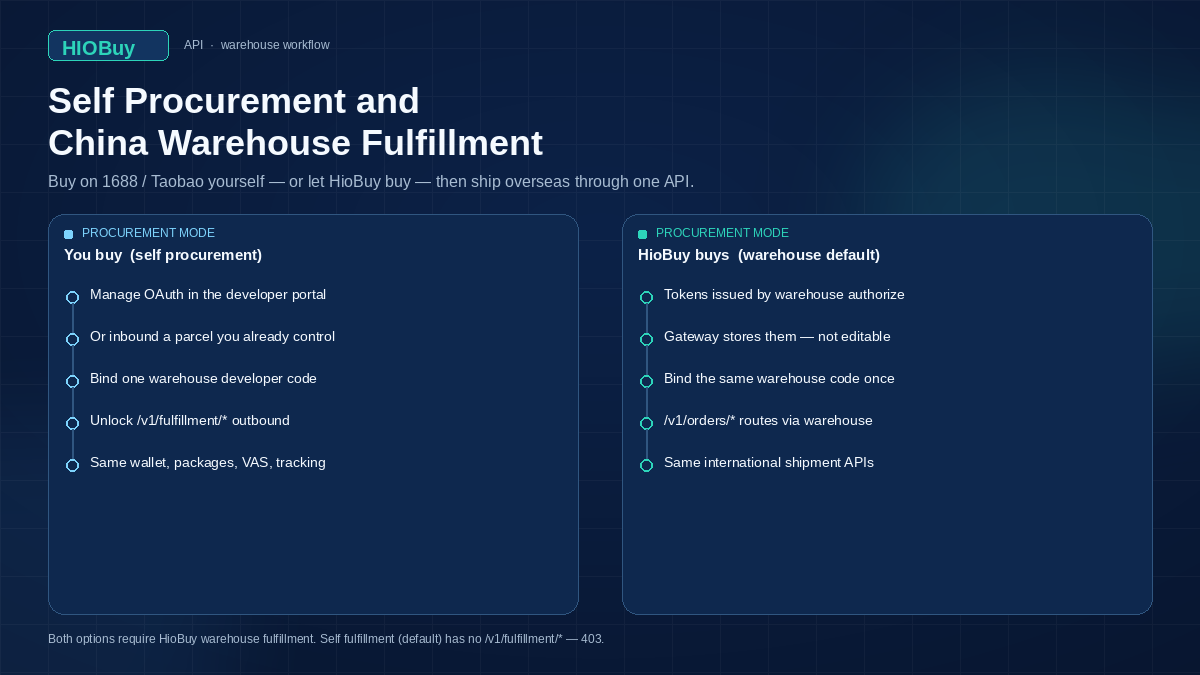
Self Procurement and China Warehouse Fulfillment: How the Workflow Works
Two questions come up whenever a team wires 1688 or Taobao into their own storefront:
- Can we buy on the marketplace ourselves — or have HioBuy buy — and still use a China warehouse?
- Can international shipping then go out through the same API?
Those are two different choices. Fulfillment mode decides whether a HioBuy warehouse is in the path. Procurement mode, which exists only when warehouse fulfillment is on, decides who places the marketplace purchase. Product APIs do not change.
This guide maps the two layers, the three runtime paths, and the API sequence. HioBuy is the infrastructure that connects the steps. You keep the storefront.
What you are solving
You already have a site, or you are building one. Customers check out on your domain. You need official catalog data from Taobao, 1688, and Weidian, then a way to turn that checkout into a China-side purchase.
Some teams also need the next leg: the parcel arrives at a China warehouse, gets packed, and ships overseas. Other teams already handle last-mile themselves and only want procurement.
The Public API is built around that split:
/v1/products/*— catalog. Gateway → marketplace in every mode./v1/orders/*— domestic procurement. Seller → a China inbound address./v1/fulfillment/*— warehouse inbound, packages, international shipments, wallet. Warehouse mode only.
Catalog-only use, or using product APIs while bypassing procurement, is not supported.
Product prices are CNY. Product APIs do not convert currency. Order money is CNY fen. Inbound notices use face amounts, not fen.
Base URL: https://api.hiobuy.com/v1.
Two layers of choice
Choose fulfillment mode in the developer portal. If you turn warehouse fulfillment on, choose procurement mode next.
| Layer | Options | What it controls |
|---|---|---|
| Fulfillment mode (always) | Self fulfillment (default), or HioBuy warehouse | Whether /v1/fulfillment/* exists. Self mode → 403 FULFILLMENT_MODE_NOT_SUPPORTED. |
| Procurement mode (warehouse only) | HioBuy procurement (default), or self procurement | Who buys on Taobao / 1688 / Weidian, and whose tokens the Gateway uses for /v1/orders/*. |
Public paths stay the same. The Gateway routes by the app’s modes.
Fulfillment mode
| Self fulfillment | HioBuy warehouse | |
|---|---|---|
| Warehouse binding | None. You handle logistics. | One warehouse developer code, app-level. |
/v1/products/* | Gateway → marketplace | Gateway → marketplace (same, low latency) |
/v1/orders/* | Gateway → marketplace with your OAuth | Depends on procurement mode (table below) |
/v1/fulfillment/* | Not available (403) | Inbound, packages, VAS, returns, international shipments, wallet |
Warehouse fulfillment and dedicated support require a paid plan (Growth / Enterprise). Free plans include documentation and Sandbox.
Procurement mode (warehouse on)
International warehousing and shipping work in both options. Only who places the marketplace order changes.
| HioBuy procurement (default) | Self procurement | |
|---|---|---|
| Who buys | HioBuy buys for you | You buy with your own accounts |
| Channel tokens | Issued by warehouse authorize. Gateway stores them. Not visible or editable. | You manage OAuth / credentials in the portal |
/v1/orders/* | Routed via HioBuy warehouse procurement | Gateway → marketplace with your tokens |
| Bind warehouse code once | Yes | Yes |
| Inbound / packages / VAS / returns | Yes | Yes |
| International shipments and wallet | Yes | Yes |
Need a warehouse developer code? Contact HioBuy operations after the app is approved for warehouse fulfillment.
Switching procurement options may clear or re-issue channel tokens. Switching back to self fulfillment clears the warehouse binding.
How the workflow works
Every path starts the same way. Product APIs feed your storefront. The customer orders on your site. Then the modes diverge.
1688 / Taobao / Weidian
        │
        ▼
  /v1/products/*          (Gateway → marketplace, both modes)
        │
        ▼
  Your storefront checkout
        │
        ├── A. Self fulfillment
        │         /v1/orders/*  (your OAuth)
        │         you handle overseas
        │         /v1/fulfillment/* → 403
        │
        ├── B. Warehouse + HioBuy procurement
        │         /v1/orders/*  (warehouse tokens)
        │         seller ships inbound
        │         /v1/fulfillment/shipments/*
        │
        └── C. Warehouse + self procurement
                  you buy (your OAuth)
                  or POST /v1/fulfillment/inbounds/create
                  same warehouse outbound
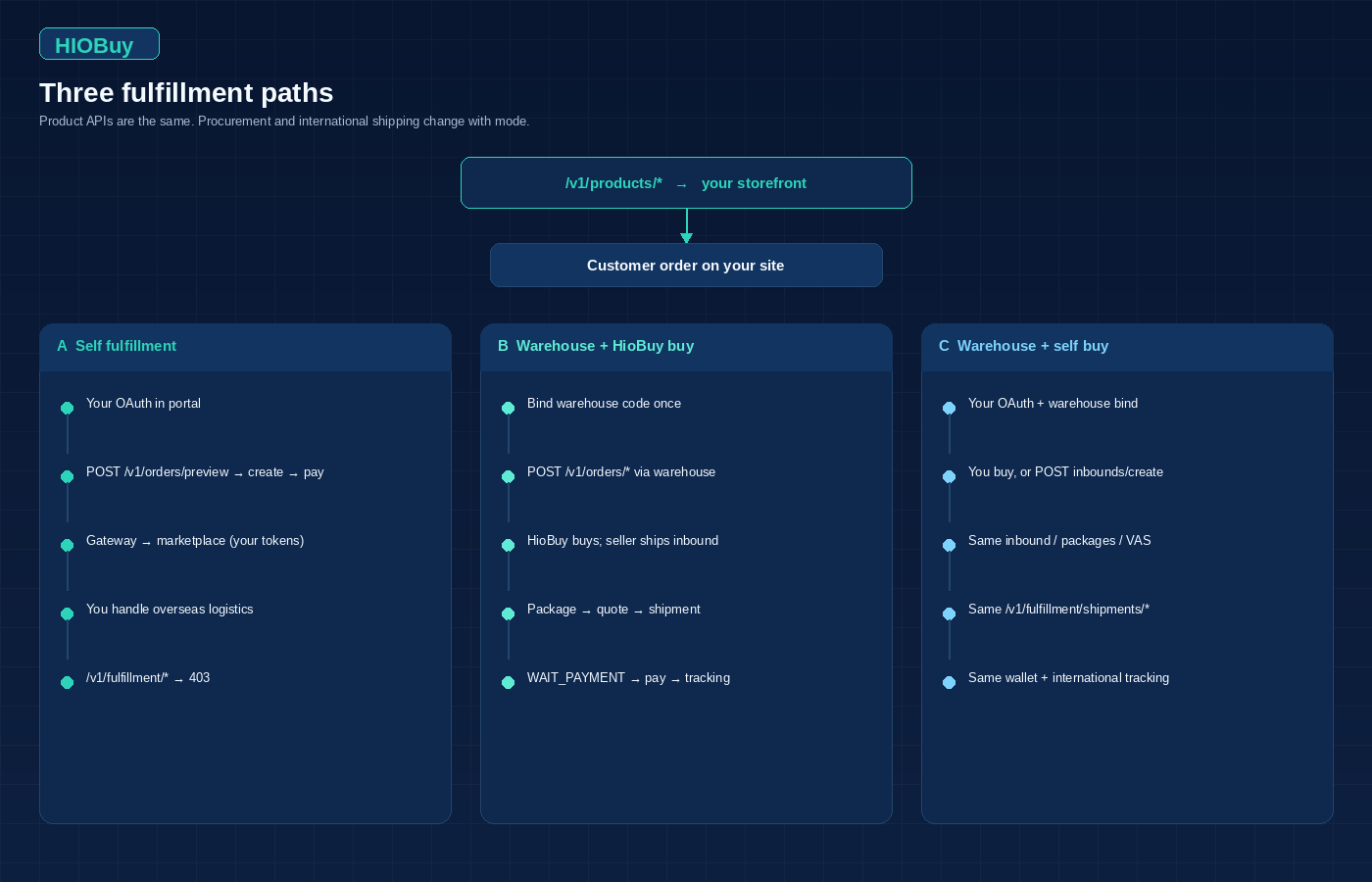
Path A — Self fulfillment
You already have marketplace accounts and you handle warehousing yourself.
- Authorize each channel in the portal (OAuth / credentials).
- Search and detail via
/v1/products/*. - When a customer pays you, call
POST /v1/orders/preview→ create → pay. - The Gateway places the marketplace order with your tokens.
- Track domestic logistics with
/v1/orders/logistics/trace. - You arrange the overseas leg. International shipping APIs are not available.
Path B — Warehouse + HioBuy procurement
One warehouse code binds all channels. HioBuy buys, stores, and ships internationally.
- Bind the warehouse developer code in the portal. Pick HioBuy procurement.
- Product APIs still call marketplaces directly.
POST /v1/orders/*is forwarded to the warehouse procurement API.- The seller ships to the warehouse. Read
tracking_numbers[]on order detail. - After inbound: package detail → freight estimate → create shipment → pack/measure →
WAIT_PAYMENT→ pay → tracking.
Path C — Warehouse + self procurement
You want the warehouse and the international APIs, but you buy with your own accounts — or you already control the parcel.
- Bind the same warehouse code. Pick self procurement.
- Complete per-channel OAuth yourself. Binding only unlocks fulfillment APIs.
- Either:
- Place
/v1/orders/*with your tokens, seller ships to the warehouse, or - Submit
POST /v1/fulfillment/inbounds/createfor a parcel you already control.
- Place
- From there the outbound path is the same as B: packages, quotes, shipments, wallet.
Required inbound fields: tracking_number, package_count, total_value, items[]. currency defaults to CNY; supported values are CNY, USD, KRW. These are face amounts, not fen. The response includes package_id. Self-fulfillment apps get 403.
Architecture
Your backend
   │  Authorization: Bearer hio_live_…  or  hio_test_…
   ▼
HioBuy Gateway    https://api.hiobuy.com/v1
   │
   ├── /v1/products/*     → marketplace (always)
   ├── /v1/orders/*       → marketplace (self tokens)
   │                      or warehouse procurement (HioBuy-buy)
   └── /v1/fulfillment/*  → warehouse (warehouse mode only)
                              inbounds / packages / VAS / returns
                              shipments / quotes / balance
Two order types. Do not mix them.
| Leg | API | What it is |
|---|---|---|
| Seller → China warehouse | /v1/orders/* | Domestic procurement |
| Warehouse → overseas buyer | /v1/fulfillment/shipments/* | International shipment |
Never send marketplace access tokens or the warehouse developer code in API calls. The Gateway attaches the warehouse binding server-side. The only credential on the wire is the Bearer key.
Step-by-step
1. Portal bind
- Register, create an app, wait for review. Then create an API key.
- For warehouse fulfillment: obtain a warehouse developer code from HioBuy ops.
- Portal → Authorizations → Use HioBuy fulfillment.
- Pick procurement mode: HioBuy procurement or self procurement.
- Enter the warehouse code once. Binding is app-level, not per channel.
- If HioBuy procurement: the portal lists channel status and
expires_at. Tokens are not visible. - If self procurement: complete normal per-channel OAuth yourself.
2. Map product ids before you order
From search or detail: id → lines[].id (also accepted: offer_id, Taobao mi_id). Variant sku_id → lines[].spec_id.
Taobao id / mi_id rotates. Do not cache it long-term. Re-fetch from search or detail immediately before preview or create.
3. Domestic procurement
Lifecycle:
- Preview — validate lines, prices, freight.
- Create — place the procurement order.
- Pay — settle with the marketplace wallet.
- Detail / list — track status.
- Domestic trace — seller → warehouse.
- Cancel — when allowed.
Channel shortcuts exist (/v1/orders/1688/*, /v1/orders/taobao/*). Amounts are CNY fen.
4. Warehouse inbound and international shipment
End-to-end after the goods are heading to, or already at, the warehouse:
- Procurement order (seller ships in) or inbound notice for a parcel you already control.
- Package detail / tracking. Package statuses include
PENDING,RECEIVED,CONSOLIDATED,SHIPPED,DELIVERED. - Freight estimate — pick
shipping_channel_code. - Create shipment — starts
PENDING. - Warehouse packing and final measurement (
boxes[], weight, dimensions, freight). - Shipment becomes payable (
WAIT_PAYMENT). - Pay shipment — wallet debit.
- International tracking.
Shipment status progression: PENDING → WAIT_PAYMENT → WAIT_SHIP → SHIPPED → SIGNED.
Paying before packing finishes returns 409 SHIPMENT_NOT_READY_FOR_PAYMENT. That is expected. Poll shipment detail. Useful signals: status is WAIT_PAYMENT, times.packed_at is not null, boxes[] is non-empty.
Warehouse-mode webhooks include package.received, package.exception, consolidation.completed, shipment.created, shipment.dispatched, shipment.delivered, shipment.exception, balance.low. There is no “ready for payment” event. Detect payability from shipment detail.
Important considerations
WH-DEV is not Sandbox, and it is not production. Test warehouse fulfillment with a production key (hio_live_*) plus a WH-DEV warehouse code. Do not use hio_test_* for WH-DEV. Sandbox returns fixtures that are unrelated to your assigned warehouse. WH-DEV is still a test warehouse, not live fulfillment.
Physical receive, pack, weigh, dispatch, and tracking progression on WH-DEV may need HioBuy simulation. Email support@hiobuy.com with the documented ticket format (application, WH-DEV code, package id, shipment id, current status, expected next step, request_id). In production you do not open a ticket per shipment.
WH-DEV channel names, prices, and times are not production commitments.
Do not mix order types. /v1/orders/* buys from Chinese sellers into a domestic warehouse. /v1/fulfillment/shipments/* sends inbound parcels overseas.
Self fulfillment has no fulfillment APIs. Calls return 403 FULFILLMENT_MODE_NOT_SUPPORTED.
Do not pay the shipment early. 409 SHIPMENT_NOT_READY_FOR_PAYMENT means packing is not finished.
Never put the warehouse code or marketplace tokens in requests. Only Authorization: Bearer hio_live_… or hio_test_….
Catalog-only integrations are not supported. Product discovery is meant to lead to real /v1/orders/* procurement.
Common errors
| HTTP | error.code | When |
|---|---|---|
| 403 | FULFILLMENT_MODE_NOT_SUPPORTED | /v1/fulfillment/* on a self-fulfillment app, including inbounds/create. |
| 409 | SHIPMENT_NOT_READY_FOR_PAYMENT | POST .../shipments/{id}/pay while status is still PENDING. |
| 409 | SHIPMENT_ALREADY_PAID | Pay called twice. |
| 402 | INSUFFICIENT_BALANCE | Wallet needs a top-up before pay. |
| 409 | EXTERNAL_ORDER_ID_ALREADY_EXISTS | Duplicate external_order_id on inbound. |
| 422 | INBOUND_VALIDATION_FAILED | Missing required inbound fields (tracking_number, package_count, total_value, items[]). |
| 404 | NOT_FOUND / SHIPMENT_NOT_EXISTS | Unknown shipment id. |
Include request_id from the response when you write to support.
Next steps
- Read the hub: HIOBuy Open Platform.
- Set modes: Warehouse authorization.
- Wire procurement: Orders.
- Wire outbound: Fulfillment and Inbound notice.
- Before go-live, follow WH-DEV testing.
Integration questions: support@hiobuy.com. Response within 1–2 business days.
Next step
If you already understand the workflow, move to the API reference for exact request and response fields, or open the developer console to create your application.
Ready to build?
Open the API documentation or create your HioBuy developer application.