 HioBuy
Product IDs, Search, and Orders: How 1688 and Taobao Identifiers Work in the API
Search and detail return an opaque id. Order lines must use that id — not the numeric marketplace item_id. How 1688, Taobao, and Weidian identifiers map from catalog to procurement.
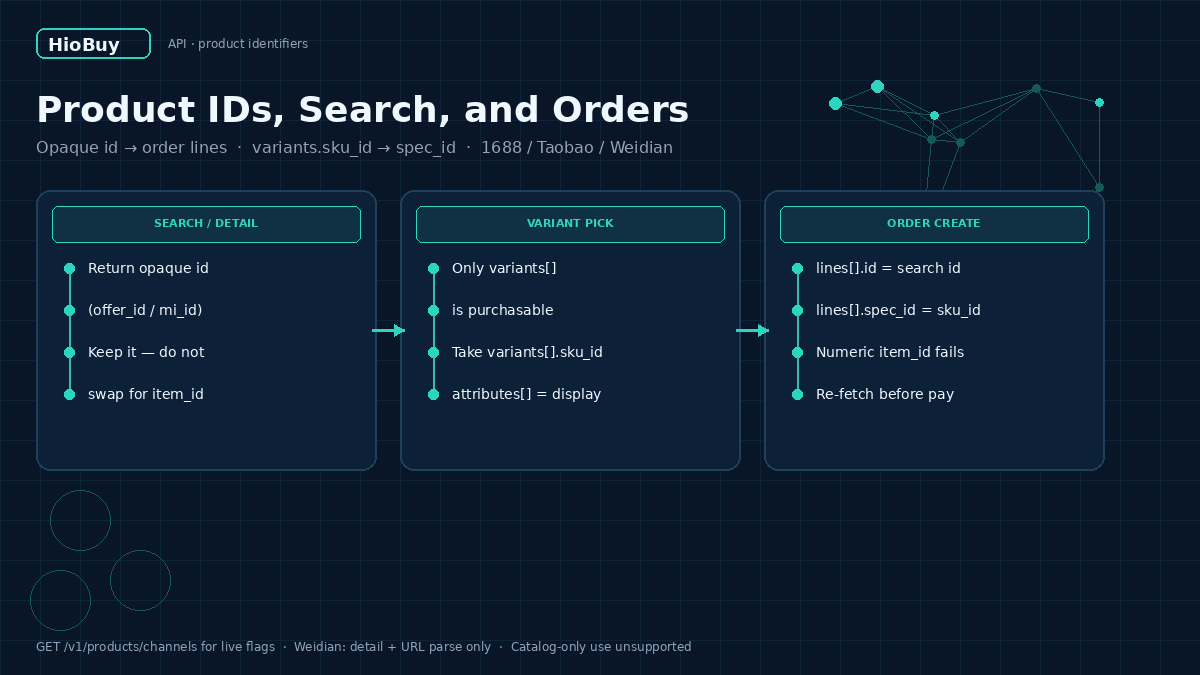
Product IDs, Search, and Orders: How 1688 and Taobao Identifiers Work in the API
When a storefront integrates 1688 or Taobao through HioBuy, the first hard failure is often not auth or quotas. It is identifiers.
Search and detail return an opaque id. Order create expects that same id on each line. Teams that paste a numeric marketplace item_id into lines[].id see purchase failures that look like "goods do not exist." The catalog call succeeded. The order call did not. The mismatch is the id field.
This guide explains which product fields map to which order fields, what each channel can search, and how to keep Taobao ids fresh before checkout. You keep the storefront. HioBuy is the gateway between your backend and the marketplaces.
What you are solving
You already have (or are building) your own site. Customers browse and check out on your domain. Your backend needs to:
- Discover products on 1688 / Taobao / Weidian.
- Load detail and a purchasable SKU matrix.
- Create a domestic procurement order when the customer pays you.
Those three steps share one rule: the id you order with must be the id the Product API just gave you.
Product APIs are not a standalone data feed. Catalog-only use, or using product APIs while bypassing procurement, is not supported. Prices on product routes are CNY. There is no FX conversion on product APIs — convert on your side if needed.
Base URL: https://api.hiobuy.com/v1.
How the workflow works
Keyword / image search  OR  URL parse  OR  detail by id/url
        │
        ▼
  Product response
    • id  (opaque — also offer_id / Taobao mi_id)
    • variants[].sku_id   ← purchasable
    • attributes[]        ← display only
        │
        ▼
  Customer picks a variant on YOUR storefront
        │
        ▼
  POST /v1/orders/preview → create → pay
    lines[].id      = product id
    lines[].spec_id = variants[].sku_id
        │
        ▼
  Seller ships to a China inbound address
  (international shipping is /v1/fulfillment/* — warehouse mode only)
Product calls always go Gateway → marketplace. Order routing depends on your app's fulfillment and procurement modes. The identifier mapping does not change.
Architecture: which field goes where
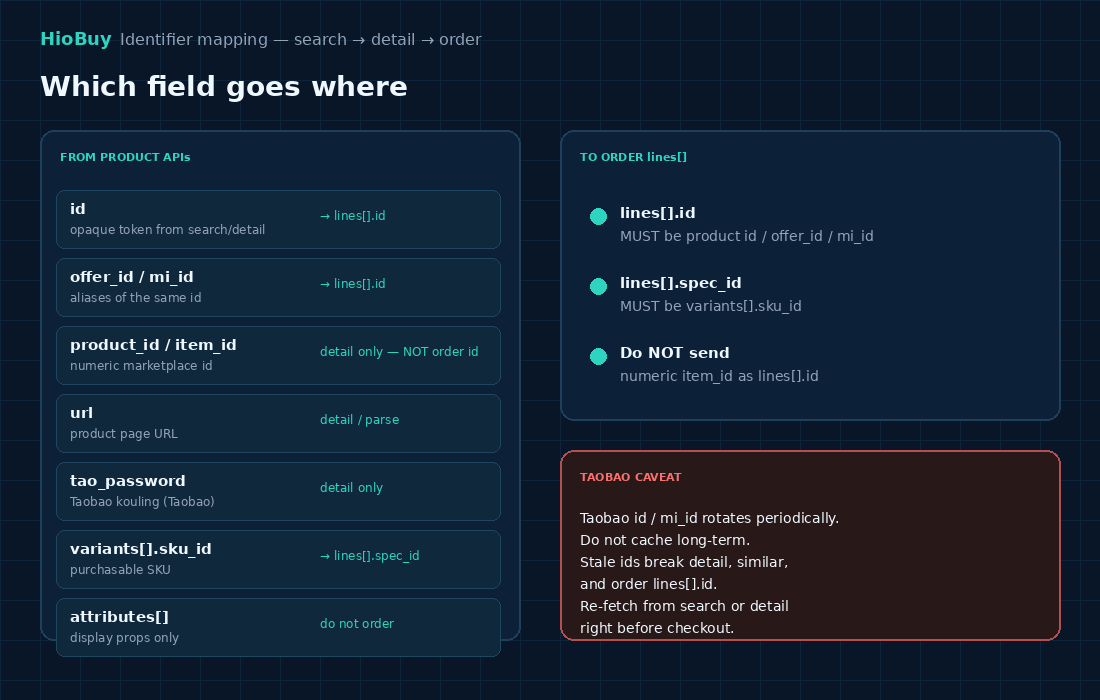
| From Product API | Meaning | Use in orders |
|---|---|---|
id | Opaque token from search / detail | lines[].id |
offer_id / Taobao mi_id | Aliases of the same opaque id | lines[].id |
product_id / numeric item_id | Marketplace numeric item id | Detail lookup only — not order line id |
url | Product page URL | Detail or POST /v1/products/parse |
Taobao tao_password | Kouling / password share text | Detail (Taobao only) |
variants[].sku_id | Purchasable SKU | lines[].spec_id |
attributes[] | Display properties | Do not send as order lines |
Rule of thumb: if it came back as id from search or detail, that is what lines[].id wants. If it is a bare number you scraped from a marketplace URL, it is almost certainly the wrong field for order create.
Step 1 — Know each channel's search capabilities
Call GET /v1/products/channels for live capability flags. Do not hard-code assumptions from memory.
| Capability | 1688 | Taobao | Weidian |
|---|---|---|---|
| Detail | yes | yes | yes |
Keyword search (POST /v1/products/search) | yes | yes | no |
Image search (POST /v1/products/search-by-image) | yes | yes | no |
URL parse (POST /v1/products/parse) | yes | yes | yes |
Taobao tao_password on detail | no | yes | no |
Weidian has no keyword or image search in the Public API. For Weidian, use detail and URL parse.
Keyword search requires keyword. Taobao pages are capped at 20 results per page. 1688 supports filters, sort, and category_ids. Image search accepts image_id from upload-image, or image_base64 / image_url in one call. Optional keyword refines image results.
Each app must complete channel authorization in the developer portal before product or order calls for that marketplace. Otherwise you get 401 CHANNEL_NOT_AUTHORIZED.
Step 2 — Resolve detail with the right identifier
POST /v1/products/detail accepts one of:
product_id— numeric marketplace item idurl— product page URLid— opaque search / list id- Taobao
mi_id - Taobao
tao_password
Do not put a Taobao search id into product_id. That field expects the numeric item_id. Mixing them is a common cause of empty or wrong detail responses.
Parse (POST /v1/products/parse) expects a URL, not kouling text. Short links work where upstream allows.
Prefer response_format: "standard" so 1688 and Taobao share one schema. Sandbox rejects upstream.
Step 3 — Pick a purchasable variant
Detail returns two related arrays:
variants[]— the purchasable SKU matrix. Each row hassku_id, price, stock, and option values.attributes[]— display-only properties (color labels, material notes, seller-authored text). Useful for your UI. Not a buy target.
When the customer selects Color / Size on your site, map that choice to a variants[] row and store sku_id. That value becomes lines[].spec_id on preview and create.
Seller-authored labels (for example a "Color Classification" that is not a color) pass through as written. HioBuy does not invent a semantic type for them. Your UI should treat option text as opaque display strings.
Prefer promotion_amount when set, else display_amount. Amounts are CNY yuan on product routes.
Step 4 — Create the order with the opaque id
Domestic procurement lives under /v1/orders/*. It buys from Chinese sellers into a China inbound address. It is not international shipping.
Typical sequence:
POST /v1/orders/previewPOST /v1/orders/createPOST /v1/orders/pay- Detail / list / domestic logistics trace as needed
On each line:
lines[].id      ← product id / offer_id / mi_id   (opaque)
lines[].spec_id ← variants[].sku_id
Sending a numeric marketplace item_id as lines[].id is the classic failure mode. Upstream may report that the channel goods do not exist, even though detail worked minutes earlier with the opaque id.
Create supports external_order_id for idempotency. Shortcuts /v1/orders/1688/* and /v1/orders/taobao/* exist; the body may omit channel.
Business failures can return HTTP 200 with success: false. Always check success. Inspect unavailable_lines on preview and failed_offers on create. 1688 may return success: true with a non-empty failed_offers list (partial success).
Order money is CNY fen (1 yuan = 100 fen). Do not confuse fen with product yuan amounts.
Step 5 — Do not cache Taobao ids for long
Taobao id / mi_id rotates periodically. A value that worked last week can break detail, similar products, and lines[].id this week.
Recommended pattern:
- Search or detail when the shopper views the item.
- Persist the opaque
idand chosensku_idon your cart / order draft with a short TTL. - Re-fetch detail (or search) right before preview / create if the id is older than your freshness window.
- Do not treat Taobao
idas a permanent primary key in your database.
1688 ids are generally more stable, but the same "order with the id you just resolved" habit still prevents stale-cart bugs.
Important considerations
Channel auth before product calls
An API key alone is not enough. Authorize 1688 / Taobao / Weidian in the developer portal for the app. Missing auth → 401 CHANNEL_NOT_AUTHORIZED on search, image search, or detail.
Acceptable use
HioBuy expects product discovery to lead to real procurement. Apps that only consume search/detail without meaningful purchase activity, or that bypass HioBuy for procurement while using the catalog APIs, are not supported and may be suspended after review.
Quotas and rate limits
Default per-minute rate is on the order of 60 requests/minute per key (plan-dependent). Daily channel quotas apply on Live keys. Detail is typically 1 billable unit; search and upload-image are typically 2. Order preview/create carry higher weight. Cache detail where allowed; reuse image_id; back off on 429.
Fulfillment is a separate layer
/v1/orders/* ends at a China inbound address. International shipments, packages, wallet, and tracking are /v1/fulfillment/* and require warehouse fulfillment on the app. Self fulfillment gets 403 FULFILLMENT_MODE_NOT_SUPPORTED on those routes. Need a warehouse developer code? Contact HioBuy operations after the app is approved for warehouse fulfillment.
Common errors
| Symptom | Likely cause | Fix |
|---|---|---|
| Order create: goods do not exist / cannot resolve price | Numeric item_id sent as lines[].id | Use opaque search/detail id |
| Detail empty or wrong item | Taobao search id put in product_id | Use id field, or put numeric id only in product_id |
401 CHANNEL_NOT_AUTHORIZED | Channel not authorized for the app | Complete portal channel auth |
| Image / keyword search on Weidian fails | Capability not offered | Use detail + URL parse |
| Order works once, fails days later (Taobao) | Cached rotating mi_id | Re-fetch before checkout |
403 FULFILLMENT_MODE_NOT_SUPPORTED | Calling fulfillment on self-fulfillment app | Switch mode in portal, or stay on orders only |
| HTTP 200 but purchase failed | Marketplace business refusal | Check success, unavailable_lines, failed_offers |
Always include x-request-id / request_id when writing to support@hiobuy.com.
Next steps
- Confirm channel capabilities with
GET /v1/products/channels. - Wire search → detail → cart using opaque
id+variants[].sku_id. - Map cart lines to
orders/previewthenorders/createwithout rewriting ids. - Add a short TTL refresh for Taobao ids before pay.
- Read the Products and Orders docs, then open the developer portal to authorize channels and create a Live or Sandbox key.
Official docs hub: https://hiobuy.com/api-docs. Developer portal: https://developers.hiobuy.com.
The identifier model is small. Get it right once, and search, detail, and checkout stop fighting each other.
Next step
If you already understand the workflow, move to the API reference for exact request and response fields, or open the developer console to create your application.
Ready to build?
Open the API documentation or create your HioBuy developer application.